


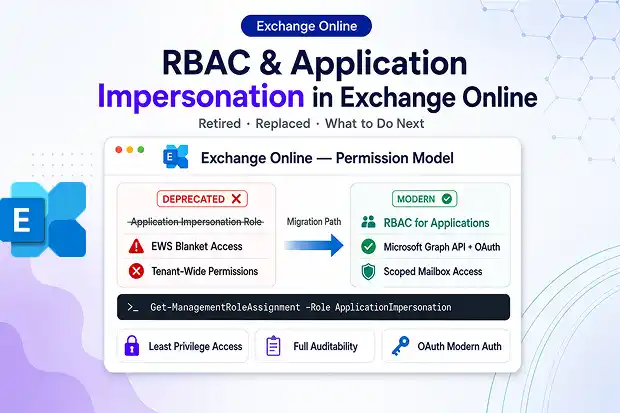
Microsoft has officially retired the Application Impersonation RBAC role in Exchange Online, completing the deprecation in March 2025. A change that completed in March 2025. If a migration tool, integration, or automated mail workflow in your environment suddenly loses mailbox access, this is very likely the cause. For many organizations, this change has had a direct impact on mailbox migrations, third-party integrations, and automated mail workflows that quietly depend on it.
It’s one of those behind-the-scenes updates that affects highly visible systems. The shift matters because the modern replacement delivers tighter security, more granular control, and significantly easier governance.
This post explains what has changed, why Microsoft retired application impersonation, and how to move forward without downtime.
Why This still Matters
For years, the Application Impersonation role let an application or service account act on behalf of any user in the organization, accessing their mailbox as if it were the app itself. It quietly powered countless migration tools, backup solutions, and calendar integrations.
That role is now gone from Exchange Online. One thing worth noting: this retirement is specific to the cloud. On-premises and hosted Exchange environments are not affected.
The reason behind it all is security. Broad, blanket impersonation across an entire tenant is exactly the kind of over-permissioned access that modern identity governance is built to eliminate.
The Deprecation Timeline at a Glance
Understanding how the rollout unfolded helps explain why some apps failed earlier than others.
- February 2024: Microsoft announced its plans to retire from the Application Impersonation role.
- September 2024: New assignments of the role started getting blocked. Microsoft initially targeted May 2024, then pushed the block to September 2024.
- February 2025: The role and its entire feature set were scheduled for complete removal.
- March 2025: Microsoft confirmed the deprecation was finished.
There were no extensions. Microsoft was clear about it: any application not updated before the deadline would simply stop working.
How This Affects Migrations and Mailbox Integrations
This is where things get practical. If your migration tool was authenticating via EWS using the Application Impersonation role, it will fail to access mailboxes entirely. There is no graceful fallback. The tool either throws an access error or completes a migration run with zero mailbox data moved, which is easy to miss if you are not actively monitoring logs.
Here is what migration admins need to verify:
- Verify your migration tool’s authentication method. If it still references Application Impersonation, the vendor needs to have issued an updated version that uses OAuth or Microsoft Graph.
- Do not kick off new migration batches before confirming the tool is updated and re-authenticated under the new model.
- Re-test permissions on a single pilot mailbox before running any bulk migration job.
- Review completed migrations run post-February 2025 to confirm they succeeded fully and did not silently skip mailboxes.
The migration impact is the most immediate reason this change demands attention, even if it feels like an identity governance topic on the surface.
🔍 Migration Health Check: “When Did Your Last Run Actually Succeed?”
Pull up the logs from your most recent migration batch and confirm full mailbox access was granted. Share in the comments what authentication method your tool is now using and whether the transition was smooth or painful.
What Replaces Application Impersonation
The old role leaned on Exchange Web Services (EWS), a legacy API that Microsoft has been steadily replacing with the modern Microsoft Graph API.
The path forward depends on what your app is doing day to day:
- For mail and mailbox access: Move to the Microsoft Graph API using OAuth-based authentication.
- For granular Exchange admin control: Use RBAC for Applications in Exchange Online, which provides precise, scoped permissions instead of tenant-wide impersonation.
- For broad app-level mailbox access via EWS: The full_access_as_app permission (the application permission itself was not retired), scoped through RBAC for Applications, remains a supported route for tools that still rely on EWS. Note that the older Application Access Policies are being superseded by RBAC for Applications, which is now Microsoft’s recommended scoping mechanism.
This shift to OAuth and Graph is not just a workaround to keep the lights on. RBAC replaces the old authorization structure with tighter, more transparent control over who and what can reach your mailboxes.
EWS itself is retiring.
Any EWS-based route should be treated as a short-term bridge, not a destination. Microsoft will block non-Microsoft apps from using EWS to connect to Exchange Online starting October 1, 2026. If you are rebuilding an integration now, move straight to Microsoft Graph wherever possible rather than re-investing in EWS.
🛠️ Try-It Challenge: “Audit Your Tenant in 5 Minutes”
Run a quick PowerShell check to spot which accounts and app IDs were still relying on the Application Impersonation role. Then report back how many lingering assignments you found.
Run this in Exchange Online PowerShell to list the accounts that held the role:
Get-ManagementRoleAssignment -Role ApplicationImpersonation -GetEffectiveUsers -Delegating:$falseRBAC for Applications: The Secure, Governed Way Forward
The modern model gives administrators scoped, role-based access rather than the all-or-nothing impersonation of the old approach. You can grant an application access to a specific set of mailboxes through a management scope, instead of opening up the whole tenant.
That delivers three governance wins:
- Least privilege: Apps get only the access they genuinely need.
- Auditability: Permissions are explicit, named, and easy to review.
- Modern authentication: OAuth tokens replace older, riskier credential patterns.
For security and compliance teams, this is a meaningful upgrade. Tenant-wide impersonation was always difficult to govern and a tempting target for attackers.
Governance Quick Win: “The Least-Privilege Pledge”
Pick one over-permissioned app this week and commit to rescoping it. Share your before-and-after permission setup as a mini case study for the community.
Action Checklist Before You Move On
If you haven’t validated your environment since the retirement, work through these steps:
- Identify every app or service account that previously relied on Application Impersonation.
- Confirm whether each tool now uses Microsoft Graph or a supported EWS policy
- Reconfigure broken integrations to OAuth-based authentication.
- Use RBAC for Applications to scope mailbox access narrowly wherever supported.
- Document the new permissions for your audit and compliance records.
Most major vendors have already made the switch in their products. Custom, in-house apps are typically the ones that slip through the cracks.
Learn More: Official Microsoft References
For guidance straight from the source, refer to these official Microsoft resources:
- Retirement of RBAC Application Impersonation in Exchange Online (Exchange Team Blog):[techcommunity.microsoft]
- Critical Update: Application Impersonation RBAC Role Deprecation (completion confirmation):[techcommunity.microsoft]

















 Migrate
 Manage
 Migrate Microsoft 365








