Products

1 min readApps4.Pro Planner Outlook Desktop add-in v1030 release

1 min readApps4.Pro Planner Outlook Desktop add-in v1030 release

Microsoft Planner integration with Apps4.Pro Outlook Desktop add-in.

Hi All,

We are happy to release the next major update for Apps4.Pro Outlook
Desktop add-in today. Below are the new features included with this
release.

New Features

  • Support for multiple user assignment
  • Manage Apps4.Pro license (You can manage your subscription from this
    portal)
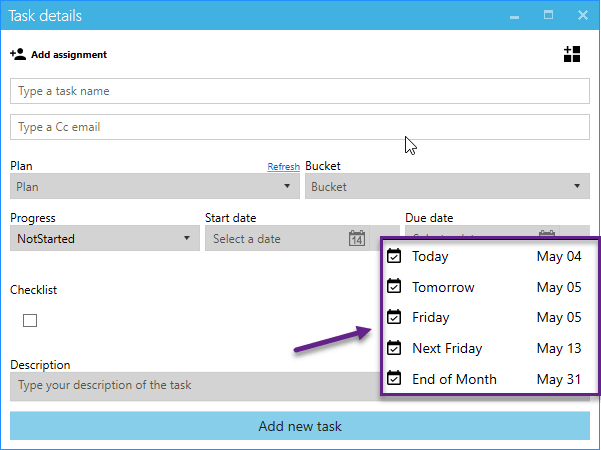
  • Quick date picker (Set dates for the task in a click. Ex: Today,
    Tomorrow. This week.)
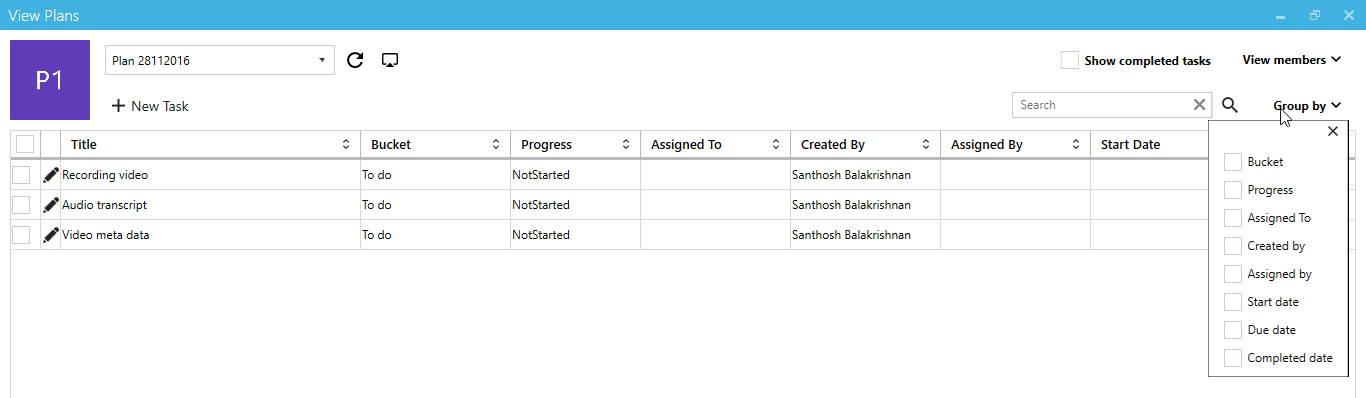
  • Introduced ‘View Plans’ (A new way to view your team tasks)

Please download the latest version of the app from 
http://apps4.pro/planner-outlook-integration.aspx

Multiple User Assignment for a task
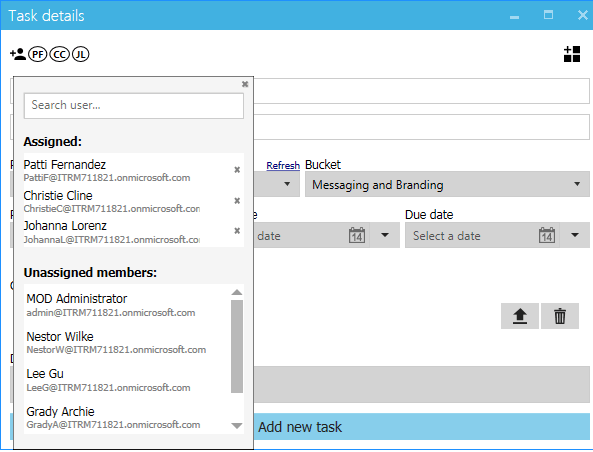
Task details in Apps4.Pro Planner Manager Outlook Add-in.

Manage License

Microsoft Planner management using Apps4.Pro Outlook add-in.

Quik Date Picker

Task creation in Apps4.Pro Planner Manager.

View Plans

Microsoft Planner task view in Apps4.Pro Planner Manager tool.

For more details visit  https://apps4.pro/microsoft-planner-outlook-addin.aspx

Migrate Everything to Microsoft 365

Exchange Online SharePoint Online OneDrive For Business Microsoft Teams Microsoft Planner Viva Engage (Yammer) Microsoft Bookings Microsoft Forms Power Automate Microsoft Power BI Exchange Online SharePoint Online OneDrive For Business Microsoft Teams Microsoft Planner Viva Engage (Yammer) Microsoft Bookings Microsoft Forms Power Automate Microsoft Power BI
  • No Data Loss
  • Zero Downtime
  • ISO-Certified Protection

Start your free 15-days trial today !


4.5 out of 5

Bot Logo

Apps4.Pro Bot

Hey!👋 Ready to make your Microsoft 365 migration journey easier? Tell me what you’re looking.

What gets migrated?
I have a sales question
I'm here for tech support
Learn about Apps4.Pro