


Convert your email to Planner task and set due date, assign to users and track status on them from your Outlook. Thus you can add tasks and track them easily.
Attach email to task Whenever you are on Planner / SharePoint, you can view the email associated to task. Thus, basic principle of ready reference between a Task and email that requested this task is fulfilled.
Link task to email From Outlook or OWA view the tasks that are created for an email. At any point during the email conversation, you have the control to check status of the task and take appropriate actions. This feature is useful for users working on customer support.
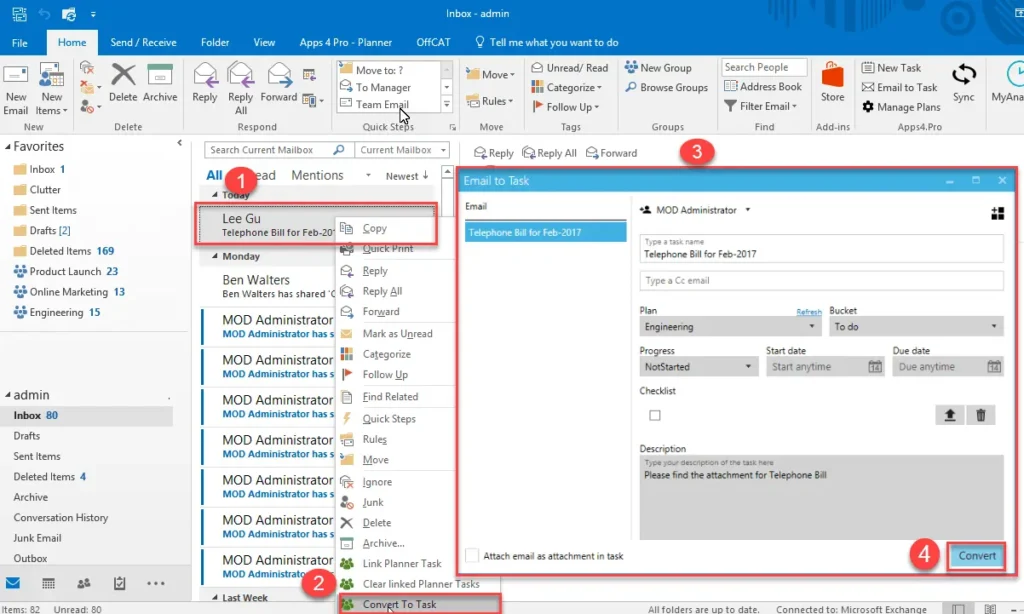
How to Convert Email to Task from Outlook Client?
Planner Manager Outlook Desktop.
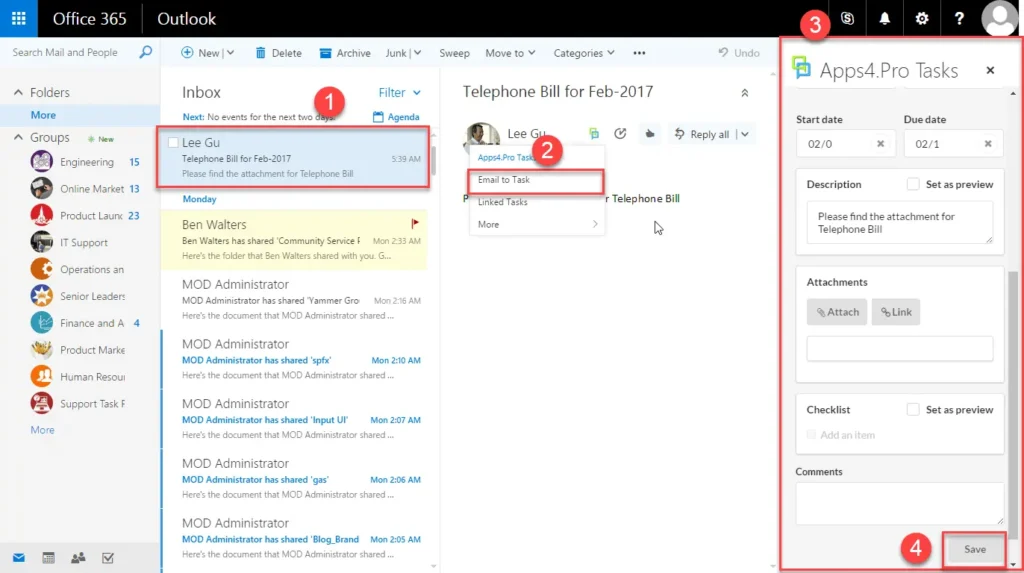
How to Convert Email to Task from OWA?
Planner Manager Outlook Web.
How to Attach email to task?

For more details visit https://apps4.pro/microsoft-planner-outlook-addin.aspx

















 Migrate
 Manage
 Migrate Microsoft 365








