


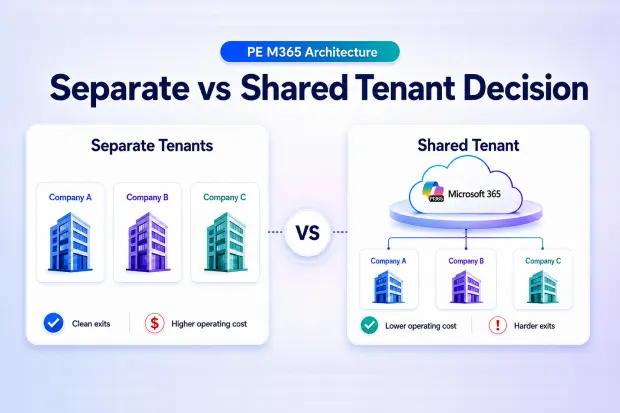
You own multiple companies. Each needs email, file storage, and collaboration tools. Should they share one Microsoft 365 account or have separate ones? This decision will either save you $1 million or cost you $2 million over five years.
- The Question That Keeps PE Operators Up at Night
- Let Me Make This Simple
- The “Best of Both Worlds” That Doesn’t Work
- How to Actually Decide
- The Real Math (5-Year Total Cost)
- If You Choose Separate Accounts: Your Day-One Playbook
- If You Choose Shared Account: Your Survival Guide
- The Mistake 95% of People Make
- The Bottom Line
- Your Decision Framework
- Final Thought
The Question That Keeps PE Operators Up at Night
You’ve just acquired your eighth portfolio company. Each one needs Microsoft 365—email, Teams, file storage, the works.
Your CFO walks in with a proposal: “Let’s put all our companies on one shared Microsoft account. We’ll save $200,000 per year.”
Your CIO counters: “Bad idea. When we exit a company, separating their data will cost us millions and delay the sale by nine months.”
Both are right. Both are wrong.
Here’s why this decision is harder than it looks and how to make it without destroying shareholder value.
Let Me Make This Simple
Think of Microsoft 365 like apartment buildings.
Option 1 – Separate Buildings: Each company gets its own building with its own keys, utilities, and security. Clean separation. Easy to sell. But you’re paying for 10 different utility bills.
Option 2 – One Mega Complex: All companies live in one giant building on different floors. Shared utilities, bulk discounts, everyone can easily visit each other’s floor. But when you sell one company, you need to physically extract their floor without accidentally giving them someone else’s furniture.
Once you build the buildings, tearing them down and rebuilding costs millions and takes 12-18 months.
This is a one-way door decision.
Option 1: Each Company Gets Its Own Account (Separate Tenants)
What This Actually Means
Each of your 10 companies has a completely separate Microsoft 365 account:
- Company A has their own email system
- Company B has their own file storage
- Company C has their own Teams workspace
- Zero overlap
The Good News
Clean separation: Company A literally cannot see Company B’s files. It’s physically impossible—they’re in different systems.
Simple exits: When you sell Company C, you hand the buyer one set of login credentials. Done. No data extraction project. No separation consultants. No delays.
Independence: Each company controls their own system. No shared governance headaches.
The Bad News
You’re paying 10x for everything:
- One account for 100 employees: $50,000/year
- Ten accounts for 1,000 employees: $500,000/year
- Extra cost: $450,000 annually
Collaboration is painful: When your finance teams from Company A and Company B need to work together on a cost-reduction initiative, watch what happens:
- Day 1: Company A shares a spreadsheet
- Day 1, 2 hours later: Company B’s security blocks it—external user detected
- Day 2: IT manually approves access
- Day 3: Company B can VIEW the file but not EDIT it
- Day 4: Teams give up and email attachments back and forth like it’s 2005
Multiply this by 50 cross-company projects per year. Your portfolio value creation just hit a wall of technical friction.
IT complexity: Your IT team manages 10 different admin panels, 10 different security policies, 10 different vendor relationships.
Option 2: All Companies Share ONE Account (Shared Tenant)
What This Actually Means
All 1,000 employees across your 10 companies exist in one massive Microsoft 365 account. You use security permissions to keep each company’s data separate within the shared system.
The Good News
Massive cost savings:
- Ten separate accounts: $500,000/year
- One shared account: $300,000/year
- Annual savings: $200,000
Over five years, that’s $1 million back in your fund.
Effortless collaboration: When teams need to work across companies, files share instantly. No security friction. No approval delays. It just works.
Operational efficiency: One IT dashboard. One security policy. One vendor relationship. Your IT team’s job just got 10x simpler.
The Bad News
Exit complexity becomes a nightmare.
Here’s the scenario that turns CFOs pale:
You’re selling Company 7. Deal closes in 90 days. Multiple is 12x EBITDA. Board is celebrating.
Then IT drops the bomb: “Company 7’s data is entangled with nine other companies. Separation will take 6-9 months and cost $1.5 million.”
What this means in practice:
- 500 employees mixed with 4,500 others
- 200,000 files in shared storage—some co-authored with other companies
- Four years of email intertwined across companies
- Shared distribution lists, Teams channels, collaborative projects
Your 90-day exit timeline just became nine months. Your buyer is nervous. Your deal team is panicking. That $1.5M separation cost? It just erased three years of “savings.”
Security requires constant vigilance: One permission mistake and Company A accidentally sees Company D’s confidential M&A plans. You’ve got a data breach during an active deal process.
Single point of failure: Technical problem? All 10 companies go dark simultaneously.
The “Best of Both Worlds” That Doesn’t Work
By now you’re thinking: “There must be a middle option.”
There is. Microsoft calls it Multi-Tenant Organization (MTO)—separate accounts with some shared features.
The brutal reality: It’s broken.
Real issues documented by users:
- Shared Outlook calendars don’t sync
- Can’t grant mailbox permissions across companies
- Persistent bugs with no timeline for fixes
- Microsoft support response time: months
Real example: PE platform spent eight months implementing MTO across nine portfolio companies. Calendar sharing never worked properly. They rolled back to separate tenants. Total wasted investment: $600,000.
My advice: Don’t bet your architecture on MTO until Microsoft proves it works. For now, you’re choosing Option 1 or Option 2.
How to Actually Decide
Stop thinking about technology. Think about your business strategy.
Question 1: How Do Your Companies Actually Operate?
Choose SHARED if:
- Companies share technology, developers, or R&D
- You have centralized shared services (HR, finance, procurement)
- Cross-portfolio collaboration is core to value creation
- Example: Five SaaS companies with shared engineering resources
Choose SEPARATE if:
- Companies operate independently in different industries
- Minimal operational overlap
- Different end customers and markets
- Example: Eight manufacturing plants across unrelated sectors
Question 2: What’s Your Exit Frequency?
Choose SEPARATE if:
- You exit 2-3+ companies per year
- Exit complexity would crush deal timelines
- Buyers expect clean day-one separation
Choose SHARED if:
- Hold periods are 5+ years
- Exit 0-1 companies annually
- Cost savings compound over time
Question 3: What’s Your IT Capability?
Choose SHARED if:
- You have dedicated platform IT team
- Strong Microsoft security expertise
- Can enforce complex governance
Choose SEPARATE if:
- Basic IT support model
- Limited security resources
- Lower risk tolerance
The Real Math (5-Year Total Cost)
Scenario: 10 companies, 100 employees each
Separate Accounts
- Setup: $100,000
- Operations (5 years): $2,500,000
- Two exits: $100,000
- TOTAL: $2,700,000
Shared Account
- Setup: $250,000
- Operations (5 years): $1,500,000
- Two exits: $2,000,000
- TOTAL: $3,750,000
The “cheaper” option costs more over the full lifecycle.
But if you exit only ONE company in five years:
- Shared total: $2,750,000
- Separate total: $2,700,000
The right choice depends entirely on your exit frequency.
If You Choose Separate Accounts: Your Day-One Playbook
✅ Pre-configure cross-tenant access between all portfolio companies
✅ Create collaboration playbook: “How to Share Files Across Companies”
✅ Set expectations: Cross-company work will have friction
✅ Budget: $50,000 per exit (minimal complexity)
You’re choosing: Exit simplicity over operational efficiency.
If You Choose Shared Account: Your Survival Guide
✅ Day 1: Tag every file with sensitivity labels (which company owns it)
✅ Every 12 months: Run exit simulation drill for one company
✅ Budget: $1-2M per company exit + 6-9 months timeline
✅ Security: Strict rules preventing cross-company data access
✅ Documentation: Exit playbook from day one, not day 900
You’re choosing: Operational efficiency with the burden of exit complexity.
The Mistake 95% of People Make
They choose based on Year 1 optics:
“Shared account saves $200,000 in year one. Easy decision!”
Then Year 3 arrives. Exit time. Suddenly:
- Nine-month separation project
- $1.5M unbudgeted cost
- Buyer threatening to reduce purchase price
- All “savings” evaporated
The right framework isn’t: “What’s cheapest today?”
It’s: “What’s the total cost of ownership across hold period + exit?”
The Bottom Line
There is no universally correct answer. Only the correct answer for YOUR portfolio strategy.
- Separate accounts = Higher running costs + Lower exit costs
- Shared account = Lower running costs + Higher exit costs
The catastrophic mistake: Choosing based on incomplete analysis of Year 1 costs while ignoring Years 3-5 and exit scenarios.
Your Decision Framework
Answer these three questions:
1. How integrated is your portfolio? (1=independent, 10=highly collaborative)
- 1-3: Separate accounts
- 4-6: Depends on factors 2 and 3
- 7-10: Shared account
2. How many exits in next 5 years?
- 3+: Lean separate
- 1-2: Either works
- 0: Shared saves money
3. IT security capability?
- Basic: Separate is safer
- Advanced: Shared is manageable
Run the math for YOUR scenario. Include setup + 5-year operations + expected exits.
The answer will become clear.
Final Thought
Your PE platform will spend $5-15M on M365 over the next five years whether you optimize or not.
The question is: Will you spend it on the right architecture up front, or waste it fixing the wrong choice later?
This decision can’t be delegated to IT alone. It’s a portfolio strategy question that belongs in your investment committee.
What’s your portfolio’s collaboration intensity, exit frequency, and IT capability? Those three variables determine your answer.

















 Migrate
 Manage
 Migrate Microsoft 365








