


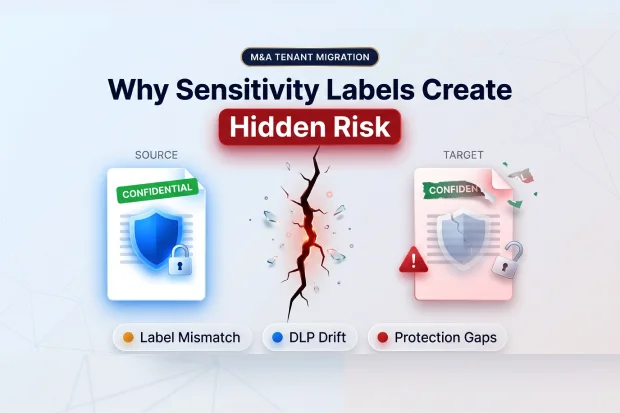
One of the easiest mistakes in M&A tenant migration is assuming that if the file moved, the protection moved too.
On the surface, everything may look fine. Mailboxes move. SharePoint sites move. OneDrive content lands in the target tenant. The dashboard starts turning green.
But sensitivity labels do not move like ordinary metadata. They depend on protection architecture, policy logic, and tenant specific configuration that do not automatically move with the file.
That means migration can appear complete while the control around sensitive data is no longer fully intact.
This is not a niche issue. In M&A migration, security and compliance are some of the biggest sources of risk, and 41 percent of IT professionals cite them as the top challenge. That is why sensitivity labels are not just an admin detail. They are a CISO level concern during integration.
The real problem: the file moves, but the protection does not
It is easy to assume that if a file moves successfully, the controls around it move too. In M&A tenant migration, that assumption creates trouble.
Microsoft Purview sensitivity labels are not just tags on documents. They sit inside a protection model built in a specific tenant. Label publishing, policy logic, encryption behavior, and compliance enforcement all depend on that environment.
So when content crosses into another tenant, the file may arrive, but the original label behavior and protection model do not automatically come with it.
This is where many teams get caught off guard. There is no native cross tenant sensitivity label migration path that simply carries labels, protection, and policy from source to target Environment.
In practice, labels from the source tenant are not automatically recognized in the destination the way teams expect.
In Microsoft 365 SharePoint and OneDrive, that becomes especially visible. Files may migrate, but labels may not display correctly after tenant to tenant migration. Protection may be stripped. If the original label applied encryption, that protection can break as well.
That is also why this issue becomes bigger than leadership expects.
Why this becomes a fast business problem
This issue usually does not show up in the migration status meeting.
It shows up later, when someone reviews a sample of migrated content and realizes sensitive files are sitting in the target tenant without the protection everyone assumed was still there.
It shows up when legal or compliance discovers that governance controls did not move with the data.
It shows when a migration that looked finished turns into post migration remediation, exception handling, and uncomfortable executive conversations.
That is what makes sensitivity labels such a hidden risk. The migration can appear healthy on the surface while the underlying protection is already missing or only partially intact.
And once that happens, it stops being just an IT issue.
It becomes a compliance issue, a confidentiality issue, a TSA issue, and sometimes a leadership confidence issue.
Where sensitivity label risk shows up first
1. The target tenant does not understand the source label
When protected content moves from one tenant to another, the target tenant does not automatically understand the source label configuration.
That means a file that was previously classified and protected can arrive in the destination without the same enforcement, visual markings, or policy behavior.
To the migration team, the move looks complete. To security and compliance, the protection gap may only become visible later.
That delayed visibility is what makes this risk dangerous.
2. Labels may not display correctly after migration
This is one of the easiest warning signs to miss.
In SharePoint and OneDrive migrations, files can land successfully while the original sensitivity labels no longer display correctly in Microsoft 365. The content is there, but the governance signals no longer match what existed before.
That creates confusion for users and false confidence for the migration team.
3. User defined permission labels can block migration entirely
Some label issues do not just weaken protection continuity. They can block migration.
User defined permission labels are a good example. These are often used on highly sensitive content such as executive communications, HR records, legal files, and deal-related documents.
So the content that matters most is often the content most likely to interrupt your migration path.
This is not the kind of problem you want to discover after batches are scheduled and leadership expects the cutover to stay on track.
For a deeper look at how litigation holds can silently block M365 Mailbox Migrations, see “The Litigation Hold Trap: How to Surface Held Mailboxes Before You Sign ”
4. Protection can disappear even when the file moves
One of the biggest hidden risks is not that files fail to move. It is that they move without equivalent protection.
If labels are removed before migration and reapplication happens later, you create a gap where sensitive content sits in the target tenant without the safeguards the business assumes are still in place.
And if those labels were tied to encryption, the problem gets worse. You are no longer dealing only with label visibility. You are dealing with broken protection behavior and possible access disruption around encrypted content.
Even a short gap here can create real exposure.
5. DLP and retention do not move with the data
This is another place where teams underestimate the work.
Files move. Governance does not automatically move with them.
DLP policies, retention labels, and retention policies are tenant specific compliance objects. There is no native cross tenant API that carries those policies into the destination environment. In practice, teams have to document them, recreate them in the target environment, and then validate that they are actually working.
So even if the content lands in the right place, the rules that governed it may no longer be there.
At that point, your project is no longer just moving data. It is rebuilding the control framework around that data, whether the migration plan formally scoped that work or not.
Why this matters beyond IT
This rarely stays technical for long.
In financial services, healthcare, government, and other regulated environments, stripped or broken labels can mean sensitive data arrives without the protection required by policy or regulation. At that point, the migration issue becomes a regulatory exposure issue.
For example, a finance team may move board or earnings preparation files into the target tenant and assume the existing restrictions still apply. If those labels no longer enforce access the way the business expects, the problem is no longer technical. It becomes a governance and audit issue immediately.
In executive and legal environments, it becomes a confidentiality issue.
In M&A programs, it becomes a TSA and timeline issue.
If user defined permission labels block site migration, or if compliance controls have to be rebuilt late in the program, the impact reaches cost, schedule, and leadership confidence very quickly.
It can also create workforce disruption. Users who relied on protected sharing, restricted access, or encrypted collaboration may suddenly find those controls missing, inconsistent, or behaving differently after migration.
The day to day experience becomes less predictable at exactly the moment the business needs stability.
There is also direct deal value impact. When this work is discovered late, it can extend dual running costs, delay TSA exit, increase remediation effort, and slow down the integration value the deal was supposed to unlock.
In practice, that can mean pausing a migration wave, reworking the compliance plan, and extending parallel operations longer than leadership expected.
There is another layer of risk now as well. If content lands in the destination without the protection model you expected, AI tools such as Copilot can surface that content based on current access, not based on the protection you thought would still be there.
It is about protecting the business during one of the most sensitive phases of integration.
The good news is that this risk is manageable, but only if you treat it as a planning issue before migration begins.
What to lock down before cutover
That starts with treating sensitivity labels as a pre migration planning issue, not as cleanup after cutover.
Before you finalize scope, sequence, or tool selection, you need clear answers to a few questions.
Find out which labels are really in play
Start by inventorying sensitivity labels across SharePoint, OneDrive, Exchange, and Teams. Include auto labeling and container level usage where relevant.
You need to know what is active before you can judge what is at risk.
Find blocking labels early
Do not wait for migration execution to uncover user defined permission labels.
Find them early and treat them as blockers until proven otherwise. If they exist in sensitive collaboration areas, they can affect sequencing, remediation, and tool choice.
Recreate the label structure in the target
This step needs to be explicit.
Do not assume you will sort out labels later. Recreate an equivalent sensitivity label taxonomy in the destination tenant before users start working there. That includes label structure, publishing logic, and the governance expectations attached to those labels.
Without that, reapplication becomes inconsistent and protection continuity becomes harder to control.
Document compliance settings before the move
Before migration starts, document the DLP, retention, and related compliance settings that exist in the source tenant.
That gives your team a baseline for rebuilding and validating the governance model in the target rather than trying to reconstruct it under deadline pressure later.
Validate controls across workloads
Do not assume recreated controls are working everywhere by default.
Validate them across SharePoint, OneDrive, Exchange, Teams, and endpoint related scenarios where relevant. A policy that exists on paper is not the same as a policy that is fully operational.
Evaluate tools based on preservation and auto mapping
This is where many teams make the wrong tradeoff.
A fast migration tool is not the right tool if it strips protection or leaves you with large scale manual remapping.
One of the biggest differences between migration tools is whether they can preserve labels, support auto mapping between source and target labels, or reduce the amount of manual rework your team has to carry. When that capability is weak or missing, teams are pushed into large scale manual remapping, which adds time, validation effort, and risk.
In practice, enterprise teams often end up comparing native Microsoft and Purview-based approaches, third party platforms, and more manual rebuild paths depending on how much label preservation and remapping support they need.
That needs to be a first order requirement, not a feature you look at after the fact.
For many teams, this is the point where internal planning is no longer enough on its own.
When Outside Guidance Becomes Useful
Sensitivity label preservation and remapping often require specialized planning and support.
If sensitivity labels are in scope, do not wait until execution to address them.
Engage early to assess risks, define label mapping, and prevent costly rework.
Apps4.Pro Migration Manager helps enterprise teams plan and execute M&A tenant migrations with better control over risk, compliance, and protection continuity.
For a deeper look at how litigation holds can silently block M&A Mailbox Migrations, see “The Litigation Hold Trap: How to Surface Held Mailboxes Before You Sign”

















 Migrate
 Manage




