


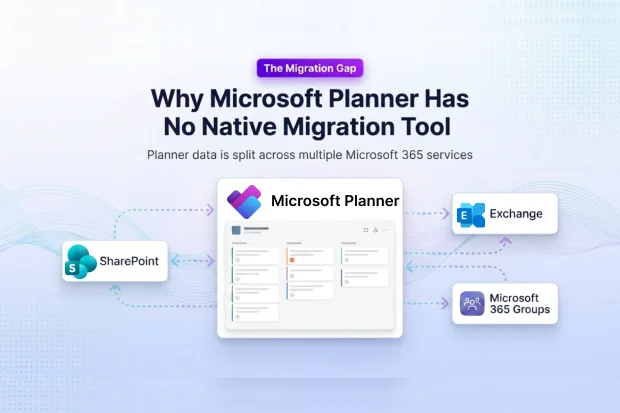
Microsoft Planner is one of the most widely used task management apps in Microsoft 365. Teams use it to organize work, assign tasks, share files, and collaborate inside Microsoft 365 Groups and Teams. But when organizations go through a M365 tenant to tenant migration, they quickly discover a major gap: Microsoft does not provide a native Planner migration tool.
This isn’t oversight. Planner’s data is distributed across multiple Microsoft 365 services by design, which makes a single, built-in migration path impossible. Understanding this architecture shows exactly why Microsoft’s own tools fall short and why third-party solutions like Apps4.Pro are required, as explained in detail in How to Migrate Microsoft Planner Between Tenants.
This blog explains why Planner has no native migration tool, what technical limitations are behind that decision, and how Apps4.Pro closes the gap so you can migrate plans safely without building your own scripts.
- Microsoft Officially Excludes Planner from Cross-Tenant Migration
- Planner Isn’t One Database – It’s Four Services Working Together
- No Single Export Pipeline Exists for Planner
- Set-PlannerConfiguration Is Not a Migration Cmdlet
- Microsoft Graph API Can Read Planner, Not Migrate It
- These Limits Create Real Migration Failures
- Apps4.Pro Provides the Missing Planner Migration Layer
- Frequently Asked Questions
Microsoft Officially Excludes Planner from Cross-Tenant Migration
Microsoft documents that Planner is not part of its official cross-tenant migration programs, including FastTrack. This is a permanent design limitation, not a temporary gap.
Teams relying only on FastTrack or native tools are forced to either skip Planner or run a separate workaround project.
- No native Microsoft tool migrates Planner between tenants
- No built-in export/import exists for Planner plans and tasks
- FastTrack documentation explicitly excludes Planner as a supported workload
- Planner APIs are built for app interaction, not migration
Planner Isn’t One Database – It’s Four Services Working Together
When you open a Planner board, everything looks like it belongs together: your tasks, buckets, attachments, and comments all sit neatly in one place. It feels like a single app with a single database behind it.
The reality is very different. Planner is actually a thin layer on top of Microsoft Graph. Almost every piece of data you see on a task card is stored somewhere else inside Microsoft 365.
Here’s where each piece actually lives:
- Plans, buckets, and tasks → Planner API. The core structure you see on the board, plans, buckets, tasks, labels, due dates, and assignments is stored as Planner entities and accessed through Microsoft Graph’s Planner endpoints.
- Attachments → SharePoint. When you attach a file to a task, the file doesn’t live in Planner. It’s uploaded to the SharePoint site behind the Microsoft 365 Group, and Planner just stores a link to it.
- Comments → Exchange group conversations. Those task comments you type aren’t part of the task at all. They’re posted as messages in the Group’s Outlook conversation, which is stored in Exchange Online.
- Members and permissions → Microsoft 365 Groups. Who can see or edit a plan isn’t controlled by Planner. It’s inherited from the Microsoft 365 Group that owns the plan.
So, when someone says, “just migrate Planner,” what they’re really asking for is a coordinated move across four different systems:
You’re not moving one database, you’re stitching together four services in sync. Microsoft has never built a tool that does all four in one step, and that’s exactly why Planner has no native migration path.
No Single Export Pipeline Exists for Planner
Because Planner data sits in four services, no unified export exists. Tasks, files, comments, and membership must each be pulled through different APIs.
There is no central “export package” for Planner and no native, single-step way to move it between tenants. Microsoft has not built a pipeline that can move all four services together, which is why Planner remains excluded from cross-tenant migration support.
- Tasks come from Planner APIs
- Attachments must be pulled from SharePoint
- Comments must be extracted from Exchange Group mailboxes
- Relationships between plans, tasks, files, and users must be rebuilt manually
Set-PlannerConfiguration Is Not a Migration Cmdlet
Administrators often assume PowerShell hides a migration cmdlet. It doesn’t.
Set-PlannerConfiguration and Set-PnPPlannerConfiguration only manage tenant-wide policies and feature flags. They cannot move Planner data.
- Controls tenant-level Planner settings such as enabling Planner
- Manages feature flags like roster creation and tenant move behavior
- Cannot export, copy, or move any Planner plan, task, or attachment
Microsoft Graph API Can Read Planner, Not Migrate It
Graph gives programmatic access to Planner, but it was designed for app interaction, not cross-tenant migration.
Building migration on Graph alone requires heavy scripting and careful handling of two hard limits: throttling and the lack of bulk operations. For a complete walkthrough of what a Graph-based script looks like in practice, see Migrate Planner Using Graph API and PowerShell.
Graph Has No Bulk Export for Planner
Graph forces you to fetch each plan and each task individually. For tenants with many plans and thousands of tasks, this is slow and fragile.
- Plans must be listed and read individually
- Tasks must be fetched one at a time or via paged queries
- No “export all Planner data” endpoint exists
Planner Graph Calls Are Throttled Aggressively
Planner endpoints return HTTP 429 “Too Many Requests” quickly under load. Every migration script must add retry and backoff logic just to keep running.
- Planner Graph calls are typically throttled at a few hundred requests per minute
- Throttling responses require honoring the Retry-After header
- Large migrations run for hours or days
These Limits Create Real Migration Failures
Most teams only discover Planner’s complexity after their first migration attempt fails-tasks missing, attachments broken, scripts throttled.
Without proper tooling, IT teams spend their time debugging scripts instead of delivering a migration where users can open their plans and keep working in the new tenant.
- Broken attachments from missing SharePoint mapping
- Lost comments when the Exchange Group mailbox isn’t included
- Missing or wrong user assignments due to identity mismatches
- Slow migrations and timeouts from Graph API throttling
These failures are exactly why teams move from DIY Graph scripts to a dedicated Planner migration solution like Apps4.Pro.
Apps4.Pro Provides the Missing Planner Migration Layer
When DIY scripts break down, this is what most teams switch to. Apps4.Pro Migration Manager is purpose-built for Planner’s fragmented architecture. It connects to Planner, SharePoint, Exchange, and Microsoft 365 Groups in one pass and moves everything into the target tenant as a single coordinated migration – no scripts, no workarounds, no gaps.
Projects that usually take weeks of Graph scripting complete in hours, and every plan, bucket, task, and relationship arrives intact. If you want step-by-step setup instructions and prerequisites, the Apps4.Pro Planner migration support guide walks you through the full configuration.
- Extracts Planner, SharePoint, and Exchange data in one coordinated run
- Preserves plans, buckets, tasks, and relationships in the target tenant
- Maps SharePoint files and links to keep attachments intact
- Handles throttling, retries, and pacing automatically so migrations finish

















 Migrate
 Manage
 Migrate Microsoft 365








