


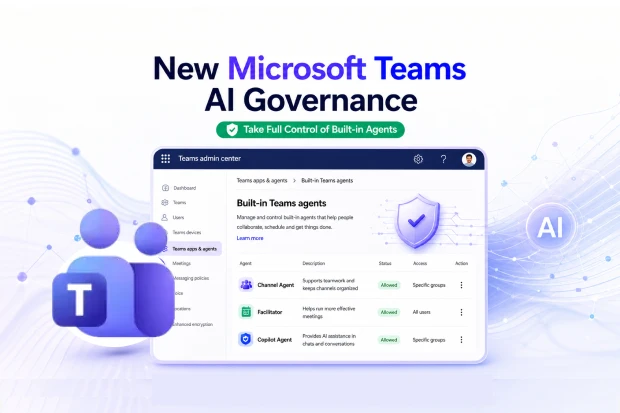
If you manage Microsoft Teams and Microsoft 365, AI agents are quickly becoming part of your daily reality. Built-in agents such as Channel Agent, Facilitator, and Copilot Agent already shape how people collaborate, schedule, and make decisions inside Teams.
Microsoft has now introduced a dedicated governance layer in the Teams admin center that gives you clearer, more granular control over these agents, so you can align AI usage with your organization’s trust, compliance, and security expectations.
This update is designed to help you govern AI in a structured, predictable way, using policy driven controls that sit right inside your existing Teams admin workflows.
What The New Teams Agents Governance Experience Unlocks
Microsoft has added a new governance experience in the Teams admin center that focuses specifically on built-in Teams agents. These agents are part of the core Teams experience and do not need installation from the app store, but they now have their own space for governance separate from traditional apps.
With this update, you gain:
- A centralized place to manage built-in Teams agents
- A clear distinction between traditional apps and AI agents
- More precise policy controls over AI powered scenarios
- Stronger AI governance capabilities in your Microsoft 365 environment
You will find this experience at:
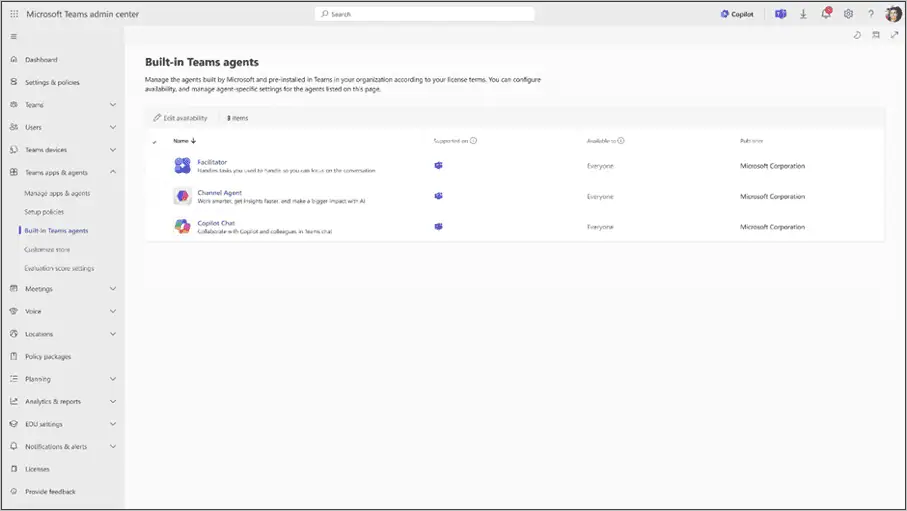
- Teams admin center > Teams apps & agents > Built-in Teams agents
Built-in Agents View in Teams Admin Center
📌 Recommended Reading:
To understand what each agent does and how it supports collaboration, review the official Microsoft resources:
Why Microsoft Is Changing Teams Agents Governance
Until now, built-in agents were typically governed under broader app policies, which could make AI controls feel opaque or difficult to fine tune. With this change, Microsoft is giving you a dedicated surface so you can design and apply controls specifically for these agents.
This separation between traditional apps and built-in agents improves the clarity of your governance model and makes it easier to explain how AI works inside Teams to stakeholders.
For organizations moving deeper into Microsoft 365 Copilot and other AI features, the update helps you treat AI governance as a first-class part of your overall Teams strategy rather than an add on.
Who This Update Matters To
This update is most relevant to people who own or influence Teams and Microsoft 365 governance inside their organization. If you are likely in one of these roles:
- Microsoft 365 tenant admin managing Teams apps and experiences
- Teams admin responsible for policies, permissions, and app lifecycle
- Security, compliance, or risk leader focused on controls in Microsoft 365
The platforms directly impacted include:
- Teams admin center (web)
- Microsoft Teams where users experience the agents in their daily work
If you sit at the intersection of IT operations, collaboration, and risk management, this change gives you more levers to shape how AI appears in your environment.
🔍 Reflect On Your AI Governance Baseline
You can use this moment to pause and reflect on your existing AI governance approach in Teams:
- How clearly have you defined where AI agents are allowed or restricted today
- Are users confident about what AI can and cannot do in their Teams environment
- Do your current policies distinguish between built-in agents and custom apps
This reflection can help you decide where the new built-in agents’ governance surface should plug into your overall governance framework.
How Teams Admin Center Behaves After This Update
The new experience introduces a structured section where each built-in Teams agent can be managed individually. Instead of treating them as part of a broad Microsoft apps setting, you gain direct controls over each agent.
Within this surface, you can:
- Allow or block individual built-in agents depending on your policies
- Assign access to specific users or groups, making use of Entra ID group membership for refined targeting
- Configure agent specific settings so each agent behaves according to your governance requirements
There are also important changes behind the scenes:
- Built-in Teams agents are no longer governed by the org-wide Microsoft apps setting.
- Existing agent level configurations remain as they are, but if a built-in agent relied solely on the org wide setting and had no agent level configuration, that org wide setting will no longer apply to it.
- Previous user installations of the agents will be retained, as those installs are carried forward.
- The install action in the admin center for these built-in agents is removed because they do not require separate installation.
These changes shift control from a broad toggle to fine grained agent specific decisions that you can align with your governance and risk appetite.
🔧 Sketch Your First Built-in Agent Policy
You can turn this update into a practical exercise by outlining your initial policy for built-in agents:
- List which agents should be generally available across your tenant
- Identify agents that should be limited to certain departments, roles, or regions
- Note any conditions where an agent should be blocked, such as sensitive projects or specific regulatory constraints
This simple sketch becomes a starting point for the more detailed configurations you apply in the Teams admin center.
Action Checklist for Teams and Microsoft 365 Admins
Microsoft does not require immediate action, but the update is an invitation to review your current setup and make sure it reflects how you want AI to show up in Teams.
To make the most of the new governance experience, you can:
- Review your current org-wide app settings for Microsoft apps, especially if you have turned the org-wide Microsoft apps setting off
- Check whether any built-in agents lack agent level configurations and understand that their availability will change to ‘allowed’ under the new model
- Review and update agent level permissions and configurations within the new built-in agents surface
- Confirm install settings and audiences, even though install actions are no longer needed for built-in agents
- Inform other admins, helpdesk teams, and support staff about where to find these controls and how they impact user experiences
- Update internal documentation, playbooks, and knowledge base articles that reference Teams app governance so they capture this new approach
📣 Update Your Governance Playbook
You can turn this update into a meaningful governance improvement with a small documentation exercise:
- Add a dedicated section titled “Built-in Agents Governance” to your Teams governance document
- List the built-in agents in scope and describe their default policies
- Document where their settings reside in the Teams admin center and who owns those controls
This helps you and your stakeholders understand, at a glance, how AI governance is structured in your Teams environment.
Strengthening Compliance with Dedicated Agent Governance
From a compliance perspective, the new governance surface improves your ability to monitor, report, and demonstrate control over AI agents in Teams. You can more easily show which agents are enabled, how access is granted, and how changes are managed over time.
Key compliance related aspects include:
- A dedicated governance surface that increases visibility and management granularity for built-in agents
- The use of Entra ID group membership to control access, which supports role based or department-based control models
- The ability for admins to allow or block agents, effectively turning features on or off according to compliance requirements
If your organization operates in regulated industries or has strong internal audit processes, this update can support your effort to integrate AI into collaboration platforms without weakening your control environment.
You can explore broader Microsoft 365 compliance and governance guidance through your Microsoft 365 admin and compliance portals and link this new Teams specific capability into your existing frameworks.
🛡️ Map AI Agents To Your Risk Framework
To fully embed this change into your compliance and risk strategy, you can map built-in agents against your existing frameworks:
- Identify which regulations, standards, or internal policies are most affected by AI usage in Teams
- Decide how the new governance surface helps you document and prove compliance for those obligations
- Capture any new controls, logs, or review steps that come into play because built-in agents are now governed in a dedicated way
This mapping exercise can help you treat AI agents as a formal part of your risk landscape, rather than an informal add on to collaboration.
📌 Recommended Reading:
To understand what each agent does and how it supports collaboration, review the official Microsoft resources:

















 Migrate
 Manage
 Migrate Microsoft 365








