


Hey all,
We are happy today to announce the release of new version (v1.0.1.0) of Apps4.Pro Planner Outlook add-in.
With the feedback we got from the users and their reviews, we included new features and modified some of the existing features.
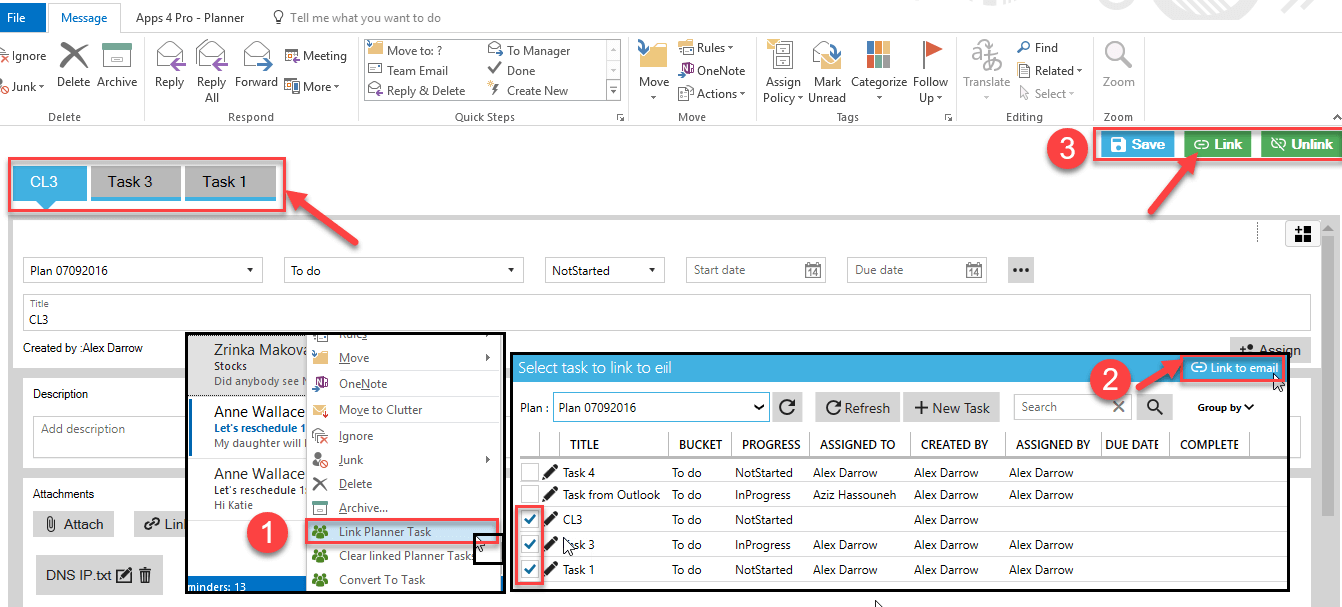
Link Planner task to an email item
You can link multiple Planner tasks to email. Helps you to identify the tasks that are created / related for an email. You can update task details / post comments on Planner tasks from this view.
Support for Attachments
Notification for new and completed task assignment
We have now updated the design in such a way that you will receive email notifications when a new task has been assigned to user as in Planner.
Email to planner task – Show icon in email read view
you can see Apps4.Pro icon in email read view for the emails which you have converted as Planner tasks.
Sorting of Bucket names
We have now sorted bucket names in all dropdown controls as you see on Planner (List based on the order it was sorted in UI). Previously it was sorted based on the date the bucket was added.
Date locale
In ‘Manage Plans’ window the date display format was now displayed based on your computer settings. Earlier it was in mm/dd/yyyy format..
New action item
We have now included ‘Text to Planner task’ as an action item in menu. You can select the required text from the email body and click on ‘Text to Planner task’ button.
Changes in calendar appointment
We have now set the Reminder time for all day events as 0.5 days and status as Free.
You can download the latest version from our website
https://apps4.pro/microsoft-planner-outlook-addin.aspx

















 Migrate
 Manage
 Migrate Microsoft 365








