


Microsoft Planner and Trello have unique core functionalities for
managing tasks but Planner is a simple task management tool which
includes task creation, assign task, attach files, view own task. Trello
has all the functionalities of Planner along with powerful features like
convert email to task, Gantt chart, import/export task, convert another
task etc. Using Apps4.Pro you can extend the Planner
and get all the Trello’s features in Microsoft Planner itself.
Below table lists features addressed by Apps4.Pro which are missing in Office 365 Planner compared to Trello.
| S.No | Feature | Trello | Microsoft Planner | Microsoft Planner with Apps4.pro |
|---|---|---|---|---|
| 1. | Email to Task | Supported (Outlook client/OWA) | Not Supported | Supported (Outlook client/OWA) |
| 2. | Gantt Chart | Supported (Elegantt Chart) | Not Supported | Supported (Inbuilt Gantt Chart) |
| 3. | Custom field | Supported | Not Supported | Supported* |
| 4. | Import/Export Task list | Export Supported(Json,Excel)Import not supported | Not Supported | Export Supported (Pdf, Excel,Csv,Html) Import Supported |
| 5. | Filters | Supported (based on label,Username, Due Date) | Not Supported | Supported (For all task fields) |
| 6. | Sync with other task management tools | Supported (Sync Asana task using Unito) | Not Supported | Supported (sync with Outlook Tasks) |
| 7. | Copy Task | Supported | Not Supported | Supported* |
*This feature is in Beta.
Apps4.Pro Planner Features
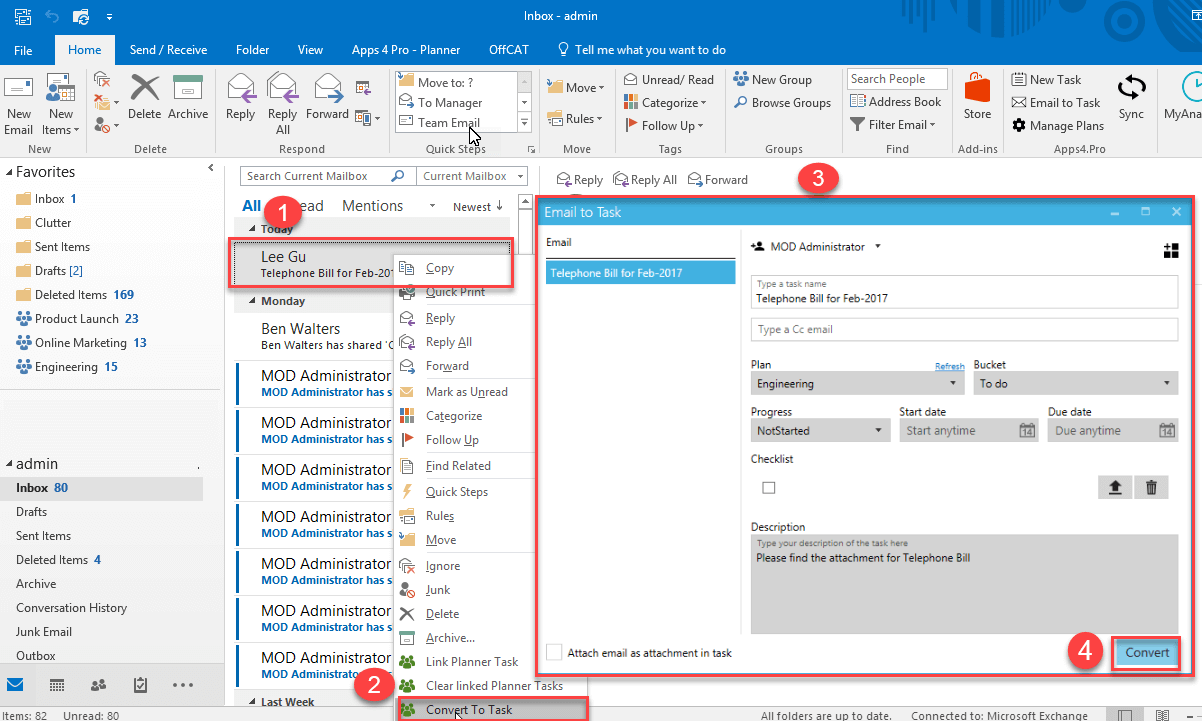
Email to Task
You can convert email to Planner task from Outlook Client and OWA
1.Covert task from Outlook Client
1.Covert task from OWA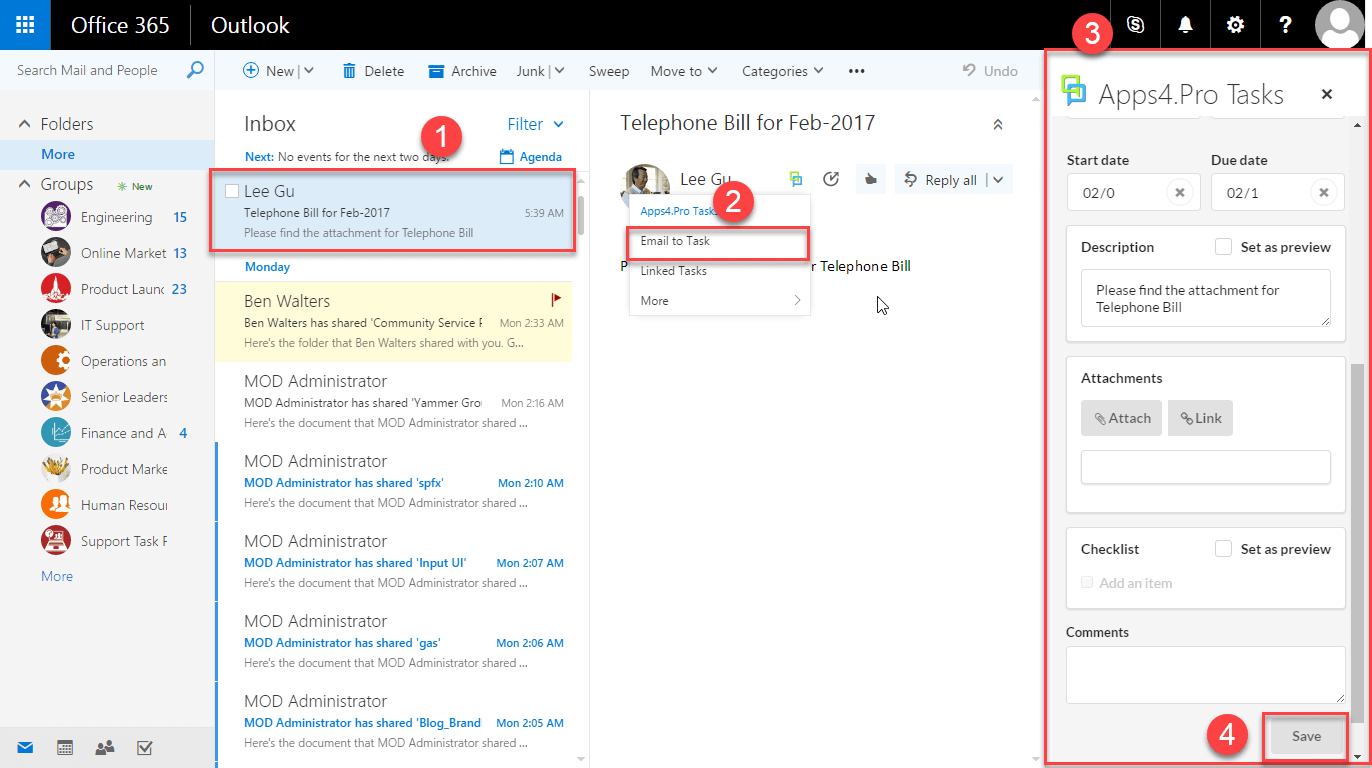
More Details refer following
link http://apps4.pro/convert-email-to-task.aspx
Gantt Chart
You can view and modify task from Gantt chart
More Details refer following link
http://apps4.pro/gantt-chart-view-for-tasks.aspx
Custom Fields
You can add custom fields of type text, multi-line, users, option list,
date to the tasks.
Import/Export Task List
You can Import/Export task List from all plans or selected plans using
Apps4.Pro.
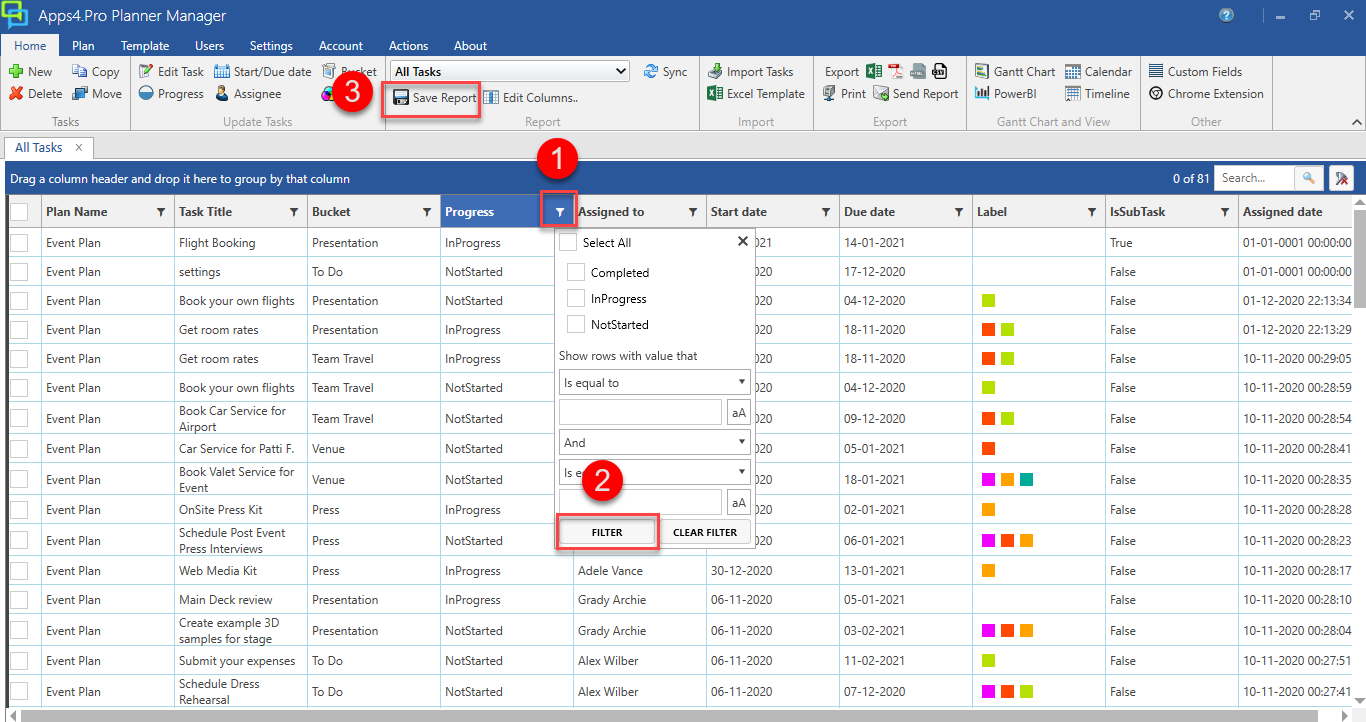
Filter
Apps4.Pro has advanced filter option for every field and you can also
save the filter and reuse it at anytime
For more details visit our site https://apps4.pro/planner-manager.aspx
Sync with other task management tools
Apps4Pro Support sync outlook task to planner task
Additional Features
- 1.Calendar sync: Apps4.Pro does the sync of Planner tasks into
users personal calendar. - 2.Set task Remainder: Apps4.Pro sync Planner tasks with your
Outlook calendar and reminders are set on them. You can set reminder
notifications based on start or due date for the task. - 3. Edit Multiple Tasks at Once: You can edit multiple Planner
tasks in Apps4.Pro. - 4. Sub Task: You can create sub in planner using chrome
extension for Apps4.pro.
More Information about Apps4.Pro please visit following web
site http://apps4.pro

















 Migrate
 Manage
 Migrate Microsoft 365








