


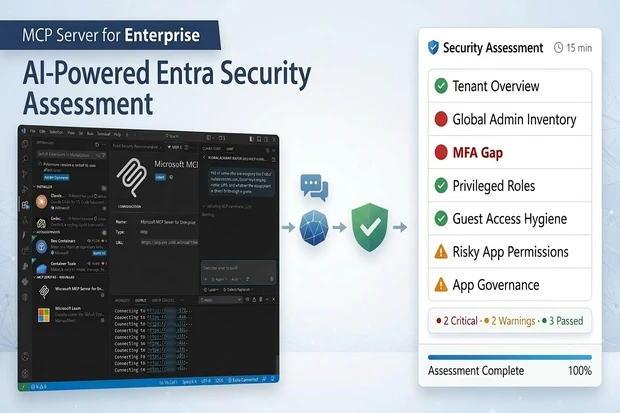
It’s Friday afternoon. Your CISO sends a message: “I need a complete picture of who has Global Admin and whether they all have MFA – by end of day.”
Here’s what most of us do: open Graph Explorer or PowerShell, look up the role Management endpoint, figure out the template ID for Global Administrator, query role members, then cross-reference with the authentication methods endpoint that’s a completely different API. Export the results, format them, send them over. If you know what you’re doing, that’s 30 to 45 minutes.
What if I told you the same answer takes one sentence and 30 seconds?
That’s exactly what Microsoft MCP Server for Enterprise enables and it’s completely free. No additional license. No code. Just plain English questions about your Entra ID tenant.
In this guide, I’ll walk you through setting it up from scratch and show you 7 security queries that form a complete identity security assessment. I presented these live at Microsoft Purview & Defender Days 2026, and I’m sharing the exact prompts, what they uncover, and what to do with the findings.
1. What is MCP Server for Enterprise?
MCP stands for Model Context Protocol – an open standard created by Anthropic and adopted by Microsoft, OpenAI, Google, and the broader AI ecosystem. Think of it as USB-C for AI: before MCP, every AI tool needed a custom integration to talk to your data. Now, any MCP-compatible client can connect to any MCP server using the same protocol.
Microsoft’s MCP Server for Enterprise connects AI clients like VS Code, ChatGPT, and Claude directly to Microsoft Graph API. This means you can query your Entra ID tenant – users, roles, MFA status, guest access, application permissions, and more by simply asking questions in natural language.
Three things make this remarkable:
- It’s an open standard - not proprietary. Any MCP-compatible client works.
- It’s deeply integrated with Microsoft – The M365 MCP Server translates your natural language into Graph API calls using a RAG layer with 500+ real-world query examples.
- It’s free - no license, no Security Compute Units, no additional cost. It uses delegated Graph permissions you already have.
As of March 2026, this is in public preview (since November 2025). No GA date has been announced yet.
2. How It Works
The architecture is straightforward:
You (natural language) → AI Client (VS Code / ChatGPT) → MCP Server (RAG + 500 examples) → Graph API (delegated permissions) → Entra ID (your tenant data) → Natural language response
The MCP Server exposes only three tools:
- microsoft_graph_suggest_queries - Uses RAG to convert your question into the right Graph API call
- microsoft_graph_get - Executes read-only Graph API calls respecting your permissions
- microsoft_graph_list_properties - Returns entity schemas so the AI understands available properties
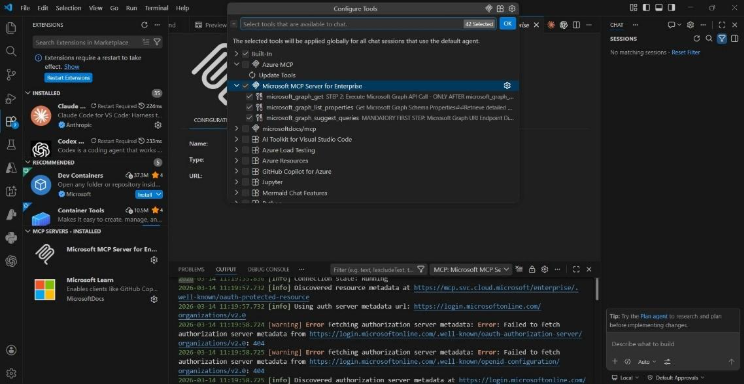
VS Code Configure Tools panel showing MCP Server for Enterprise with its three tools — microsoft_graph_get, microsoft_graph_list_properties, and microsoft_graph_suggest_queries — all enabled. Both MCP servers (Enterprise and Microsoft Learn) are visible in the sidebar under MCP SERVERS – INSTALLED.
Key security points your team needs to know:
- Delegated permissions only - it runs as YOU, not as an application. It can only see what you can already see in the portal.
- Read-only in preview - it cannot make changes to your Microsoft 365 tenant. Safe for production.
- Fully auditable -every request appears in Graph Activity Logs. Filter by AppId e8c77dc2-69b3-43f4-bc51-3213c9d915b4.
- Admin-controlled - admins decide which MCP clients get provisioned and which scopes they receive.
3. Setup: 3 PowerShell Commands + 1 VS Code Install
Total time: about 5 minutes.
Step 1: Install the Entra Beta PowerShell Module
Install-Module Microsoft.Entra.Beta -Force -AllowClobber
Step 2: Connect and Provision
Connect-Entra -Scopes ‘Application.ReadWrite.All’,’Directory.Read.All’,’DelegatedPermissionGrant.ReadWrite.All’
Grant-EntraBetaMCPServerPermission -ApplicationName VisualStudioCode
That’s it on the PowerShell side. This command registers the Office 365 MCP Server in your tenant and grants VS Code all the MCP.* scopes.
Step 3: Install in VS Code
- Go to the MCP Server for Enterprise install page and click “Install Microsoft MCP Server for Enterprise”
- Click Install in VS Code and authenticate with your admin account
- Also install the Microsoft Learn MCP Server (we’ll use this later for remediation guidance)
Step 4: Verify
- Open VS Code → Copilot Chat → switch to Agent Mode (this is critical – MCP Software are only available in Agent Mode, not regular Chat)
- Check the MCP servers panel – both “Microsoft MCP Server for Enterprise” and “Microsoft Learn ” should show as connected
- Test with a simple query: “How many users are in my tenant?”
If you get a response with a number, you’re ready.
4. The 7-Query Security Assessment
Here’s the scenario: you’ve just been given access to a tenant maybe you’re an MSP onboarding a new client, or a security admin who just joined an organization. You know nothing about this tenant. Let’s assess its identity security posture using nothing but natural language.
Query 1: Tenant Overview
Prompt:
“Give me an overview of this Entra ID tenant – total users, guest users, groups, and application registrations.”
What it checks: Your baseline numbers. How large is this directory? How many external identities (guests) have access? How many apps are registered?
What to look for: A high ratio of guests to members can indicate loose collaboration controls. A large number of app registrations warrants a deeper look at permissions.
Why it matters: You can’t assess what you don’t measure. This is your starting picture.
Query 2: Global Admin Inventory
Prompt:
“List all users who are assigned the Global Administrator role. Show their display name, UPN, and whether the assignment is direct or through a group.”
What it checks: Who has the highest-privilege role in your tenant, and how they got it.
What to look for: More than 2-4 Global Admins is typically a red flag. Group-based assignments are harder to track than direct ones. Look for service accounts or shared accounts with GA.
Why it matters: Every security assessment starts here. Global Admin is the keys to the kingdom.
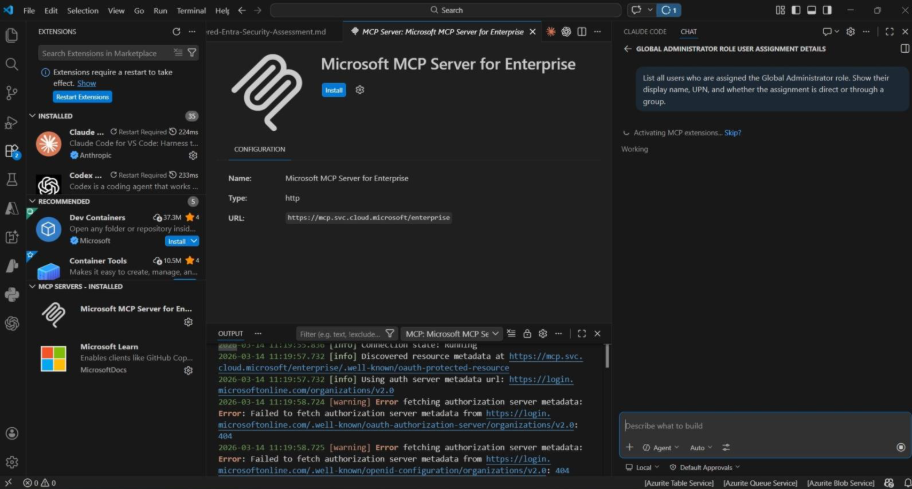
Watch the AI think through the problem: it searches for relevant Graph examples, resolves the role definition ID, and constructs the exact Graph API call — all automatically from a plain English question.
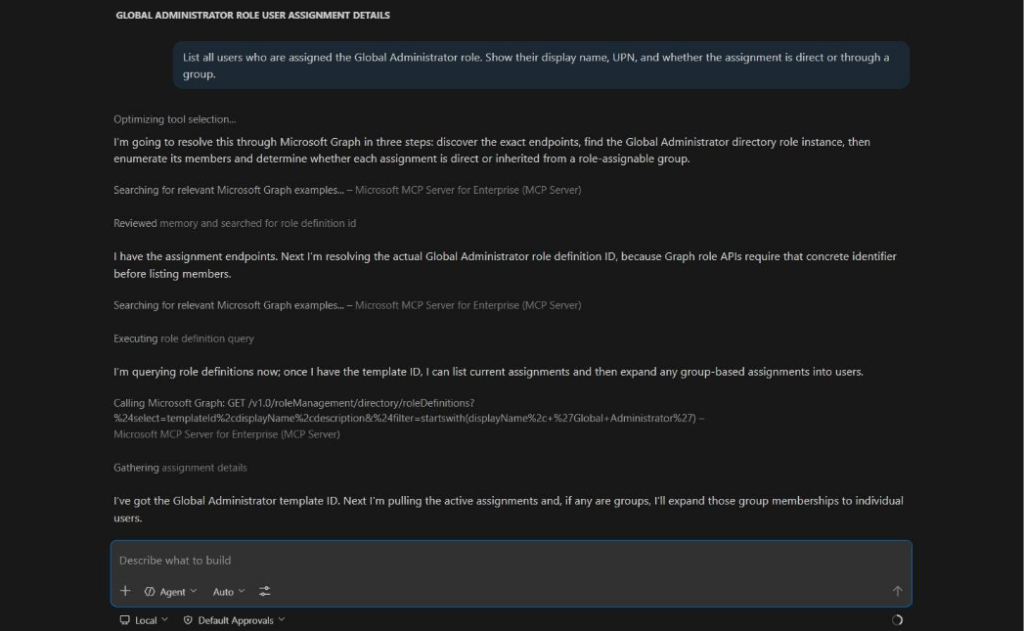
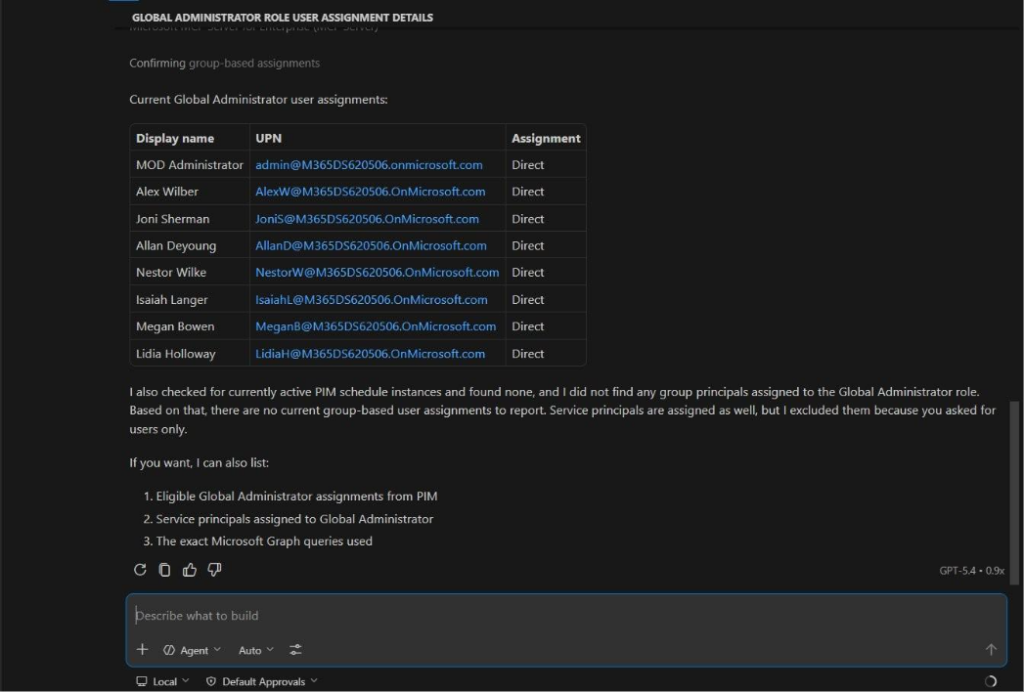
8 Global Admins – all with direct assignments. The AI even checked for PIM-eligible and group-based assignments without being asked. Now the critical question: how many of these have MFA?
Query 3: The MFA Gap (Critical Finding)
Prompt:
“Which of these Global Administrator users have NOT registered any MFA authentication methods?”
What it checks: Whether your most privileged users have MFA protection.
What to look for: ANY Global Admin without MFA is a critical finding. This is the query that saves your Friday afternoon.
Why it matters: In Graph API, this requires combining two different endpoints, role assignments AND authentication methods. The MCP Server maintains conversation context from the previous query and handles this cross-reference automatically. What would take 30+ minutes manually happens in 30 seconds.
What to do: Implement a Conditional Access policy requiring MFA for all admin roles immediately.
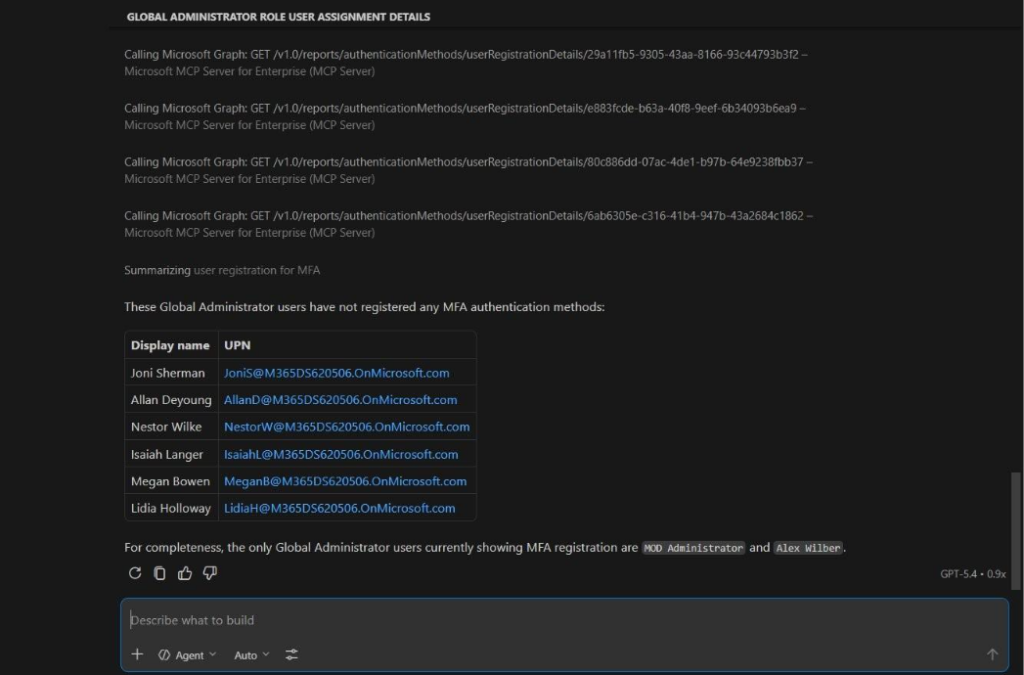
The money shot: 6 out of 8 Global Admins without MFA. Found in 30 seconds with a single follow-up question. In any real environment, this is a critical finding that demands immediate action. Notice the Graph API calls visible above – the MCP Server is querying the authentication Methods endpoint for each admin automatically.
Query 4: All Privileged Roles
Prompt:
“Show me ALL users with ANY privileged directory role assigned – not just Global Admin. Include the role name and the user’s display name.”
What it checks: The full picture of privileged access beyond Global Admin.
What to look for: Exchange Admin, Privileged Role Admin, Application Admin, User Admin all have significant access. Users with multiple privileged roles are especially risky.
Why it matters: Attackers don’t just target Global Admin. Any privileged role can be a stepping stone.
Query 5: Guest Access Hygiene
Prompt:
“List all guest users in this tenant with their display name, email, creation date, and invitation acceptance status. Highlight any guests whose invitation has not been redeemed.”
What it checks: External identities in your directory and whether they’re even active.
What to look for: Unredeemed invitations -these are guests who were granted access but never signed in. The invitation is still pending and could be redeemed at any time. In a newer tenant, the question isn’t “are they stale” it’s “were they even activated?”
Why it matters: Guest accounts are one of the most overlooked attack surfaces in Entra ID. They’re created for a project, the project ends, the account stays forever.
Backup prompt (if the original is too complex): “List all guest users and whether their invitation was accepted or is still pending.”
Query 6: Risky App Permissions
Prompt:
“List all application registrations that have been granted application-level permissions like Directory.ReadWrite.All, Mail.ReadWrite, or Sites.FullControl.All. Show the app name, the permissions, and the owner.”
What it checks: Apps with high-privilege application permissions that work without a user context.
What to look for: Any app with Directory.ReadWrite.All can modify anything in your directory. Apps with Mail.ReadWrite can read anyone’s email. These are often created during initial setup and over-permissioned to “just make it work.”
Why it matters: Overpermissioned apps are a top identity risk and they often fly under the radar because nobody reviews app permissions regularly.
Backup prompt (if the complex query struggles): “List all app registrations and their API permissions.”
Query 7: App Governance – Owners + Credential Hygiene
Prompt:
“Show me any app registrations that have no owner assigned. Also, list any apps with client secrets that have already expired or will expire within 30 days.”
What it checks: Two governance blind spots in one query.
What to look for:
- Ownerless apps - nobody is accountable for credential rotation, permission reviews, or decommissioning
- Expired/expiring secrets -integrations can break silently, or someone creates a new secret without proper approval
Why it matters: In a growing tenant, these problems start small and compound quickly. Catching them early prevents governance debt.
Backup (if the combined query fails): Split into “Which app registrations have no assigned owner?” and “Show me app registration credential expiry dates.”
Assessment Wrap-Up
In about 15 minutes, you’ve assessed:
- Privileged access (who has power)
- MFA coverage (are the powerful accounts protected)
- Guest hygiene (who’s from outside, and are they active)
- App permissions (which apps have dangerous access)
- Credential health (are secrets being managed)
- App ownership (is anyone accountable)
Seven queries. Plain English. Zero cost. Fully auditable.
In a traditional approach Graph Explorer, PowerShell, portal clicking this takes an experienced admin 1 to 2 hours minimum.
5. Bonus: Multi-MCP Workflow(Risk + Remediation in One Conversation)
This is the feature that changes everything.
We’ve identified risks. But what do we DO about them? This is where the second M365 MCP server - Microsoft Learn Docs comes in.
Finding the Fix for the MFA Gap
Prompt:
“I found Global Administrators without MFA in my tenant. Using the microsoft_docs_search and microsoft_docs_fetch tools, find the official Microsoft documentation on how to create a Conditional Access policy that requires MFA for all users with administrative roles.”
What happens: the Enterprise MCP Server identified the risk. Now the Learn MCP System pulls the official remediation guidance all in one conversation, one interface, no tab switching, no searching docs.microsoft.com.
In a real workflow, you’d take this guidance, implement the Conditional Access policy, then re-run Query 3 to verify the fix.
Finding Best Practices for App Permissions
Prompt:
“I found app registrations with excessive application permissions in my tenant. Using the microsoft_docs_search tool, find the Microsoft best practices for implementing least-privilege application permissions and how to review and reduce overpermissioned apps in Entra ID.”
Same pattern, different risk. Identify → get official guidance → implement → verify. This workflow is repeatable for any finding: guest cleanup, credential rotation, PIM configuration – the Learn MCP Server covers all of it.
6. Limitations You Should Know
I believe being honest about limitations builds more credibility than pretending they don’t exist. Here’s the current reality as of March 2026:
- Still in preview -Public preview since November 2025. No GA date announced. Features and behavior may change.
- Read-only -It can identify problems but cannot fix them. Discovery only, no write operations or remediation actions.
- Complex queries can struggle -The RAG corpus has approximately 500 examples. Edge cases, multi-hop queries, or unusual Graph API patterns may produce incorrect or incomplete results. Always validate critical findings in the Entra admin center.
- Public cloud only - No support for GCC, GCC-High, or sovereign clouds yet.
- Authentication quirks - If your VS Code GitHub account differs from your Entra account, you may hit 401 errors. Test your setup before any demos or assessments.
- Rate limits - 100 calls per minute per user, plus standard Graph API throttling. Fine for interactive use, but batch-style assessments may throttle.
- No Dynamic Client Registration – ChatGPT and Claude require predefined provisioning via PowerShell (though Microsoft has made this straightforward with one-command provisioning).
Bottom line: This is preview software. It’s impressive for what it does, but it’s not a certified audit tool. Use it for discovery and rapid assessment, then validate and remediate through the portal or PowerShell. Think of it as your AI-powered starting point, not your final report.
7. Getting Started & Resources
Set this up Monday morning. It takes 5 minutes. Run the 7 queries from this guide on your own tenant. You’ll find at least one thing you didn’t know.
Resources
Quick-Start Commands (Copy-Paste Ready)
# Install the module
Install-Module Microsoft.Entra.Beta -Force -AllowClobber
# Connect to your tenant
Connect-Entra -Scopes ‘Application.ReadWrite.All’,’Directory.Read.All’,’DelegatedPermissionGrant.ReadWrite.All’
# Provision VS Code
Grant-EntraBetaMCPServerPermission -ApplicationName VisualStudioCode
# Optional: Provision ChatGPT and Claude too
Grant-EntraBetaMCPServerPermission -ApplicationName ChatGPT
Grant-EntraBetaMCPServerPermission -ApplicationName Claude
This article is based on the session “AI-Powered Entra Security Assessments Using MCP Server for Enterprise” presented at Microsoft Purview & Defender Days 2026 by Narasima Perumal Chandramohan, Microsoft MVP and Co-Founder of JiJi Technologies.
Have questions? Connect with me on LinkedIn.
















