


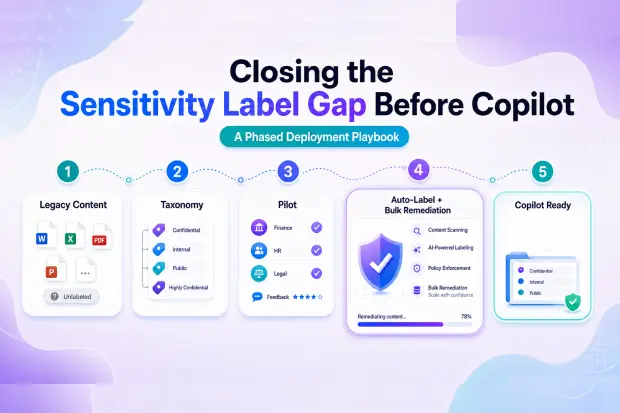
Microsoft 365 Copilot respects sensitivity labels, but there is one important condition: the content must already be labeled.
That sounds simple, but for many organizations, especially in regulated industries, this is where Copilot readiness becomes harder than expected. Sensitivity labels are often introduced after years of content has already been created, shared, moved, copied, and stored across SharePoint, OneDrive, Teams, Exchange, and Microsoft 365 Groups.
New documents may be covered by labeling policies, user prompts, or auto-labeling rules. But legacy content often remains unlabeled.
Before Copilot is widely deployed, this gap needs attention. If sensitive content is not labeled, Copilot cannot use those labels as part of its information protection model. The result is a risky disconnect: the organization may believe its data protection strategy is mature, while large volumes of older sensitive content remain outside the labeling framework.
For M365 admins, compliance leads, and security teams, closing this gap is one of the most important pre-Copilot workstreams.
- Why Sensitivity Labels Matter More Before Copilot
- The Core Problem: Labels Are Often Enabled Mid-Lifecycle
- Why Auto-Labeling Alone Does Not Close the Gap
- The Risk of Entering Copilot Rollout With Unlabeled Sensitive Content
- A Phased Deployment Playbook
- Phase 1: Define a Practical Label Taxonomy
- Phase 2: Pilot Labels With High-Risk Teams
- Phase 3: Configure Policies and User Guidance
- Phase 4: Use Auto-Labeling for New and Detectable Content
- Phase 5: Identify Legacy Content That Needs Remediation
- Phase 6: Run Targeted Bulk Labeling Campaigns
- Phase 7: Preserve Labels During Reorganization
- Phase 8: Monitor, Adjust, and Repeat
- Final Thoughts
Why Sensitivity Labels Matter More Before Copilot
Sensitivity labels help organizations classify and protect content based on its business sensitivity. A file may be labeled as Public, Internal, Confidential, Highly Confidential, or aligned to a more specific taxonomy such as Legal, HR, Finance, Customer Data, or Regulated Data.
These labels can apply protection settings, encryption, access restrictions, visual markings, and compliance controls. They also help users and administrators understand how content should be handled.
Copilot adds a new layer of urgency because it can reason across organizational content that users already have permission to access. Copilot does not bypass Microsoft 365 permissions or protection controls, but it can make existing access easier to use. That means mislabeled, unlabeled, or overshared sensitive content can become more discoverable.
This is why sensitivity label readiness is not just a compliance task. It is also a Copilot risk-reduction task.
The Core Problem: Labels Are Often Enabled Mid-Lifecycle
Most organizations do not start their Microsoft 365 journey with a fully mature sensitivity label strategy. Labels are usually introduced later, after content has already grown across the tenant.
By the time Copilot readiness begins, organizations may already have thousands or millions of files that were created before sensitivity labels were deployed. These files may include contracts, HR records, board documents, financial reports, customer information, legal correspondence, intellectual property, and regulated data.
The issue is not that Microsoft 365 lacks labeling capabilities. The issue is that labeling is an opt-in capability that needs planning, rollout, adoption, and remediation.
A label taxonomy must be defined. Policies must be assigned. Users must be trained. Auto-labeling rules must be configured. Existing content must be reviewed and remediated. Each of these steps becomes a same-tenant reorganization and governance workstream.
Why Auto-Labeling Alone Does Not Close the Gap
Auto-labeling is valuable, especially for new content and content that matches clear conditions such as sensitive information types, trainable classifiers, or specific compliance patterns.
But auto-labeling does not fully solve the legacy content problem.
Some files may not match auto-labeling conditions even though they are sensitive. Some content may require business context that automated rules cannot easily detect. Some legacy documents may live in locations where ownership is unclear. Some files may need review before applying a label. Some labels may also need to be applied based on site purpose, department, project, geography, or regulatory scope rather than document text alone.
This is why regulated organizations usually need both auto-labeling and targeted bulk operations.
Auto-labeling helps reduce future drift. Bulk labeling helps close the historical gap.
The Risk of Entering Copilot Rollout With Unlabeled Sensitive Content
Unlabeled sensitive content creates ambiguity. It becomes harder for users, admins, and compliance teams to know which documents require special handling.
Before Copilot, this may already be a governance issue. After Copilot, it becomes more visible.
If users already have access to unlabeled sensitive files, Copilot may be able to use that content in responses. Copilot is still respecting access controls, but the organization may not have the classification signals it expected. This can lead to compliance concerns, audit findings, and internal trust issues around AI adoption.
The risk is especially high in industries such as financial services, healthcare, legal, government, manufacturing, and professional services, where sensitive data must be classified, protected, retained, and audited carefully.
A Phased Deployment Playbook
The best approach is not to label everything at once. Large-scale sensitivity label deployment works better when it is phased, measurable, and tied to business risk.
Phase 1: Define a Practical Label Taxonomy
Start by defining a label taxonomy that users can understand and admins can manage. Avoid creating too many labels at the beginning. A complicated label structure often slows adoption and increases misclassification.
A practical taxonomy should reflect business risk. For example, organizations may begin with broad labels such as Public, Internal, Confidential, and Highly Confidential, then add sub-labels for regulated or department-specific content where needed.
The goal is to create a structure that supports compliance without overwhelming users.
Phase 2: Pilot Labels With High-Risk Teams
Do not begin with the entire tenant. Start with teams that handle sensitive data regularly, such as Legal, HR, Finance, Compliance, Executive Leadership, or Customer Operations.
A pilot helps validate whether the label names make sense, whether users understand when to apply them, and whether policies create friction. It also helps identify technical issues before scaling across the organization.
During this phase, admins should monitor label usage, user feedback, policy conflicts, and unlabeled content volumes.
Phase 3: Configure Policies and User Guidance
Once the taxonomy is validated, configure label policies for the right users and locations. Users need clear guidance on what each label means and when to apply it.
Training should be practical. Instead of explaining every technical capability, show users common examples: contracts, employee records, customer files, sales proposals, financial documents, project plans, and board materials.
The more concrete the guidance, the more consistent the labeling behavior.
Phase 4: Use Auto-Labeling for New and Detectable Content
Auto-labeling should be configured for content that can be reliably identified by rules. This may include files containing financial data, personal information, health information, customer identifiers, or other sensitive information types.
Auto-labeling helps prevent the gap from growing. It supports ongoing governance by classifying new content as it is created or modified.
However, auto-labeling should be tested carefully. Over-labeling can create user frustration, while under-labeling can create false confidence.
Phase 5: Identify Legacy Content That Needs Remediation
The largest effort is usually legacy content. Admins need to identify sites, libraries, teams, and file repositories where sensitive content may exist without labels.
This assessment should prioritize high-risk areas first. For example, focus on executive sites, HR libraries, finance workspaces, legal document repositories, customer project sites, and externally shared locations.
The goal is not to label every file immediately. The goal is to reduce the most material Copilot-readiness risks first.
Phase 6: Run Targeted Bulk Labeling Campaigns
Once priority content is identified, organizations can run bulk labeling campaigns. These campaigns may apply labels based on file location, metadata, content type, ownership, business unit, sensitivity scan results, or other governance signals.
PowerShell can help in some scenarios, but large environments often need more operational flexibility. Admins may need to label content across many sites, apply changes in batches, preserve existing label states where appropriate, and track remediation progress.
This is where bulk operations become important. Without them, legacy label remediation can turn into a long manual project.
Phase 7: Preserve Labels During Reorganization
Copilot readiness often involves more than labeling. Organizations may also need to reorganize SharePoint sites, clean up permissions, move content, archive old workspaces, or standardize information architecture.
During these changes, sensitivity labels must be preserved and respected. Moving content without understanding label state can create new governance problems.
A label-aware reorganization approach helps ensure that content cleanup does not undo classification work.
Phase 8: Monitor, Adjust, and Repeat
Sensitivity label deployment is not a one-time project. Taxonomies evolve. Business units change. New regulations appear. Copilot usage expands. New content is created every day.
Admins should continuously monitor unlabeled sensitive content, label usage patterns, user adoption, policy effectiveness, and exceptions.
The best programs treat labeling as an ongoing governance process, not a one-time migration task.
Final Thoughts
Copilot readiness is not only about enabling licenses or training users. It is about making sure Microsoft 365 content is governed well enough for AI-powered discovery.
Sensitivity labels are a key part of that governance model. But labels only help when they are actually applied.
For many organizations, the biggest gap is legacy content created before labeling policies existed. Auto-labeling can help reduce future risk, but it cannot fully remediate years of unlabeled content on its own.
A phased approach works best: define the taxonomy, pilot with high-risk teams, configure policies, enable auto-labeling, identify legacy content, run targeted bulk labeling campaigns, preserve labels during reorganization, and continuously monitor progress.
Before Copilot scales across the organization, close the sensitivity label gap. It is one of the most practical ways to reduce compliance risk and build trust in AI adoption.
















