


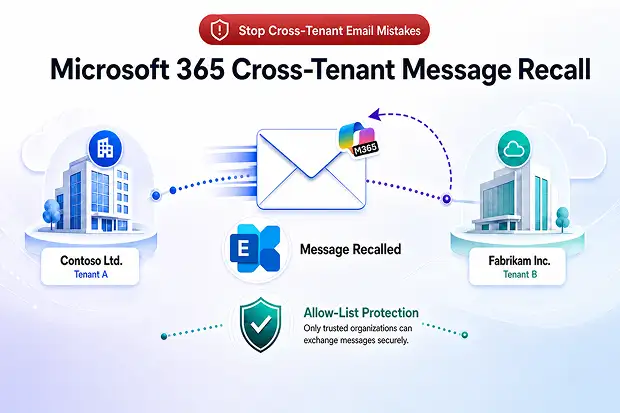
A new safety net for cross‑tenant email
You know the feeling when an email leaves your outbox and you instantly realize that sensitive data has gone to the wrong organisation. Inside your own Microsoft 365 tenant, modern Exchange Online message recall already gives you a second chance, but once that mail crosses into another tenant, it used to be game over.
Microsoft is changing that with Cross‑Tenant Message Recall in Exchange Online, a security focused enhancement that lets you recall emails sent to other Microsoft 365 organisations that have explicitly allowed your tenant.
It is built on the cloud-based Message Recall service introduced in 2023, which already delivers a much higher recall success rate compared to the classic Outlook-only recall feature.
Recall releases lined up in the Microsoft 365 world
If you look at the broader message recall story, you see a series of releases and enhancements that all build on each other.
You can think of the recall releases in three main waves:
- Wave 1(February 2023): Cloud based Message Recall foundation
- New service side recall engine for Exchange Online
- Higher success rate, recall from more folders and a unified recall report
- Wave 2(2023 to 2024): Experience and governance enhancements
- Support for Outlook on the web and mobile clients
- Recipient notification options and maximum recallable message age
- Better handling of external round trip routing scenarios
- Wave 3(May 2026): Cross‑Tenant Message Recall and beyond
- Allow list based cross tenant recall for trusted Microsoft 365 organisations
- Stronger alignment with information protection, DLP and collaboration agreements
Each wave makes the feature more usable, more secure and more aligned with the way modern organisations work across multiple tenants.
📌 Refer Microsoft RoadMap to find the release updates of this new feature.
What is cross‑tenant message recall
Cross‑Tenant Message Recall is an enhancement to Exchange Online Message Recall that works across Microsoft 365 tenants, not just inside one organisation. It is designed for secure collaboration across partners, subsidiaries and affiliated organisations where emails routinely cross tenant boundaries.
Key points that matter for you:
- Let’s you recall emails sent to users in other Microsoft 365 tenants that have allow‑listed your tenant ID
- Keeps control with the receiving organisation, which decides who can recall messages from its mailboxes
- Uses the same cloud-based recall engine as intra-tenant recall, so you get consistent behaviour and reporting
From an email security and data protection perspective, this is a powerful addition to the existing Exchange Online message recall and Microsoft 365 compliance capabilities.
How cross‑tenant message recall works
Previously, Message Recall was limited to messages where the sender and recipient were in the same Microsoft 365 tenant. Any attempt to recall a message that had gone to another tenant would fail, even when the two organisations worked together closely.
With cross‑tenant recall, the flow now looks like this:
- The receiving tenant admin adds the sender’s tenant ID to a cross‑tenant recall allow list
- When a sender in that trusted tenant recalls a message, Exchange Online checks the allow list and processes the recall if the tenant is present
- If the sender’s tenant is not in the allow list, the recall is blocked and the sender sees that outcome in the recall report
The below image illustrates the flow: how Exchange Online checks the receiving tenant’s allow list before processing a cross-tenant recall.

Admin control and configuration in Exchange Online
Cross‑tenant message recall is fully admin controlled and disabled by default. You decide both how recall works inside your own tenant and which external organisations can participate.
Common organisation‑wide Message Recall settings
These settings apply to your own tenant’s recall behaviour, whether the recall is internal or cross tenant.
Approach 1: Via Exchange Online PowerShell
- Enable cloud-based Message Recall
Set-OrganizationConfig -MessageRecallEnabled $true - Allow recall of read messages (optional, but important for real incidents)
Set-OrganizationConfig -RecallReadMessagesEnabled $true - Set maximum recallable age, for example 365 days
Set-OrganizationConfig -MessageRecallMaxRecallableAge 365.00:00:00 - Configure recipient notifications
- Enable notifications when messages are recalled
Set-OrganizationConfig -MessageRecallAlertRecipientsEnabled $true - Restrict notifications to messages that were read
Set-OrganizationConfig -MessageRecallAlertRecipientsReadMessagesOnlyEnabled $true
- Enable notifications when messages are recalled
Approach 2: In Exchange Admin Center
You can also configure these common settings from Exchange Admin Center under Settings >> Mail flow >> Message Recall settings as shown below:
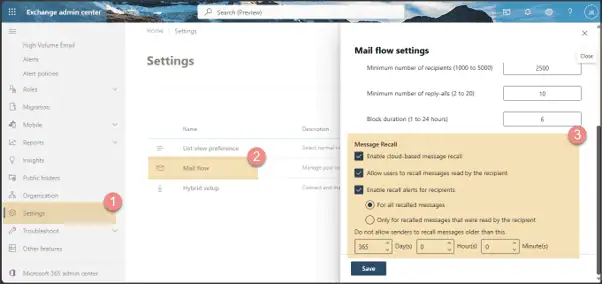
These common settings determine how recall behaves for users and mailboxes in your own tenant.
Receiver side configuration
On the receiver side, the admin decides which external organisations are allowed to recall messages from their users’ mailboxes. This is where Cross‑Tenant Message Recall is actually enforced.
Enable Cross‑Tenant Message Recall
In Exchange Online PowerShell for the receiving tenant:
- Turn on cross tenant recall
Set-CrossTenantRecallConfiguration -CrossTenantRecallEnabled $true - Check the configuration using Get-CrossTenantRecallConfiguration, you should see CrossTenantRecallEnabled set to True.
Manage the cross‑tenant allow list
This allow-list decides which external tenants can successfully recall messages from your users.
- Add trusted external tenant IDs
Set-CrossTenantRecallConfiguration -AllowedSenderTenantIds @{Add=”11111111-1111-1111-1111-111111111111″,”22222222-2222-2222-2222-222222222222″} - Remove tenants that should no longer be trusted
Set-CrossTenantRecallConfiguration -AllowedSenderTenantIds @{Remove=”11111111-1111-1111-1111-111111111111″} - Review the current allow list
Get-CrossTenantRecallConfiguration | fl AllowedSenderTenantIds
Design guidelines for the receiver side:
- Only add tenants with a formal collaboration or data sharing agreement
- Document who owns the relationship for each trusted tenant
- Review and update the allow list regularly as partnerships change
If the receiving tenant does not enable cross tenant recall or does not add a particular sender’s tenant ID to this list, cross tenant recall requests from that organisation will fail even if the sender’s tenant has recall enabled.
📌 Please refer to the Microsoft documentation on “How to find your Microsoft Entra tenant ID”
Sender side configuration
On the sender side, the goal is to make sure users can initiate recalls and that the cloud-based service is active in their tenant.
Key steps for the sender tenant:
- Enable cloud-based Message Recall as shown in the common settings
- Confirm that users have the right Outlook or Outlook on the web experience with the Message Recall option visible using the below options
- Option 1: Using PowerShell cmdlet Get-OrganizationConfig | fl *recall*
- Option 2: In the Exchange admin center under Settings > Mail flow > Message Recall >> Allow users to recall messages.
- Align recall policies (read messages, maximum age, notifications) with your incident response and governance needs
📌 No special cross tenant allow list configuration is required on the sender side for their users to attempt recalls.
🔐 “Trusted Tenant Playbook”
Create a Trusted Tenant Playbook for your organisation.
Include:
- Criteria for deciding which external Microsoft 365 tenants qualify for the recall allow list
- A standard approval workflow with security and legal sign off
- A short test procedure for validating cross‑tenant recalls in a staging environment
You can publish this playbook on your internal IT portal, so business units know what to expect when asking for cross tenant recall support.
What senders and recipients experience
From a user perspective, cross‑tenant recall is designed to feel familiar and predictable.
It uses the same cloud based Message Recall engine and reporting as intra tenant recall.
For senders in an allow listed tenant:
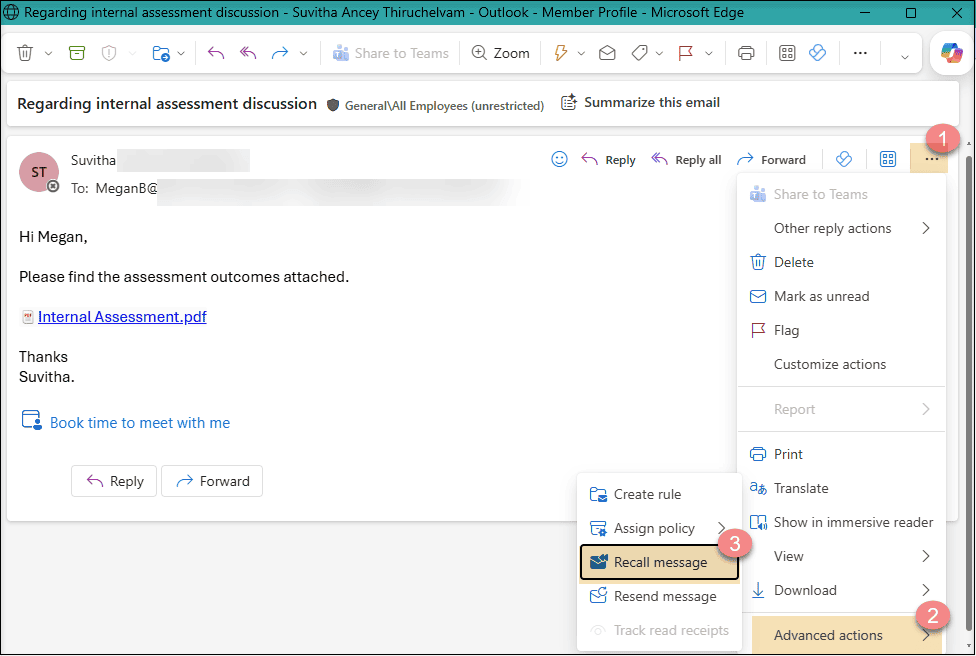
- They initiate recall using the existing Message Recall option, for example in Outlook as depicted below from the ‘Sent’ folder.

- Exchange Online attempts to hard delete the original message from each eligible recipient mailbox
- The sender receives a Message Recall Report email with a link to a web-based status report showing success or failure per recipient
For recipients in the receiving tenant:
- If recipient recall notifications are enabled, they will see notifications that messages were recalled
- If notifications are disabled, the recalled message disappears from their mailbox, similar to the current cloud based recall behaviour
If a sender’s tenant is not on the allow list, the recall fails and the report clearly indicates that cross organisation recall is not permitted.
Cross‑tenant recall vs classic message recall
Cross‑tenant recall sits on top of Microsoft’s modern cloud based Message Recall service, which replaces the older, Outlook only approach. Understanding the differences helps you explain why this new capability is more reliable and more suitable for enterprise email compliance.
Capability | Classic Outlook Message Recall | Cloud based and Cross‑Tenant Recall |
|---|---|---|
Where recall processing runs | On the Outlook client | In the Exchange Online service |
Works across Microsoft 365 tenants | No | Yes, when allow listed by receiving tenant |
Client requirements | Outlook for Windows only | Any version of Outlook with an Exchange Online mailbox |
Can recall read messages | No | Yes, if tenant policy allows it |
Can recall from sub‑folders | Inbox only | Most mailbox folders, excluding some by design |
Recall reporting | Individual status emails per recipient | Single web-based recall status report |
Admin control for external recalls | Not applicable | Allow list managed in Exchange Online |
Classic recall was best effort and often failed once messages were read or moved.
The new cloud based approach is far more successful and now extends that reliability to cross tenant scenarios when governance is in place.
🧪 Quarterly Recall Health Check
Run a Quarterly Recall Health Check as part of your email hygiene review.
Include checks such as:
- Sampling recent recall reports for success rates and patterns
- Verifying that the cross tenant allow list still matches current partnerships
- Confirming that recall aligns with data loss prevention and retention policies
Sharing the outcomes with stakeholders reinforces the value of the feature and keeps configuration aligned with business reality.
Final thoughts
Cross‑Tenant Message Recall adds an important safety layer to Exchange Online for organisations that regularly work across Microsoft 365 tenants.
It gives admins a controlled way to reduce the impact of accidental email sends without giving up governance, visibility or trust boundaries.
For IT teams, the real value is not just the recall itself, but the ability to pair it with clear tenant controls, PowerShell based configuration and stronger collaboration guardrails. As Microsoft continues to modernise message recall, this update shows how Exchange Online is evolving to support real world cross organisation communication more securely and more reliably.
Where to learn more from Microsoft
To go deeper into the technical design, limitations and governance options for message recall, stick to the official Microsoft content so your understanding stays accurate.
Start here:
- Cloud‑based Message Recall in Exchange Online
Explains the original move to a cloud-based approach, the differences from classic recall and how the service processes recall requests. - Cross‑Tenant Message Recall in Exchange Online
Covers the new cross tenant capability, allow list design, administrator controls and sender or recipient experience.
These two Microsoft articles together provide a complete view of Exchange Online Message Recall, from intra tenant basics to cross tenant collaboration scenarios.

















 Migrate
 Manage
 Migrate Microsoft 365








