


Export / Import tasks using Excel in Apps4.Pro Planner Manager solves many purposes and saves time. This helps users in following ways:
- For reporting purposes
- Use for ad-hoc needs such as filtering, categorizing, sorting.
- Create new tasks in bulk
- Can be used as plan templates for creating new plans from scratch
Planner fields supported for Export
- |Title Plan Bucket|Created By
- Assigned By
- Assigned Date Time
- Completed Date Time
- Completed By |Categories
- Description
- Checklist
- Attachments |Assigned To
- Start Date
- Due Date
- Percent Complete|
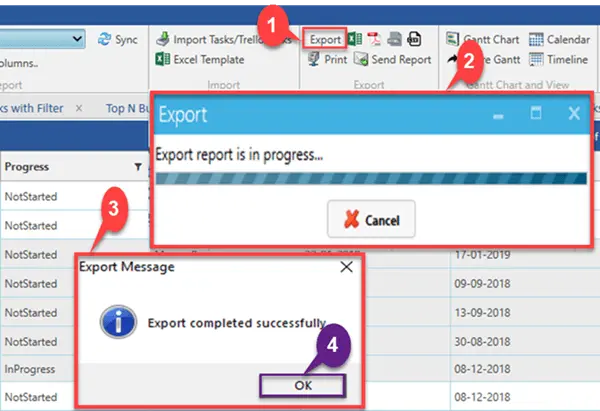
Export Planner Tasks to Excel
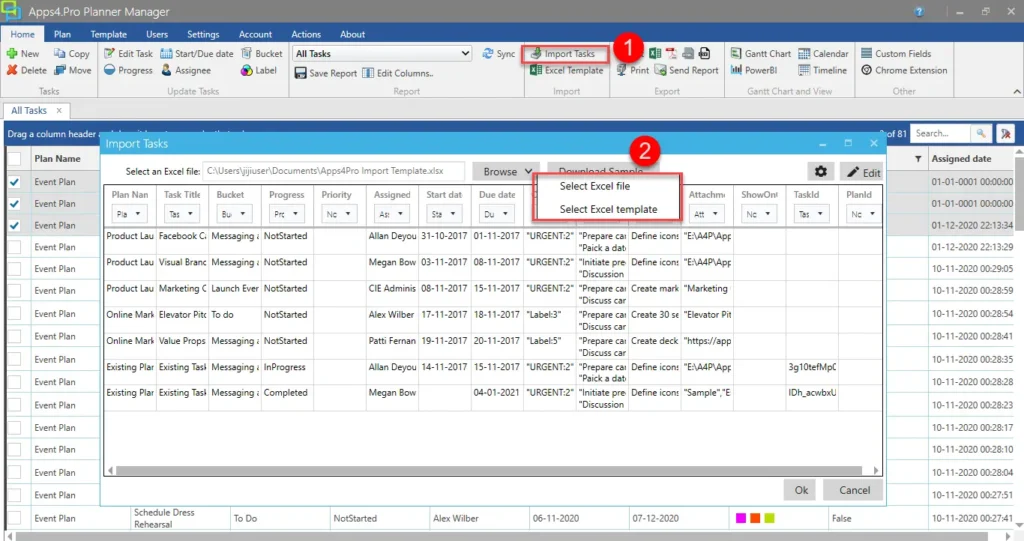
Import Planner Task using Excel
For more details visit https://apps4.pro/planner-manager.aspx

















 Migrate
 Manage
 Migrate Microsoft 365








