
Products

1 min readHow to Integrate Planner Tasks with Outlook Calendar

1 min readHow to Integrate Planner Tasks with Outlook Calendar

Right now, the tasks created from Planner will not sync with the respective user’s calendar. This would help with a high-level understanding of when tasks are coming due across the team.

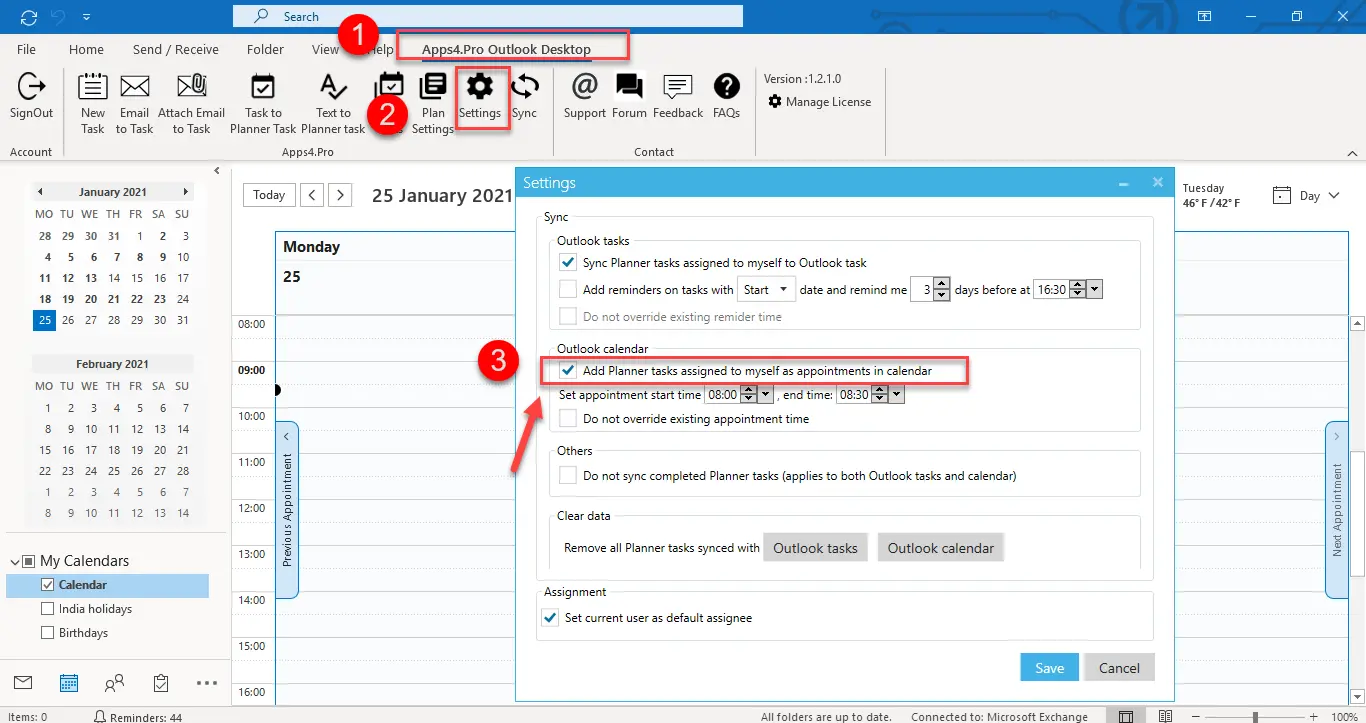
Apps4.Pro Planner Outlook Desktop does this by syncing the tasks to its user’s Outlook calendar. So, you can see the calendar view of the tasks in the plan.

By using this user can set reminder in outlook on a) when to start a new task and b) the due date of the task, with the ability to set a reminder some time in advance (eg two days).
For more details visit our site : https://apps4.pro/microsoft-planner-outlook-addin.aspx

Migrate Everything to Microsoft 365

Exchange Online SharePoint Online OneDrive For Business Microsoft Teams Microsoft Planner Viva Engage (Yammer) Microsoft Bookings Microsoft Forms Power Automate Microsoft Power BI Exchange Online SharePoint Online OneDrive For Business Microsoft Teams Microsoft Planner Viva Engage (Yammer) Microsoft Bookings Microsoft Forms Power Automate Microsoft Power BI
  • No Data Loss
  • Zero Downtime
  • ISO-Certified Protection

Start your free 15-days trial today !


4.5 out of 5

Bot Logo

Apps4.Pro Bot

Hey!👋 Ready to make your Microsoft 365 migration journey easier? Tell me what you’re looking.

What gets migrated?
I have a sales question
I'm here for tech support
Learn about Apps4.Pro


















