


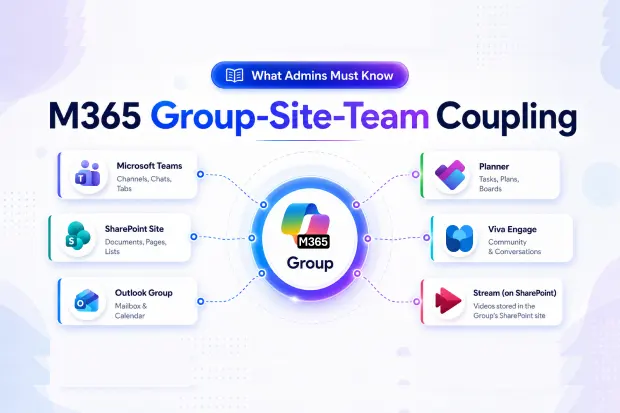
The one mental model that prevents most reorg disasters
Before your next Microsoft 365 reorganization, internalize this single idea: a Microsoft 365 Group is never just a group. It’s the invisible spine that simultaneously holds together a Team, an Outlook conversation space, a SharePoint site, a Planner plan, a Viva Engage community, and videos stored in the Group’s SharePoint site (surfaced through Stream on SharePoint).
Touch any one of those surfaces without understanding the spine, and you’ll either orphan content, break access for hundreds of users, or trigger a cascade that takes weeks to clean up. Most “mysterious” reorganization failures we see in the field trace back to this single misunderstanding.
Think of a Group as an “identity hub,” not a mailing list
When Microsoft introduced Microsoft 365 Groups, the goal was to give a team of people one shared identity that every workload could plug into. Instead of creating a distribution list and a SharePoint site and a Team and a Planner board separately, you create one Group, and Microsoft wires the surfaces to it automatically.
That’s the upside. The downside is coupled lifecycle because all those surfaces hang off the same identity, anything that happens to the Group happens to all of them.
A single Group can be backing all of the following at once:
- A Microsoft Team (channels, chats, tabs)
- A SharePoint site (documents, pages, lists)
- An Outlook group mailbox and calendar
- A Planner plan
- A Viva Engage (formerly Yammer) community
- Stream (on SharePoint) video content owned by the Group
Reorganizing “just the Team” or “just the site” is actually reorganizing one face of a six-headed object.
Discovery is harder than it looks
The first failure mode shows up before you move anything – at the discovery stage.
Admins typically open the Teams admin center, see the Team they want to restructure, and start planning. What they miss is that the same Group is also backing a Planner plan the project managers rely on, a Viva Engage community marketing posts to, and the Group’s SharePoint site, where training videos live and play through Stream (on SharePoint). None of those show up in the Teams admin center.
Why it happens: Microsoft 365 evolved workload-by-workload, so each surface has its own admin center. The unifying relationship lives in Microsoft Graph, which means you must compose the full picture from multiple API endpoints – there’s no single screen that says “here is everything this Group owns”.
What goes wrong if you skip it: Surface-by-surface reorganization without Group-level discovery leaves orphaned artifacts behind – Planner plans nobody owns, Stream content nobody can find, Viva Engage communities running with no admin.
What to do instead:
- Run a Microsoft Graph query against the Group resource and enumerate every backed surface before you touch anything
- Treat the output as your reorg scope-of-work, not the Teams admin center view
- Document who owns each surface today, because that’s who needs to validate the move tomorrow
The Group Deletion Cascade
This is the one that ends careers if you get it wrong.
When you delete a Microsoft 365 Group, you don’t just delete the Group. You trigger a cascade that takes down:
- The Outlook group mailbox and conversation history
- The SharePoint site (marked for deletion)
- The Team
- The Planner plan
- Any videos hosted in the Group’s SharePoint site (surfaced through Stream on SharePoint) – they are deleted with the site
The cascade isn’t even synchronous, which makes it more dangerous:
|
Surface |
When the deletion takes effect |
|---|---|
|
Teams (visibility to members) |
Immediate |
|
Outlook |
~20 minutes after Group removal |
|
Teams membership changes |
~2 hours |
In the first two hours after you click delete, your tenant is in an inconsistent state where some users still see the Team, some don’t, the mailbox is half-gone, and the SharePoint site is queued for deletion. If users are actively working in there, they will feel it.
Recovery exists, but it has caveats. You have a 30-day window to restore the deleted Group using Restore-MgDirectoryDeletedItem from the Microsoft Graph PowerShell SDK (the older Restore-AzureADMSDeletedDirectoryObject from the retired AzureAD module should no longer be used). SharePoint site recovery has its own caveats and is not always a clean undo.
The pattern that works – “soft-delete”:
- Rename the Group with a clear retirement marker (e.g., ZZ-RETIRED-Marketing-2024)
- Remove it from active navigation, hubs, and quicklinks
- Monitor for 30+ days. If nobody screams, you know it was truly unused
- Enumerate the surfaces one more time, then delete
Unglamorous, but it has saved more weekends than any tool on the market.
Private channels are their own little universe
Here’s the architectural surprise that catches even experienced admins: every private channel in a Team has its own dedicated SharePoint site – not a folder, not a library, a separate site collection.
Microsoft did this on purpose – private channels need a different permission scope from the parent Team, and the cleanest way to enforce that was to give each one its own site. Three consequences matter for reorganization:
- Private channels cannot be moved between Teams. The dedicated site is bound to the parent Team’s identity
- Deleting a private channel deletes its dedicated site (with a retention window)
- A reorg plan that treats a Team as one monolithic object will miss every private-channel site attached to it
If your Team has eight private channels, you are not reorganizing one site – you are reorganizing nine.
What to do:
- Before any Teams reorganization, enumerate every private channel per Team and its associated site URL
- For private channels with valuable content, plan content extraction before the parent Team is touched
- Communicate honestly to private channel members that channel history may not survive the reorganization – set that expectation early, not on go-live day
Pre-reorg checklist
Before you restructure anything in your tenant, walk this list:
- Pulled a Graph-based inventory of every surface backing the affected Group(s)
- Identified named owners for each surface (Teams, SharePoint, Planner, Viva Engage, Stream on SharePoint)
- Enumerated every private channel and its dedicated site
- Decided whether each Group is being modified, soft-deleted, or hard-deleted
- Communicated the ~2-hour Teams membership lag and ~20-minute Outlook lag to stakeholders
- Confirmed your 30-day recovery path and tested Restore-MgDirectoryDeletedItem in a non-production scenario
If any box is unchecked, you are not ready to push the button.
Continue the series
















