


Branded event emails can make a meaningful difference in how attendees perceive your webinar or town hall. From the first registration confirmation to the final reminder, every message shapes trust, attendance, and engagement.
Microsoft has updated its guidance for Teams Events email customization. If you use a worldwide Microsoft 365 tenant, you can now use custom HTML editing for Teams webinar and town hall emails without first configuring a custom domain.
This gives you more flexibility to build polished, branded event communications while keeping custom domains as an important option for improving sender recognition and email deliverability.
What Has Changed for Teams Event Emails?
Previously, custom HTML editing for Teams Events emails required a configured custom domain. This created an additional setup requirement before you could fully customize communications for webinars and town halls.
Microsoft has removed that requirement for worldwide customers. You can now create and send customized Teams Events emails even if your Microsoft 365 tenant does not have a custom sending domain configured.
This change applies to premium custom HTML editing for Teams webinar and town hall emails. It helps you create event communications that better reflect your brand, event value, and attendee expectations.
You can use custom HTML editing to improve the appearance and relevance of messages such as:
- Registration confirmation emails
- Event reminders
- Waitlist notifications
- Event cancellation updates
- Recording availability emails
- Schedule change communications
- Town hall invitation emails
Custom HTML Editing Is No Longer Blocked
You no longer need to pause your Teams event email design plans because a custom domain has not been configured. For worldwide tenants, the lack of a custom domain will not block access to premium custom HTML editing for Teams Events emails.
This makes it easier to create professional webinar and town hall communications when you need to move quickly. You can focus on presenting the event clearly, highlighting the value for attendees, and maintaining a consistent visual experience.
Custom HTML editing can help you:
- Add branded headers, banners, and visual elements
- Improve the structure of event reminders and confirmations
- Include relevant speaker details and agenda highlights
- Use clear calls to action for registration, attendance, or resource access
- Promote related services, blogs, or learning materials
- Create a more consistent experience across the event lifecycle
Administrators can manage email customization through Teams Events policies in the Teams admin center.
Teams admin center Event policies page showing Customize event emails setting:
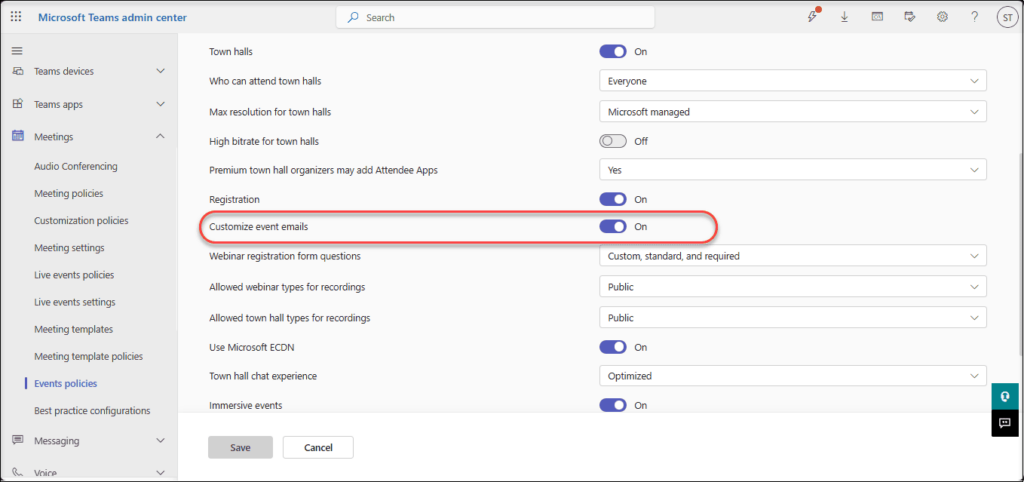
The setting can also be managed through PowerShell using the AllowEmailEditing parameter in the CsTeamsEventsPolicy cmdlet.
🎯 Turn Registration Emails into Event Landing Pages
Use custom HTML editing to make registration emails more than a confirmation. Add useful event details that build interest and help attendees prepare.
- Event value and key takeaways
- Speaker details and agenda highlights
- Calendar reminder and resource link
For example, if you are hosting a Microsoft 365 migration webinar, the registration email could highlight common tenant-to-tenant migration risks and explain that the event will cover ways to reduce downtime, data loss, and end-user disruption.
License Requirements for Custom HTML Teams Event Emails
Custom HTML editing for Teams webinar and town hall emails requires the event organizer to have a Microsoft Teams Premium license.
To use the feature, ensure that:
- The organizer has an active Teams Premium license.
- Customize event emails is turned On in Teams admin center > Meetings > Events policies.
- The event is a supported Teams webinar or town hall.
- Worldwide tenants can use custom HTML editing without a custom domain.
- GCC, GCC High, and DoD tenants must still configure a custom domain.
Tip
Assign Teams Premium directly to employees who organize branded events, not only to the Teams administrator.
Important Exception for Sovereign Cloud Customers
The updated guidance applies only to worldwide Microsoft 365 customers. If your organization uses GCC, GCC High, or DoD environments, you must continue to configure a custom domain to use custom HTML editing and email template customization for Teams Events emails.
If you support a sovereign cloud environment, keep your existing custom domain configuration in place. Review your internal Teams Events guidance before making policy or process changes.
This distinction is important for IT teams, managed service providers, and organizations that manage multiple Microsoft 365 tenant environments. Your Teams event email configuration should always align with the cloud environment used by the tenant.
What Microsoft 365 Admins Should Do Next
This update is a good opportunity to review how your organization creates and manages Teams webinar and town hall emails.
Even though a custom domain is no longer required for worldwide tenants, you should consider whether Microsoft-provided sender domains offer the right experience for your external audiences.
Recommended actions include:
- Review Teams Events policies and confirm who can customize event emails
- Identify webinar and town hall organizers who need custom HTML email templates
- Update internal guidance to reflect that custom domains are recommended for worldwide tenants
- Review current sender domain settings for external event communications
- Consider adding and verifying a custom domain to support brand recognition and email deliverability
- Confirm whether your tenant operates in a worldwide, GCC, GCC High, or DoD environment
- Establish a reusable email template approach for common Teams Event scenarios
🚀 Create a Branded Event Email Journey
Teams Event emails are more effective when they work together as a connected attendee experience. Instead of treating each message as a separate notification, create a consistent journey from registration to post-event follow-up.
A structured communication sequence can include:
- Registration confirmation: Confirm attendance, establish the event value, and provide a calendar reminder.
- Pre-event email: Introduce the agenda, speakers, and helpful background resources.
- Final reminder: Share the join link and reinforce the main reason to attend.
- Post-event follow-up: Send the recording, presentation, resources, and a relevant next-step call to action.
This approach helps your Teams webinar or town hall feel more organized, trustworthy, and valuable. It also gives you more opportunities to support engagement before and after the live event.
Why a Custom Domain Still Matters
Although a custom domain is no longer mandatory for worldwide tenants using Teams Event email customization, it remains highly valuable for external-facing webinar and town hall communications.
When you do not configure a custom domain, Teams Event emails continue to use Microsoft-provided domains. These sender addresses may be unfamiliar to external recipients, especially if they have not attended one of your Teams events before.
An unfamiliar sender domain can affect how quickly an attendee recognizes your invitation. In some cases, it may lead them to question whether the email is legitimate or overlook it among other event notifications.
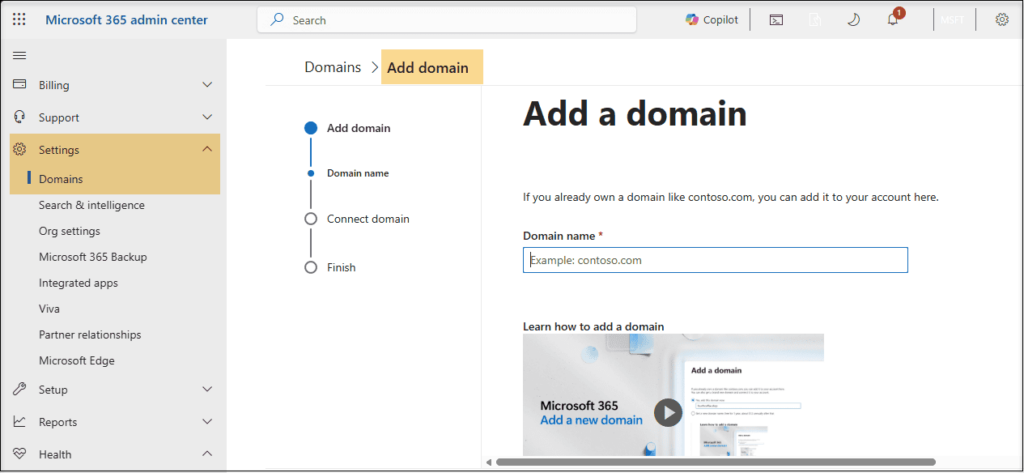
A verified custom domain can help you:
- Create a clearer and more recognizable sender identity
- Improve brand consistency across event communications
- Support stronger email deliverability
- Reduce the chance of event messages being questioned or ignored
- Build greater trust with prospects, customers, partners, and external attendees
A custom domain is especially useful if you regularly host customer webinars, product demonstrations, partner events, training sessions, or large-scale town halls.
Microsoft 365 admin center highlighting the option to add a verified domain:
✉️ Make Reminder Emails More Valuable
A reminder email should do more than share the Teams event link. Use custom HTML to reinforce why the session matters and help reduce no-shows.
- Add key takeaways or a speaker insight
- Include a question submission or resource link
- Use a clear, visible Join Event button
For a Microsoft 365 migration webinar, share a short pre-event checklist to help attendees come prepared.
Final Takeaway
Microsoft’s updated Teams Event email guidance gives worldwide organizations more flexibility. You can now use premium custom HTML editing for Teams webinar and town hall emails without making a custom domain a prerequisite.
This makes it easier to create branded, useful, and engaging event communications. At the same time, a verified custom domain remains a strong choice when you want recognizable sender identity, improved email deliverability, and greater trust among external attendees.
For GCC, GCC High, and DoD tenants, the custom domain requirement remains in place for custom HTML editing and email template customization.
Learn More from Microsoft
Use these Microsoft resources to verify Teams Event email customization settings, domain setup steps, and DNS configuration requirements.
















