


A successful Microsoft Teams event starts before the first invitation goes out. The license assigned to the organizer shapes the features available, how attendees participate, and how many people can join.
Microsoft’s updated Teams Events licensing brings these decisions into sharper focus. Whether you are planning a business webinar, a frontline briefing, or an education event, understanding the changes can help you avoid unexpected limitations.
- Microsoft Teams Events Licensing: What Has Changed?
- Which Microsoft 365 Licenses Include Teams Events Features?
- Foundational Teams Events Features: Essential Tools for Everyday Events
- Advanced Teams Events Features: More Control for Professional Events
- Teams Events Attendee Limits: Know the Difference Before You Invite
- Teams Attendee Capacity Packs: When Larger Events Need an Add-On
- Teams Premium vs. Teams Enterprise: Avoid Licensing Assumptions
- Microsoft Teams Admin Checklist: Prepare Your Next Event
Microsoft Teams Events Licensing: What Has Changed?
Microsoft now groups Teams Events capabilities into two categories:
- Foundational event features cover the essential tools for creating and running events.
- Advanced event features include foundational capabilities plus additional controls for production, management, engagement, customization, and analytics.
New Teams Premium licenses no longer include Teams Events capabilities, while qualifying legacy Teams Premium licenses retain their existing benefits until the license term ends.
Eligible Teams Enterprise licenses provide advanced event capabilities.
The most important detail is the organizer’s license. Reviewing it early helps you plan an event around the features and capacity available to you.
Which Microsoft 365 Licenses Include Teams Events Features?
Your Microsoft 365 subscription determines which Teams Events capabilities are available. The updated categories distinguish between business, frontline, enterprise, and education licenses.
|
Customer segment
|
Foundational event features
|
Advanced event features
|
|---|---|---|
|
Business
|
Foundational event features
Microsoft 365 Business Basic, Business Standard, and Business Premium
|
Advanced event features
Not included with these plans
|
|
Frontline
|
Foundational event features
Microsoft 365 F1, Microsoft 365 F3, and Office 365 F3
|
Advanced event features
Not included with these plans
|
|
Enterprise
|
Foundational event features
Included within advanced capabilities
|
Advanced event features
Office 365 E1, E3, E5; Microsoft 365 E3, E5, E7
|
|
Education
|
Foundational event features
Office 365 A1, Microsoft 365 A1; Office 365 and Microsoft 365 A3/A5 for Students
|
Advanced event features
Office 365 and Microsoft 365 A3/A5 for Faculty
|
|
Other
|
Foundational event features
Microsoft Teams Exploratory, Teams Trial, and Teams Essentials
|
Advanced event features
Qualifying Teams Premium Legacy licenses
|
Advanced licenses include foundational capabilities, so you retain the essential event tools alongside the additional features.
If you manage education events, pay particular attention to student and faculty licenses. Their event capabilities differ, making the organizer’s assigned license an important part of preparation.
🔎 Does Your Event License Match Your Plans?
A short licensing check can prevent changes to your event setup later.
- Identify who will organize the event.
- Check their assigned Microsoft 365 or Teams license.
- Confirm whether the planned experience needs foundational or advanced features.
Foundational Teams Events Features: Essential Tools for Everyday Events
Foundational features give you the core tools needed to organize an event and support audience participation. They are available with eligible business, frontline, education, and other Teams licenses.
These capabilities include:
- Attendee microphones and cameras.
- Attendee chat, reactions, and raised hands.
- Q&A for audience questions.
- Basic registration through a customizable form.
- Attendance reports.
- The option to hide attendee names.
Hide attendee names is included in the foundational feature set. You can use it when attendees should not see other attendees’ names and details.
Advanced Teams Events Features: More Control for Professional Events
When your event needs more detailed registration settings, production controls, or reporting, advanced Teams Events features provide additional options.
These capabilities help you manage the experience before, during, and after the event.
Advanced features include:
- Custom attendee emails and reminder send times.
- Registration waitlists and manual registration approval.
- Registration start and end time controls.
- Controls over what attendees see.
- RTMP-In for production using external encoders.
- Microsoft eCDN for enterprise video distribution.
- Event insights, real-time monitoring, and engagement reports.
Availability can also depend on event capacity and product constraints. Check the requirements for the features you intend to use rather than assuming every capability works at every audience size.
📌 Explore the detailed Teams Events features included with eligible licenses in Microsoft’s official guide: Microsoft Teams Events Licensing: Foundational Event Features.
🎯 What Would Improve Your Next Event?
Focus on the part of your event that needs the most improvement.
- More control over registration.
- A more polished presentation experience.
- Better audience participation.
- Clearer insights after the event.
Use that priority to assess whether advanced event capabilities are necessary for your plans.
Teams Events Attendee Limits: Know the Difference Before You Invite
Audience size is only one part of event capacity planning. The way people participate also determines which limits apply.
An event that allows attendee microphones and cameras has a different limit from one designed for viewing and Q&A.
|
Event capability
|
Foundational features
|
Advanced features
|
|---|---|---|
|
Number of events
|
Foundational features
No limit
|
Advanced features
No limit
|
|
Full interaction, including attendee microphones and cameras
|
Foundational features
Up to 1,000 attendees
|
Advanced features
Up to 1,000 attendees
|
|
Engagement through chat, reactions, raised hands, polls, and Q&A
|
Foundational features
Up to 1,000 attendees
|
Advanced features
Up to 3,000 attendees
|
|
View-only experience with Q&A
|
Foundational features
Up to 10,000 attendees
|
Advanced features
Up to 10,000 attendees
|
These limits represent different event experiences. A view-only event for 10,000 attendees does not offer the same participation options as an event with chat, reactions, raised hands, or polls.
Choose the participation experience first, then confirm that your license supports the expected audience.
Teams Attendee Capacity Packs: When Larger Events Need an Add-On
If your event needs engagement capabilities for more than 3,000 attendees, you need an appropriately sized Teams Attendee Capacity Pack assigned to the organizer.
View-only events exceeding 10,000 attendees also require additional capacity.
Available capacity packs support:
- 5,000 or 10,000 attendees.
- 20,000 or 35,000 attendees.
- 50,000 or 75,000 attendees.
- 100,000 attendees.
Teams Attendee Capacity Packs are add-ons for Teams Enterprise. They increase audience capacity but do not unlock additional event features.
Some capabilities have limits that remain separate from the capacity pack size. A larger pack should not be treated as a guarantee that every participation feature supports the full audience.
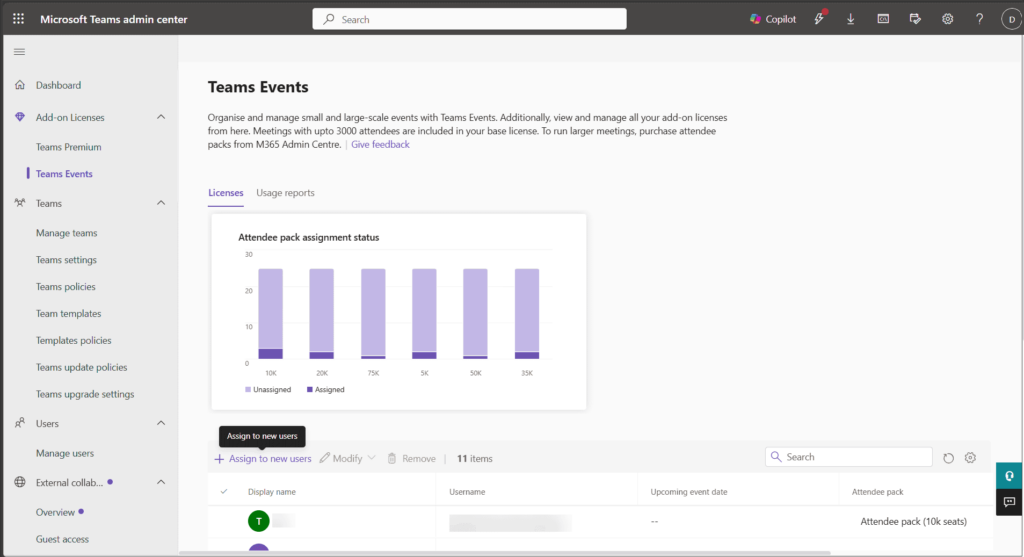
You can manage these licenses in the Teams admin center under Add-on Licenses > Teams Events. Each organizer can have one attendee capacity pack assigned at a time.
📊 How Will Your Audience Participate?
Define what your attendees need to do before selecting an event capacity.
- Watch the presentation and submit questions.
- Participate through chat, reactions, or polls.
- Speak using microphones and cameras.
Matching capacity to participation helps you plan the right experience without relying on attendee numbers alone.
Teams Premium vs. Teams Enterprise: Avoid Licensing Assumptions
Understanding the licensing differences helps you choose the right features for your next Teams event.
- New Teams Premium licenses do not include advanced Teams Events capabilities.
- Eligible Teams Enterprise licenses include foundational and advanced event features.
- Teams Premium continues to offer meeting protection, branding, personalization, and intelligence capabilities.
- Qualifying legacy Teams Premium subscriptions retain existing event benefits until the current license term ends.
- Before renewal, review organizer licensing and any attendee capacity pack requirements.
External Attendee Verification: A Service Protection Measure
External attendees may need to verify their email address before joining your Teams event.
- Microsoft may require an email one-time passcode to help prevent fraud or abuse and protect service health.
- Verification is not a premium event feature or tied to a specific license tier.
- Account for this possible verification step when preparing joining instructions for external attendees.
Microsoft Teams Admin Checklist: Prepare Your Next Event
A focused review of organizer licensing and event requirements can help you avoid last-minute changes.
Before scheduling your next Teams event:
- Check the license assigned to the organizer.
- Identify whether foundational or advanced features are needed.
- Match expected attendance to the participation experience.
- Assign an eligible advanced license where required.
- Evaluate capacity packs for larger audiences.
- Update internal event-planning and support guidance.
Keep licensing, participation, and audience capacity connected throughout planning. Together, they determine whether your Teams event can deliver the experience you have promised attendees.
Explore Microsoft’s Official Teams Events Licensing Guides
Use these official Microsoft resources to review licensing requirements, capacity options, and administrative steps in detail.
















