


Understanding how your organization uses Copilot agents takes more than a quick look at dashboard summaries. You need a clearer view of which agents attract regular use, how adoption varies across functions, and where additional support could make a difference.
Microsoft’s new Agent Dashboard export capability gives you access to de-identified Copilot agent usage data for deeper analysis. With agent activity, retention, and credit usage data available for export, you can build a more informed picture of your organization’s AI adoption.
Instead of reviewing usage figures in isolation, you can explore how these patterns develop over time. This helps you bring more context to decisions about agent adoption, user enablement, and your Microsoft 365 Copilot strategy.
Go Beyond Dashboard Views With Copilot Agent Analytics
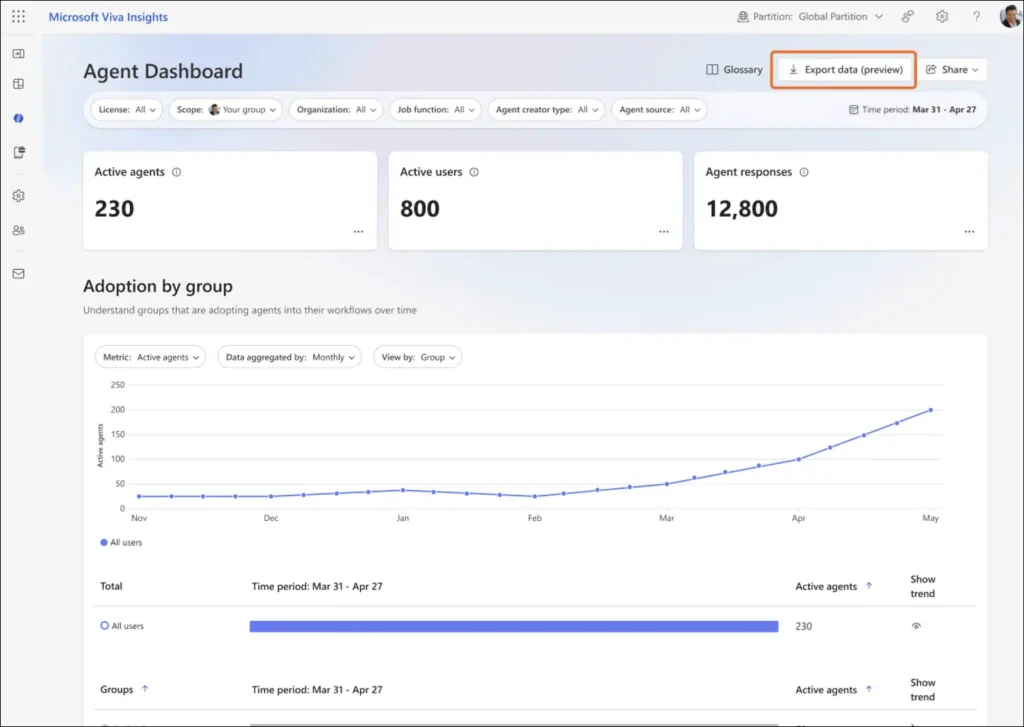
The new export capability is available through the Agent Dashboard in the Viva Insights web app. If you have eligible access, you can download user-level agent metrics and attributes aggregated by user and week.
The export covers up to the past six months, giving you a broader view of adoption patterns beyond a single reporting period. This makes it easier to examine whether agent activity remains steady, increases, or needs closer attention.
User identifiers are removed from the output, while existing privacy and access controls remain in place. You gain more detailed information for analysis without including those identifiers.
The value lies in connecting the data to a clear business question. For example, you can examine whether an agent continues to attract use after its initial introduction.
View of the Agent Dashboard:
🔍 Which Agents Keep Your Teams Coming Back?
Sustained use can help you identify which agents deserve a closer look during your next adoption review. Consider both activity levels and retention rather than relying on a single metric.
- Compare agent response activity with user retention metrics.
- Identify agents that may benefit from clearer guidance or greater visibility.
- Use the findings to prioritize your next user enablement activity.
What the Agent Dashboard Export Includes
The export brings together multiple data tables so you can examine agent activity alongside agent details and organizational context.
You can access:
- Agent metadata: Agent name, creator type, and publishing source.
- Usage metrics: Activity measures, including the number of responses generated.
- Credit usage and retention metrics: Information about credit consumption and continued agent use.
- People metadata: Organizational attributes, including organization and function type.
Together, these datasets support deeper Microsoft 365 Copilot adoption analysis. You can use them to explore usage trends and inform decisions about licensing, user enablement, and your broader AI adoption strategy.
Combining different data points also gives your analysis more context. Response activity shows one aspect of usage, while retention helps you examine whether people continue using an agent over time.
These insights can guide further investigation, but usage figures alone should not be treated as a complete measure of business value.
Who Can Export Copilot Agent Usage Data?
Your organization must have at least 50 Microsoft 365 Copilot licenses to meet the feature’s licensing requirement.
You also need eligible access to full company-level data in the Agent Dashboard. The supported access categories include:
- Senior leaders identified through Microsoft Entra ID.
- Admin-assigned company-level users.
- Delegates with company-level access.
- Global analysts and admins.
If your access is limited to your own team as a group manager, you cannot use this export capability. The licensing requirement and the access requirement both matters.
Before planning your reporting workflow, confirm that your access covers company-level data. This helps you establish who can export the information and who will be responsible for analysing it.
📊 Turn Usage Trends Into an Adoption Conversation
Make your next stakeholder review more useful by connecting usage patterns with a clear improvement opportunity.
- Review which organizational functions show stronger agent adoption.
- Identify where a focused demonstration or training session could help.
- Select one adoption priority to revisit in your next review.
Keep Agent Metrics Export Under Admin Control
Agent data export is enabled by default for eligible users. If you manage feature access, you can control or disable it at the tenant or group level through Viva Feature Access Management (VFAM).
Use the following settings:
- Module: Viva Insights.
- Feature: Agent Metrics Export.
No action is required to enable the feature. Existing user workflows remain unchanged unless an eligible user accesses the export capability.
If the default setting does not fit your organization’s requirements, you can use the available controls to adjust access. This allows you to align the capability with your internal approach to analytics and data governance.
Reviewing the setting alongside eligible user access helps you manage both feature availability and responsibility for exported data.
🛡️ Make Data Access Part of Your AI Discussion
A clear approach to access and data handling helps keep your analytics work purposeful. Establish expectations before exported information becomes part of regular reporting.
- Review who has company-level Agent Dashboard access.
- Define how exported data should be handled and used internally.
- Agree who will review the findings and coordinate follow-up actions.
Prepare Your Organization for Better Copilot Insights
Start by reviewing eligible access and deciding whether the default export setting suits your organization. Make sure anyone using the capability understands what the export contains and how it should be used.
Choose a specific question before you begin your analysis, such as how agent retention changes over time or how adoption differs across functions.
Keep your review focused on a few relevant metrics. This makes the findings easier to interpret and helps you connect them with practical actions, such as improving guidance or refining adoption activities.
A focused approach helps you turn Copilot Analytics data into useful insights for user support, adoption planning, and more informed AI investment discussions.
Explore the Update With Official Microsoft Resources
Use these official Microsoft resources to review export requirements, manage feature access, and track the Agent Dashboard rollout.

















 Migrate
 Manage
 Migrate Microsoft 365








