


Introduction
In today’s digital-first workplace, organizations handle massive volumes of sensitive data across email, documents, chats, and collaboration platforms. Ensuring this information remains secure, compliant, and well-governed is no longer optional – it’s a business necessity. This is where the Office 365 Compliance Center (now the Microsoft Purview compliance portal) plays a critical role.
Formerly known as the Office 365 Security & Compliance Center, the platform has now evolved into the Microsoft Purview Compliance Portal, offering a unified approach to data protection, risk management, and regulatory compliance across Microsoft 365.
This complete guide explains what the platform is, how it was renamed, how to access it, its core solutions, licensing, and best practices. helping organizations meet compliance requirements with confidence.
- What Is Office 365 Compliance Center?
- Security & Compliance Center to Microsoft Purview
- How to Access the Purview Portal
- What Each Purview Solution Does
- Licensing Requirements
- Summary of Office 365 Compliance Center Roles & Permissions
- Key Capabilities of the Office 365 Compliance Center
- Office 365 Compliance Center vs Microsoft Purview
- Best Practices for Office 365 Compliance Management
- Conclusion
- Frequently Asked Questions
What Is Office 365 Compliance Center?
The Office 365 Compliance Center is a centralized management portal designed to help organizations identify, manage, protect, and govern data across Microsoft 365 services such as:
- Exchange Online
- SharePoint Online
- OneDrive for Business
- Microsoft Teams
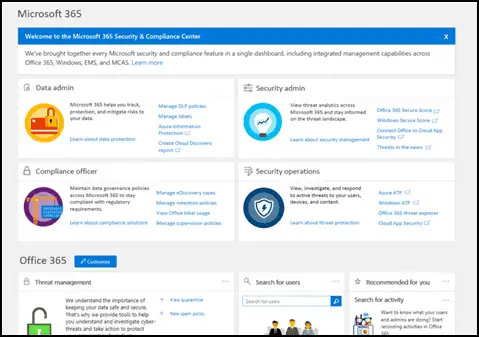
Image Courtesy: Microsoft365 Security and Compliance Center
Today, these capabilities are delivered through the Microsoft Purview Compliance Portal, which extends compliance and governance across cloud, hybrid, and third-party data sources.
Its primary goal is to help organizations meet regulatory, legal, and internal compliance requirements while minimizing risk and ensuring data integrity.
Security & Compliance Center to Microsoft Purview
Many admins still search for the “Security & Compliance Center,” but Microsoft split and rebranded that legacy portal several years ago. Understanding this navigational shift is the fastest way to find the right tools today.
In April 2022, Microsoft rebranded its compliance and data governance offerings under the Microsoft Purview name, with no functional changes to the underlying features. The old Microsoft 365 Compliance Center simply became the Microsoft Purview compliance portal.
How the old portal was split:
- Security solutions moved to the Microsoft 365 Defender / Security portal (security.microsoft.com)
- Compliance and governance solutions moved to the Microsoft Purview compliance portal (compliance.microsoft.com)
- Mail flow solutions moved to the modern Exchange admin center (admin.exchange.microsoft.com)
The original Office 365 Security & Compliance Center (protection.office.com) was fully retired, and all redirection to the new portals eventually stopped. If you still have bookmarks pointing to the old address, they should be updated.
A few solution names also changed inside the portal:
- Information Governance became Data Lifecycle Management
- Core eDiscovery became eDiscovery (Standard)
- Advanced eDiscovery became eDiscovery (Premium)
More recently, Microsoft introduced a unified Microsoft Purview portal (purview.microsoft.com) that brings data security, data governance, and risk and compliance solutions together in a single experience. This unified portal is now the primary place to manage compliance: Microsoft retired the classic compliance portal and carried existing configurations and data over automatically, so purview.microsoft.com is the front door to use today.
To learn more, see Microsoft’s official overview of the Purview compliance portal and the Microsoft Purview portal guide.
How to Access the Purview Portal
Getting into the portal is straightforward, and there are a couple of reliable paths depending on how you prefer to navigate.
Option 1: Direct URL
- Open your browser and go to Microsoft Purview Portal
- Sign in with your Microsoft 365 administrator credentials
Option 2: From the Microsoft 365 admin center
- Go to Admin center and sign in
- In the left pane, click “Show all”
- Under the “Admin centers” section, click “Compliance”
- You will be redirected to the Microsoft Purview portal
Once inside, use the “Show all” option in the navigation pane to reveal every available solution.
What Each Purview Solution Does
The portal groups tools by the compliance job they handle. Here is a quick reference of the core solutions and their purpose.
| Solution | What it does |
|---|---|
| Data Loss Prevention (DLP) | Prevents sensitive data from being shared accidentally or maliciously |
| Information Protection (Sensitivity Labels) | Classifies and protects data with labels, encryption, and markings |
| Data Lifecycle Management | Manages retention and deletion of content (formerly Information Governance) |
| Records Management | Declares, retains, and disposes of records to meet obligations |
| eDiscovery (Standard & Premium) | Searches, holds, and exports data for legal and investigation needs |
| Audit (Standard & Premium) | Logs and investigates user and admin activity |
| Insider Risk Management | Detects risky internal behavior while preserving privacy |
| Communication Compliance | Monitors messages for policy and regulatory violations |
| Compliance Manager | Scores compliance posture and maps controls to regulations |
Licensing Requirements
Compliance features vary by license:
- Microsoft 365 E3
- DLP
- Retention policies
- Core eDiscovery
- Audit (Standard)
- Microsoft 365 E5 / E5 Compliance Add-on
- Insider Risk Management
- Communication Compliance
- Advanced eDiscovery
- Audit (Premium)
Summary of Office 365 Compliance Center Roles & Permissions
The Office 365 Compliance Center, now part of the Microsoft Purview compliance portal, uses role-based access control (RBAC) to ensure the right people have the right level of access. The table below provides a concise overview of the key Compliance Center roles, outlining their primary permissions and the typical users responsible for each role.
| Role Group | Primary Purpose | Key Permissions | Typical Users |
| Compliance Administrator | Full compliance management | Manage DLP, retention, sensitivity labels, eDiscovery, audit, role groups | Global admins, compliance leads |
| Compliance Data Administrator | View compliance data & reports | View/export reports, content search, monitor policies | Compliance analysts, auditors |
| eDiscovery Administrator | Full control over eDiscovery | Assign eDiscovery roles, manage cases, legal holds, exports | Senior legal admins |
| eDiscovery Manager | Manage legal cases | Create cases, place holds, search & export data | Legal & compliance teams |
| Insider Risk Management Admin | Configure insider risk policies | Create policies, define indicators, assign analysts | Security & risk teams |
| Insider Risk Management Analyst | Investigate risk alerts | Review alerts, analyze activity, escalate cases | SOC, HR-security teams |
| Communication Compliance Admin | Configure communication monitoring | Create policies, classifiers, reviewer workflows | Compliance admins |
| Communication Compliance Analyst | Review flagged messages | Review Teams/Exchange messages, resolve violations | Compliance reviewers |
| Records Management Administrator | Data retention & records control | Create retention labels, disposition reviews, declare records | Information governance teams |
| Audit Administrator | Audit log management | Search/export audit logs, configure audit retention | IT security, internal audit |
Key Capabilities of the Office 365 Compliance Center
1. Data Loss Prevention (DLP)
Data Loss Prevention policies help prevent sensitive information-such as credit card numbers, personal identifiers, or financial data-from being accidentally or intentionally shared.
Key features:
- Prebuilt regulatory templates (GDPR, HIPAA, PCI-DSS)
- Custom DLP policies
- Real-time user alerts and policy tips
- Coverage across Exchange, SharePoint, OneDrive, and Teams
2. Information Protection & Sensitivity Labels
Sensitivity labels allow organizations to classify and protect data based on its sensitivity.
Capabilities include:
- Data classification (Public, Internal, Confidential, Highly Confidential)
- Encryption and access restrictions
- Visual markings (headers, footers, watermarks)
- Automatic or user-applied labelling
This ensures sensitive content remains protected even when shared externally.
3. eDiscovery (Standard & Premium)
The eDiscovery tools in the Office 365 Compliance Center help legal and compliance teams respond to litigation, audits, and investigations.
Features include:
- Content search across Microsoft 365 workloads
- Legal holds to preserve data
- Advanced analytics (Premium)
- Custodian and case management
Note:
Microsoft has since unified the eDiscovery experience, so Content Search and the classic eDiscovery (Standard) cases now live inside a single Purview eDiscovery interface.
4. Insider Risk Management
Insider Risk Management helps identify potential risky user behavior-whether malicious or accidental-while maintaining user privacy.
Use cases include:
- Data theft
- IP leakage
- Security policy violations
Machine learning–based insights allow security teams to respond proactively.
5. Communication Compliance
This feature enables organizations to monitor and detect inappropriate communications across Microsoft Teams, Exchange, and Yammer.[GU1]
Common scenarios:
- Harassment prevention
- Financial regulatory compliance
- Code of conduct enforcement
6. Audit (Standard & Premium)
The Audit solution provides detailed visibility into user and admin activities.
Audit logs include:
- File access and sharing
- User sign-ins
- Admin configuration changes
Audit (Premium) offers longer retention and advanced investigation capabilities.
7. Records Management & Retention Policies
Retention policies ensure data is kept or deleted in accordance with legal and regulatory obligations.
Key features:
- Retention labels and schedules
- Event-based retention
- Immutable records
- Automated disposition reviews
Office 365 Compliance Center vs Microsoft Purview
While many still search for the Office 365 Compliance Center, Microsoft has consolidated and expanded these capabilities under Microsoft Purview.
| Office 365 Compliance Center | Microsoft Purview Compliance |
| Legacy naming | Modern unified platform |
| M365-focused | Multi-cloud & hybrid ready |
| Core compliance features | Advanced governance & AI |
Best Practices for Office 365 Compliance Management
- Start with regulatory templates (GDPR, HIPAA, ISO)
- Apply sensitivity labels consistently
- Automate retention and deletion policies
- Regularly review audit logs
- Train users on compliance awareness
- Periodically reassess policies as regulations evolve
Conclusion
The Office 365 Compliance Center, now part of Microsoft Purview, is a powerful platform that enables organizations to safeguard data, reduce compliance risks, and meet regulatory requirements effectively. With integrated tools for data protection, eDiscovery, auditing, and governance, it forms the backbone of a modern Microsoft 365 compliance strategy.
For organizations operating in regulated industries or handling sensitive data, leveraging the full capabilities of Microsoft Purview is not just recommended-it’s essential.

















 Migrate
 Manage
 Migrate Microsoft 365








