


If you rely on Microsoft 365 search to find your sites, files, and documents, this new update from Microsoft directly affects how securely your content is discovered.
With Restricted Access Control (RAC) enforced in Microsoft 365 search, users will now only see results for content they are permitted to access, which helps reduce accidental data exposure and aligns search behavior with existing security policies.
What Is Restricted Access Control (RAC)?
Restricted Access Control is a premium security policy that allows you to lock down specific SharePoint sites and OneDrive locations to a clearly defined set of users.
Instead of relying on complex, item level permissions everywhere, RAC creates a group-based boundary around selected sites so only members of chosen Microsoft 365 or Microsoft Entra security groups can reach that content.
How RAC Protects Your Sites
- RAC is configured at the site level and tied to one or more security or Microsoft 365 groups that represent who should have access.
- Only users in those groups who also have normal SharePoint permissions can open the site and its files; everyone else is blocked.
- This helps prevent oversharing by design, because broad tenant defaults or old sharing links cannot bypass the RAC boundary.
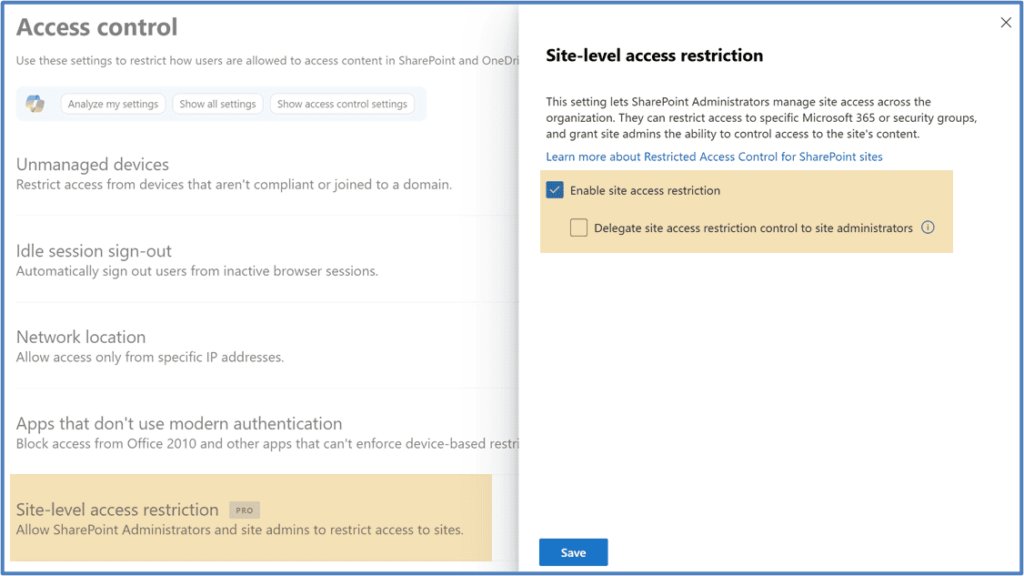
Enable site access restriction from SharePoint Admin Center
Who can access this feature?
Restricted Access Control (RAC) is a premium governance feature that requires a specific license to use. The tenant automatically receives access to RAC and the broader SharePoint Advanced Management (SAM) capabilities when at least one of the following conditions is met:
- Microsoft 365 Copilot: At least one user in the organization is assigned a Microsoft 365 Copilot license.
- SharePoint Advanced Management Plan 1: The tenant has a base subscription (such as Microsoft 365 E3/E5, or SharePoint P1/P2) and purchases the standalone SharePoint Advanced Management (SAM) Plan 1 add-on.
- Microsoft 365 E7: The organization is licensed under Microsoft 365 E7 (The Frontier Suite), which inherently includes SAM features.
What This New RAC Update Does
Microsoft is enhancing Restricted Access Control for SharePoint Online and OneDrive by enforcing RAC across Microsoft 365 search experiences, including SharePoint search, organization wide search, and Microsoft 365 app experiences such as Office.com.
This means that when a site or OneDrive location is protected by RAC, search results will respect those policies, so users outside the approved groups will neither access nor discover that content through search.
Key Effects of the Update
- Search results are limited to content that users can access under RAC policies, which strengthens data protection.
- RAC enforcement applies automatically to both existing and new RAC enabled SharePoint sites and OneDrive accounts in the tenant.
- RAC configuration methods stay the same, as enforcement is handled at the service level without changing the current setup.
Why This Matters For Data Security And Compliance
RAC already allows access to be restricted to SharePoint sites and OneDrive locations using specific Microsoft 365 or Microsoft Entra security groups.
By extending RAC into Microsoft 365 search, Microsoft closes gaps where users might see references to sites or content that they are not supposed to know about, which supports compliance frameworks focused on least privilege and confidentiality.
Benefits For IT And Security Teams
- Stronger alignment between access control and content discovery, making the governance model more predictable.
- Reduced risk of oversharing and fewer chances that sensitive files or sites appear in search for unintended audiences.
- A more consistent user experience where access denied surprises are minimized because blocked sites no longer appear in search results.
Who This Change Impacts
This change affects anyone managing SharePoint Online and OneDrive site access, especially in environments that use RAC for sensitive sites and OneDrive content.
It also affects all users in RAC enabled environments, because their search experience in SharePoint Online, OneDrive, and Microsoft 365 apps now strictly matches the access policies configured for those locations.
Impacted Roles and Scenarios
- SharePoint and OneDrive administrators who design and maintain RAC policies and group memberships for sensitive content.
- Security and compliance officers who rely on search behavior that reflects least privilege principles and regulatory obligations.
- Business users who depend on Microsoft 365 search to find project sites, team documents, and shared files across the organization.
💬 Admin Stories Series
Invite users to share anonymized scenarios such as
- When RAC helped protect a sensitive project site
- Where search visibility still feels risky
- What internal teams needed to understand before adopting RAC more broadly
These practical stories make the update more relatable and show how RAC works in real environments.
What Happens Once RAC Is Enforced
Once the feature is rolled out, RAC policies for sites reflect automatically in Microsoft 365 search results without requiring configuration changes.
The enforcement applies to both SharePoint sites and OneDrive accounts with RAC enabled today, and it will also apply to future RAC controlled locations as they are created.
Practical Outcomes to Expect
- RAC controlled sites and OneDrive locations will not appear in search for users who are not members of the permitted groups.
- Users will see fewer search results that lead to access denied pages, which can reduce confusion and support requests.
- RAC becomes the authoritative control for both visibility and access, so permissions design directly shapes what search can reveal.
📈 Idea: Before And After Search Audit
Encourage users to capture a set of common enterprise search queries and compare results before and after RAC enforcement.
This simple audit can show how visibility changes, highlight where governance is stronger, and provide useful evidence for security and compliance teams.
Recommended Actions for Admins
No special action is required to receive RAC enforcement in Microsoft 365 search, because Microsoft applies it as part of a standard service update.
However, a few proactive steps help ensure RAC design, internal support, and user expectations align with the tighter search experience.
Admin Checklist
- Review current RAC configurations and group memberships for key SharePoint sites and OneDrive locations that store sensitive content.
- Inform helpdesk and support teams that search result visibility will now follow RAC policies more strictly so they can better handle user questions.
- Update internal documentation, knowledge base articles, and training materials that describe search behavior and access expectations for SharePoint and OneDrive.
🛠️ RAC Readiness Workshop
Recommend a short internal workshop for admins to walk through RAC setup and demonstrate how RAC affects search results in practice.
Use the session to clarify responsibilities, collect recurring questions, and identify documentation gaps before issues surface broadly.
Official Microsoft References
To help you and your teams explore RAC and this new enforcement behavior in more detail, share these official Microsoft resources in your internal documentation and training channels
- Restrict SharePoint site access with Microsoft 365 groups and Microsoft Entra security groups
- SharePoint Advanced Management Overview
- Restricted SharePoint Search
Sharing these links in your guidance materials will help your admins, security teams, and power users stay aligned as Microsoft continues to refine how access and search work together across Microsoft 365.

















 Migrate
 Manage
 Migrate Microsoft 365








