


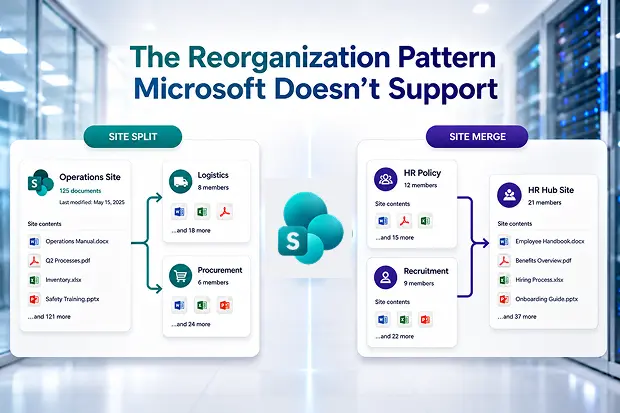
SharePoint sites rarely stay aligned with the business forever.
Departments split. Teams merge. Projects become long-term functions. Regional workspaces become global workspaces. Business units reorganize, and the SharePoint structure that once made sense starts to feel outdated.
At that point, admins often face two common questions:
Can we split one SharePoint site into multiple sites?
Can we merge several SharePoint sites into one?
These are normal reorganization needs. But they expose one of the biggest gaps in SharePoint administration: Microsoft does not provide a direct native way to split or merge SharePoint sites.
You can create new sites. You can move documents. You can copy libraries. You can retire old sites. But a true split or merge operation, with content, metadata, permissions, sharing behavior, and history handled cleanly, is not something SharePoint provides as a simple admin action.
That is where SharePoint reorganization becomes more than a content move. It becomes a governance, security, and migration project.
- Why SharePoint Site Split and Merge Is So Difficult
- The Real Risk Is Not Just Moving Content
- Permission Inheritance Is the Hidden Complexity
- When a SharePoint Site Split Is Needed
- When a SharePoint Site Merge Is Needed
- Pre-Reorganization Permission Audit
- Post-Reorganization Validation
- Where Apps4.Pro Fits In
- Best Practices for SharePoint Site Split and Merge Projects
- Final Thoughts
Why SharePoint Site Split and Merge Is So Difficult
SharePoint site architecture is built around stable site identity.
A site has its own URL, permissions, storage, libraries, lists, pages, metadata, sharing links, membership model, and connected Microsoft 365 services. Microsoft expects that site to remain the container for that content over time.
But business restructuring often requires the opposite.
A department may divide into separate teams, requiring one large SharePoint site to be split into multiple smaller sites. Or several teams may combine into one department, requiring multiple SharePoint sites to be merged into a single destination site.
This creates a structural problem. SharePoint can store content well, but it does not treat site split and merge as native lifecycle operations.
As a result, admins usually have to create new destination sites, move or copy content manually, recreate structure, review permissions, validate metadata, communicate changes to users, and eventually retire the original site.
That work is manageable for one small site. It becomes difficult when the site contains years of content, custom permissions, shared links, libraries, folders, lists, and business-critical files.
The Real Risk Is Not Just Moving Content
Many site reorganization projects are planned as if the main challenge is content movement.
That is only part of the work.
The bigger risk is preserving the meaning of the original site.
A SharePoint site is not just a collection of files. It contains ownership decisions, permission boundaries, metadata structures, sharing behavior, document history, and user expectations. When content is moved into a new structure, those details can change.
A document that was restricted in the source site may become visible to a broader group in the destination site. A folder with unique permissions may inherit access from the new parent library. A user who previously had access through a direct share may lose access after the move. A business team may find that links, shortcuts, or references no longer work as expected.
This is why site split and merge projects often create post-migration issues even when the files themselves are successfully moved.
The question is not simply, “Did the content arrive?”
The better question is, “Did the content arrive with the right access, context, and structure?”
Permission Inheritance Is the Hidden Complexity
Permission inheritance is one of the most important areas to review before any SharePoint reorganization.
In a clean SharePoint site, permissions flow from the site to libraries, folders, and files. But mature SharePoint environments are rarely clean. Over time, users share folders directly, break inheritance for sensitive libraries, grant access to specific people, and create exceptions for projects, vendors, or leadership teams.
This creates a complex permission state.
When that content is reorganized, the outcome depends on how the move is performed, what tool is used, and whether the source and target structures are related. Some operations may preserve permissions. Some may reset them. Some may cause content to inherit permissions from the destination location.
That inconsistency is the major failure point.
If permissions are too broad after the reorganization, users may gain access to content they should not see. If permissions are too restrictive, users may lose access to documents they need for daily work. In highly regulated environments, either outcome can become a security or compliance issue.
This is why permissions should not be treated as an afterthought. They should be reviewed before the split or merge begins and validated after the reorganization is complete.
When a SharePoint Site Split Is Needed
A site split usually happens when one workspace has grown too large or when a department divides into separate operating units.
For example, a single “Operations” site may need to become separate sites for Logistics, Procurement, and Facilities. A project site may need to split into product, support, and compliance workspaces. A regional team site may need to be divided by geography.
In these cases, the admin must decide which content belongs in each destination site, which permissions should be preserved, which permissions should be redesigned, and when the original site should be retired.
The mistake is to move everything quickly and clean up later. That often leads to confusion, broken access, duplicate files, and unclear ownership.
A better approach is to treat the split as a controlled transition. Map the content first. Review permissions. Create the target sites. Move content in phases. Validate with site owners. Then retire or archive the original site only after the new structure is confirmed.
When a SharePoint Site Merge Is Needed
A site merge usually happens when teams, departments, or business units combine.
For example, separate HR policy, recruitment, and onboarding sites may need to become one HR site. Multiple regional sales sites may need to merge into a single global sales workspace. Several project sites may need to consolidate into a long-term program site.
Merging sites can be harder than splitting them because the destination site must absorb different structures, naming conventions, metadata practices, and permission models.
One site may use department-based permissions. Another may rely on direct sharing. Another may have broken inheritance across multiple libraries. If all of that is merged without review, the destination site can become harder to govern than the original sites.
A successful merge requires standardization. Admins should decide which metadata structure will be used, how libraries will be organized, which permissions will be preserved, and which old access patterns should be cleaned up during the move.
A merge should not simply combine clutter. It should create a cleaner destination workspace.
Pre-Reorganization Permission Audit
Before splitting or merging SharePoint sites, admins should perform a permission audit.
This audit should identify sites, libraries, folders, and files with broken inheritance. It should also highlight broad access groups, direct user permissions, anonymous or organization-wide sharing links, and content that is more sensitive than its current access model suggests.
The goal is not always to preserve every permission exactly as it exists. In some cases, the current permission model may already be messy or risky. Preserving it would simply move the problem into a new site.
Admins should make a decision for each site or content area: preserve the current permission model, simplify it, or reset it to a cleaner inherited structure.
This decision should be made before migration, not during troubleshooting after users report access problems.
Post-Reorganization Validation
After the split or merge is complete, permission validation is essential.
Admins should confirm that users have the access they need and that sensitive content has not become overexposed. Site owners should review key libraries, business-critical folders, and restricted content areas. Any unexpected permission changes should be corrected before the old site is retired.
Validation should also include metadata, document history, ownership, links, and user communication. Even when permissions are correct, users may still be confused if they do not know where content moved or which site is now authoritative.
Original sites should not be deleted immediately. A safer approach is to keep them available in read-only or archived form until the destination sites are validated and users have adjusted to the new structure.
Where Apps4.Pro Fits In
Microsoft does not provide native tooling for direct SharePoint site split and merge operations.
Apps4.Pro Migration Manager can help make these reorganization projects more manageable by supporting structured movement of SharePoint content during intra-tenant restructuring. This is especially useful when admins need to reorganize sites after department changes, mergers, splits, or workspace cleanup initiatives.
The key value is not just moving files from one place to another. It is helping admins handle the practical details that make SharePoint reorganization difficult, including content structure, metadata mapping, permission handling, and validation planning.
For SharePoint admins, this reduces repetitive manual work. For M365 admins, it creates a more controlled approach to restructuring collaboration spaces. For business users, it helps reduce disruption because content is moved with more planning and consistency.
Apps4.Pro Migration Manager does not eliminate the need for governance decisions. Admins still need to decide whether permissions should be preserved, simplified, or reset. But Apps4.Pro can help execute the reorganization in a more scalable and predictable way, especially when many sites, libraries, or folders are involved.
Best Practices for SharePoint Site Split and Merge Projects
Start with a clear content map. Identify what must move, where it should go, and who owns each destination site.
Audit permissions before the move. Broken inheritance, direct sharing, and broad access should be reviewed before content is reorganized.
Decide whether to preserve or reset permissions. Do not automatically carry forward a messy access model if the reorganization is also an opportunity to clean it up.
Validate after the move. Confirm access, metadata, structure, and user experience before retiring the original site.
Communicate clearly with users. Let site members know what is changing, where content will live, and when old locations will be retired.
Avoid deleting source sites too quickly. Keep them available in a controlled state until the destination sites are confirmed.
Final Thoughts
SharePoint site split and merge projects are common because organizations keep changing.
The challenge is that SharePoint does not provide a native button for these reorganization patterns. Admins are left to combine planning, manual effort, scripts, third-party tooling, permission reviews, and post-move validation.
The content move itself is only one part of the project. The real success factor is whether the destination sites preserve the right access, structure, metadata, and usability.
For SharePoint and M365 admins, the safest approach is to treat split and merge as governance-led reorganization, not simple migration.
When permissions are reviewed before the move, destination sites are validated after the move, and the original sites are retired carefully, site restructuring becomes far less risky and far more predictable.
















