



Introduction
At Apps4.Pro, we don’t just build features-we solve real-world problems. Many of our most powerful enhancements to Microsoft Teams chat migration were developed directly in response to customer queries during support conversations.
In this blog, we share four real-world issues raised by our customers and how our team provided targeted solutions-making Microsoft 365 tenant-to-tenant Teams chat migration faster, smarter, and more reliable.
1. Selective Teams Chat Migration

The Challenge:
Some customers had already migrated all Teams chats but later realized they only needed to migrate specific conversations-such as executive discussions, legal team chats, or content from a particular date range.
The Impact:
Migrating unnecessary data consumes time, increases storage costs, and clutters the new environment.
Our Solution:
We developed Selective Chat Migration, allowing admins to migrate only what they need-based on users, date ranges, or specific chat threads. This makes migrations faster, lighter, and more focused.
2. Slow Performance When Using a Single Machine

The Challenge:
Running Teams chat migration on a single machine was too slow for large environments. Customers tried scaling across machines but faced duplicate data and sync errors.
The Impact:
Inefficient migrations increase downtime and risk incomplete data transfer.
Our Solution:
Apps4.Pro leverages a centralized Azure Storage Table platform to efficiently manage and store user chat data. This centralized architecture enables multiple machines to run in parallel without the risk of data duplication.
3. Duplicate File Uploads from OneDrive and Chat
The Challenge:
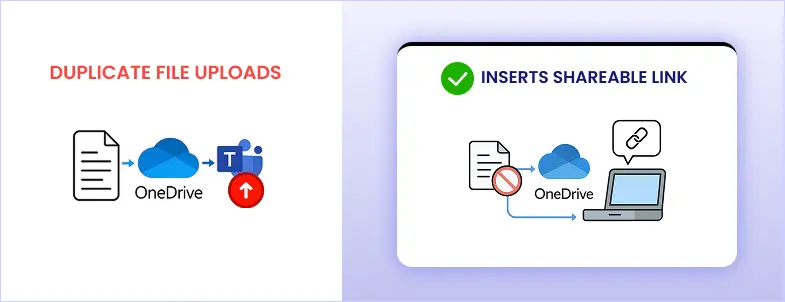
Files already migrated through OneDrive were also being re-uploaded during Teams chat migration, since the same files were shared in chat.
Why It Mattered:
This led to storage bloat, redundant data, and confusion over file versions.
Our Solution:
We implemented duplicate file detection. When a file already exists in the user’s OneDrive, Apps4.Pro inserts a shareable link into the chat instead of uploading it again-reducing storage usage and eliminating confusion.
4. Inline Images from External Users Didn’t Migrate Properly

The Challenge:
When external users (from other tenants) sent inline images in chat, those images often failed to migrate correctly, leading to broken message threads.
The Impact:
Inline images are critical for preserving context in business conversations.
Our Solution:
We added flexible options to store external inline images in OneDrive. Admins can choose where images are stored:
- The recipient’s OneDrive
- A specified user’s OneDrive
- A service account’s OneDrive
This guarantees that inline image links remain accessible in the target tenant.
Why These Updates Matter
These features weren’t created in a vacuum-they were driven by real migration challenges faced by IT teams around the world. Every enhancement was designed to:
- Minimize downtime
- Reduce data redundancy
- Streamline large-scale migrations
- Preserve chat integrity and structure
Final Thoughts
Your challenges shape our innovation roadmap. If you’re preparing for a Microsoft Teams chat migration or facing any of the issues above-Apps4.Pro Migration Manager offers the robust, intelligent solution you need.
Get in touch with us to book your demo
learn how we can simplify your Microsoft 365 migration journey.

















 Migrate
 Manage
 Migrate Microsoft 365








