


Enhance your proficiency in Microsoft Teams private channel governance with this comprehensive guide. While private channels promote effective collaboration, they require well-defined policies to ensure security and compliance. Adhere to our private channel security checklist to protect your organization.
- How Private Channels are structured in Microsoft Teams
- Limits on M365 Teams Private channels
- Why Private Channels Need Governance
- SharePoint vs Standard Channel Storage: What’s Different?
- Private Channel Governance: Complete Checklist
- Plan Your Seamless Microsoft Teams Tenant to Tenant Migration Today
- MSP Pain Points & Solutions
- Extended Reading: Private Channels in Microsoft Teams
- Frequently Asked Questions
How Private Channels are structured in Microsoft Teams
Private channels in Microsoft Teams create isolated spaces within a team. Only invited members access them, unlike standard channels open to all team users.
Key structure elements:
- Parent Team Dependency: Private channels live inside an existing team; you can’t create standalone ones.
- Membership Controls: Owners add members manually; no self-join like public channels.
- Dedicated Resources: Each gets its own SharePoint folder, Planner tab, and OneNote notebook.
This setup ensures Teams private channel governance focuses on access limits from the start.
Limits on M365 Teams Private channels
Microsoft Teams private channels have defined limits to ensure scalable, secure collaboration within a Team.
Here are the limits pre-2025 and the later expanded post-2025 limits for private channels in Microsoft Teams:
| Version | Max Private Channels per Team | Max Members per Private Channel |
|---|---|---|
| Pre-2025 (Traditional) | 30 | 250 |
| Post-2025 (Expanded) | 1,000 | 5,000 |
Why Private Channels Need Governance
Without private channel governance, sensitive data risks exposure. They handle confidential projects, yet lack built-in oversight like standard channels.
Top reasons for governance:
- Data Leak Prevention: Limit who sees HR or finance info.
- Compliance Mandates: Meet GDPR, HIPAA via access audits.
- Shadow IT Risks: Unmonitored channels bypass central controls.
- Scalability Issues: Rapid growth leads to orphaned channels.
Try this: Audit your teams today—Find out how many private channels do you have!
SharePoint vs Standard Channel Storage: What’s Different?
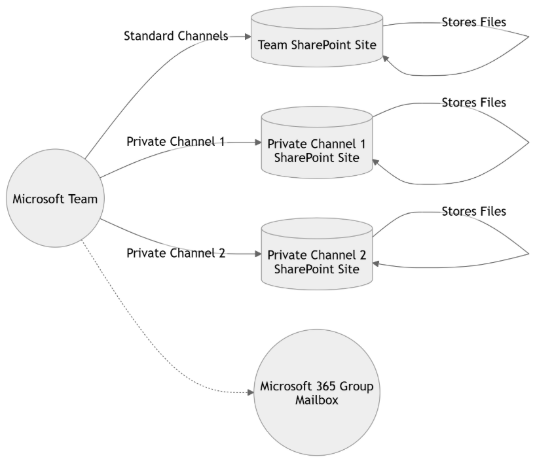
Private channel storage diverges from standard channels for isolation. Standard channels share one SharePoint site; private ones get unique sites.
Key differences:
- Standard Channel: Files in team-wide SharePoint site; all members access.
- Private Channel: Auto-provisioned separate SharePoint site; only channel members view files.
- Permissions: Private channel inherits team owners but restricts files to members.
- Limits: Private sites count toward SharePoint quotas independently.
This separation bolsters Private channel security in Microsoft Teams but requires governance for site management.
Private Channel Governance: Complete Checklist
Implement this private channel security checklist for airtight Microsoft Teams private channel governance.
Creation Policies:
- Require owner approval for new channels.
- Mandate naming conventions (e.g., Project-Private-YYYY).
- Limit to business-critical use cases.
Access Management:
- Review memberships quarterly.
- Enable expiration dates for temporary channels.
- Use Azure AD groups for scalable invites.
Security & Compliance:
- Enforce DLP policies on private SharePoint sites.
- Enable retention labels for data lifecycle.
- Audit logs via Microsoft Purview.
Deactivation Rules:
- Auto-archive inactive channels after 90 days.
- Transfer ownership before deletion.
- Notify stakeholders pre-purge.
Monitoring Tools:
- Use Teams admin center reports.
- Integrate with Microsoft Sentinel for alerts.
Plan Your Seamless Microsoft Teams Tenant to Tenant Migration Today
Migrating Microsoft Teams – especially Private Channels and Teams Chats (1:1, group, and meeting chats), – requires specialized expertise to preserve permissions, compliance, and collaboration history.
Connect with Apps4.Pro for a tailored migration assessment and expert guidance.
👉 Schedule a Migration Consultation with Apps4.Pro
MSP Pain Points & Solutions
Managed Service Providers (MSPs) and IT teams face specific challenges when governing private channels. The table below summarizes common pain points with their impacts and recommended policy/technical solutions.
| MSP Pain Point | Impact | Solution (Key Action) |
|---|---|---|
| Uncontrolled Private Channel sprawl | Hidden data silos, compliance risk | Enforce naming policies + approval workflows |
| Separate SharePoint site creation | Storage duplication, backup gaps | Automate site discovery + include in backup scope |
| Limited visibility for global admins | Security blind spots | Enable reporting + scheduled access reviews |
| Guest access mismanagement | Data leakage risk | Apply conditional access + guest expiration policies |
| Orphaned private channels | Unmanaged data & inactive users | Automate lifecycle & ownership reassignment |
| Backup complexity | Incomplete recovery scenarios | Use M365-aware backup tools covering private channel sites |
| eDiscovery confusion | Legal/compliance delays | Document storage mapping + retention policies |
| Role-based access inconsistencies | Over-permissioning | Implement least-privilege RBAC model |
| Manual governance processes | Operational overhead | Deploy policy automation via PowerShell / governance tools |
| Client misunderstanding of risks | Reactive security posture | Offer governance assessments + security workshops |
Extended Reading: Private Channels in Microsoft Teams
1. Private channels in Microsoft Teams (Admin & Tech Guide): Microsoft Learn | IT Admins – Private channels in Microsoft Teams
2. Standard, private, or shared channels in Teams: Microsoft Support | Standard, Private, Shared channels in Microsoft Teams
3. First things to know about channels in Microsoft Teams: Microsoft Support | First things to know about channels in Microsoft Teams
















