


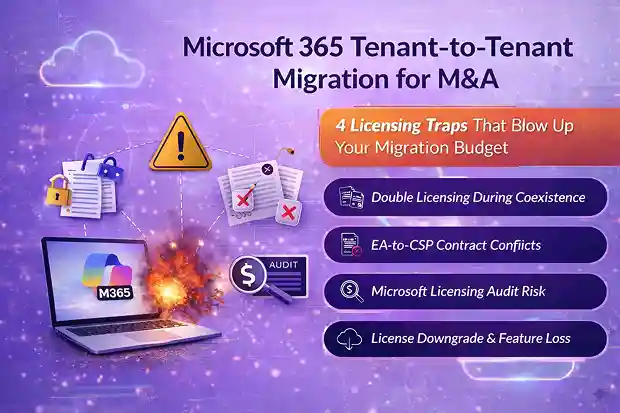
If you’re an MSP running a Microsoft 365 tenant-to-tenant migration during an M&A, licensing mistakes can quietly destroy your customer’s migration budget and your margin.
During mergers and acquisitions, Microsoft 365 environments merge, but licenses, contracts, and billing models do not. What looks like a straightforward tenant consolidation can quickly turn into double licensing, billing confusion, audit exposure, and unexpected feature loss.
This guide breaks down the four Microsoft 365 licensing traps MSPs encounter most often during M&A migrations, and how you can turn each one into a structured advisory opportunity instead of a costly surprise.
Pre-LOI bid pricing?
See M365 Migration Cost Estimation: A Pre-Deal Framework for M&A for the pre-deal licensing assessment framework
- Why Microsoft 365 Licensing Becomes a Problem During M&A
- Trap 1: Double Licensing During Tenant to Tenant Migration Coexistence
- Trap 2: EA to CSP Transition Complexity in Microsoft 365 M&A
- Trap 3: Microsoft 365 Licensing Audit Risk During Mergers and Acquisitions
- Trap 4: License Downgrade and Feature Loss in Microsoft 365 Tenant Consolidation
- Pulling It Together: MSP Playbook for M&A Licensing
- Frequently Asked Questions
Why Microsoft 365 Licensing Becomes a Problem During M&A
When two Microsoft 365 tenants merge, technical migration and licensing operate under completely different rules.
Mailboxes, Teams data, and SharePoint sites can move between tenants. Microsoft 365 licenses cannot. Licenses are tied to tenant IDs, contract agreements, and billing structures that do not automatically align during a merger.
As the MSP running the migration, you’ll typically encounter four recurring problems:
- Double licensing during coexistence
- EA-to-CSP contract conflicts
- Microsoft licensing audit exposure
- Feature loss after license consolidation
If these are not planned early, licensing becomes the hidden cost center of the migration.
Pre-Migration Licensing Discovery: The Step MSPs Often Skip
Before any Exchange Online mailbox, Microsoft Teams, or SharePoint migration begins, MSPs should perform a structured licensing discovery across both tenants.
This discovery should capture:
- License SKUs and quantities
- Contract types (EA, CSP, MOSP, direct subscriptions)
- Renewal timelines
- Azure reservations and commitments
- Security and compliance add-ons
- Historical license assignment patterns
Without this baseline, it is impossible to:
- Model coexistence costs
- Plan EA-to-CSP transitions
- Identify compliance gaps
- Design license standardization strategies
Many MSPs treat licensing discovery as a quick spreadsheet exercise.
In reality, it should be a structured advisory engagement that informs the entire M365 Tenant migration strategy.
Trap 1: Double Licensing During Tenant to Tenant Migration Coexistence
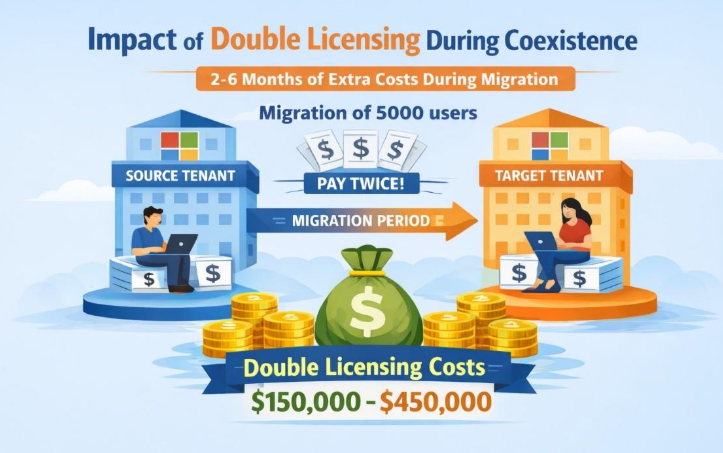
During a tenant-to-tenant migration, you often need users active in both the source and target tenants for a period of coexistence.
Because Microsoft 365 licenses are tenant-bound and cannot be transferred, each tenant must maintain its own subscriptions.
If users are simply recreated in the new tenant without careful planning, the organization can end up paying twice for the same users for several months.
At Microsoft 365 E3 or E5 price levels, a 5,000-user migration can add hundreds of thousands of dollars in temporary licensing costs if coexistence is poorly managed.
These are the situations MSPs typically encounter and how to address them.
| MSP Trouble Spots | Remediation Steps |
|---|---|
| Coexistence periods run long and quietly double license costs | Design tight migration waves so coexistence windows are as short as possible. |
| Customers blame you for “paying twice for the same users” | Use Microsoft migration add-on licenses and flexible monthly CSP terms for temporary needs. Negotiate short “bridge” agreements with Microsoft to cover the transition instead of full multi-year renewals |
| You absorb some overages to protect the relationship and margin erodes | Model coexistence cost scenarios upfront and present best/expected/worst cases to finance and IT. |
| Licensing risk is treated as an afterthought instead of a scoped service | Bundle a licensing design workshop and coexistence cost planning into a paid M&A migration assessment. |
Handled correctly, coexistence planning becomes a structured advisory service instead of a budget surprise.
Trap 2: EA to CSP Transition Complexity in Microsoft 365 M&A
In many M&A migrations, you inherit a messy licensing environment.
One company might run Microsoft 365 under an Enterprise Agreement, while the other uses CSP, MOSP, or direct subscriptions. These agreements operate under different billing models, contract timelines, and discount structures.
The technical migration may look simple, but contracts and billing rarely align cleanly.
Azure Reservations, Savings Plans, and historical utilization data often cannot move easily between agreements. This leads to operational complexity for the MSP managing the transition.
EA-to-CSP transitions typically create:
- Revenue leakage
- Cash-flow unpredictability
- Accounting complexity
- Compliance risk
Here are the most common challenges MSPs face.
| MSP Trouble Spots | Remediation Steps |
|---|---|
| You inherit a messy mix of EA, CSP, MOSP, and direct agreements | Run detailed pre-migration cost and contract modelling across all Microsoft agreement types. |
| Billing gaps and misaligned dates cause 2–3% margin leakage | Adopt a hybrid EA/CSP strategy, keeping some workloads on EA temporarily and moving others to CSP with a plan. |
| Overlapping or confusing invoices trigger customer disputes | Align license and workload cutovers with billing cycles to avoid unnecessary overlap. |
| Cash flow becomes unpredictable around cutovers and renewals | Automate billing and reconciliation between Partner Center, PSA, ERP, and invoicing tools. |
| Commercial risk is not clearly owned in the project | Package this as an “EA-to-CSP transition and profitability plan” within your Microsoft 365 M&A offering. |
For MSPs, this is not just a licensing issue, it’s a commercial architecture problem.
Trap 3: Microsoft 365 Licensing Audit Risk During Mergers and Acquisitions
Mergers and acquisitions frequently trigger Microsoft licensing audits.
From Microsoft’s perspective, an acquisition means environments are changing rapidly, records may be incomplete, and licensing inconsistencies are more likely.
If the acquired company had historical under-licensing issues, those obligations can transfer to the acquiring organization.
During an audit, this can quickly escalate into:
- Six-figure true-up payments
- Legal escalation
- Disruption to ongoing migration projects
MSPs are often pulled into the middle of these audits even when the licensing issues existed before the Office 365 tenant migration.
These are the situations where preparation makes the difference.
| MSP Trouble Spots | Remediation Steps |
|---|---|
| You get pulled into audit defence that was never scoped or priced | Perform proactive license reconciliation and build a defensible entitlement/usage baseline before migration. |
| Entitlement and usage history is scattered across multiple tenants and tools | Centralize license, usage, and contract data from all tenants and systems into a single compliance view. |
| You are blamed for compliance gaps that pre-date your involvement | Clearly document pre-migration findings and risks as part of an Audit Readiness Review. |
| Audit requests disrupt ongoing migration and BAU operations | Offer a dedicated audit-support retainer for high-risk customers so response effort is funded and planned. |
| Licensing/compliance is treated as reactive instead of strategic | Position “audit readiness” as a standard phase in your Microsoft 365 M&A and tenant consolidation projects. |
Treating audit readiness as a standard migration phase protects both the MSP and the customer.
Trap 4: License Downgrade and Feature Loss in Microsoft 365 Tenant Consolidation
After an acquisition, leadership often wants to standardize Microsoft 365 licensing across the merged company.
The goal is usually cost reduction—moving users from E5 to E3, or from enterprise plans to business SKUs.
However, these downgrades often occur without understanding feature dependencies.
The result is silent loss of:
- Advanced security controls
- Compliance tools
- Power BI Pro capabilities
- Audio conferencing features
- Automation or analytics workflows
For the MSP, this typically appears as a spike in support tickets and security concerns after migration.
These are the patterns that cause problems.
| MSP Trouble Spots | Remediation Steps |
| Ticket volume spikes after broad SKU downgrades | Run a pre-migration feature-dependency and license usage audit per department or role. |
| Critical security, compliance, or analytics features disappear unexpectedly | Identify high-risk users and workloads that must stay on E5 or higher SKUs and protect them in the design. |
| Business owners say you “broke” workflows just to save license dollars | Design tiered licensing models (for example, E5 for high-risk users, E3 plus add-ons for others). |
| Change management and communication lag behind technical changes | Communicate license changes and concrete feature impacts clearly to business owners before cutover. |
| Optimization is a one-time event, not a service | Turn license rationalization into an ongoing optimization service with regular reviews and adjustments. |
Pulling It Together: MSP Playbook for M&A Licensing
When licensing is ignored during an M&A migration, the result is predictable: budget overruns, audit exposure, and customer frustration.
But when licensing is treated as a structured workstream alongside O365 tenant migration planning, it becomes a high-value advisory opportunity for the MSP.
The most successful MSPs approach M&A migrations with a clear licensing strategy:
- Start every migration with licensing and contract discovery
- Model coexistence periods and double-licensing costs
- Design a hybrid EA-to-CSP transition plan
- Establish a defensible license and audit baseline
- Map license SKUs to real feature usage before consolidation
When structured correctly, these activities evolve into repeatable service offerings, such as:
- Microsoft 365 M&A Licensing Assessment
- EA-to-CSP Transition and Profitability Planning
- Audit Readiness and Compliance Review
- License Optimization and Rationalization Programs
Handled well, Microsoft 365 M&A licensing does not just protect the migration budget—it strengthens the MSP’s role as a strategic advisor during complex tenant consolidations.

















 Migrate
 Manage
 Migrate Microsoft 365








