


Ever published an urgent company-wide announcement in Viva Engage and then wondered whether the notification actually went out?
That moment of uncertainty matters. For everyday updates, it may not be a big concern. But when the message is about a leadership announcement, an outage, a compliance deadline, or an urgent employee update, communicators need more confidence than “I think it sent.”
Microsoft is introducing a Notifications Delivery Tracker for immediate Community announcements in Viva Engage. The worldwide rollout is expected in early July 2026. The goal is simple: give communicators a clearer view of notification delivery after publishing.
What the Tracker Shows
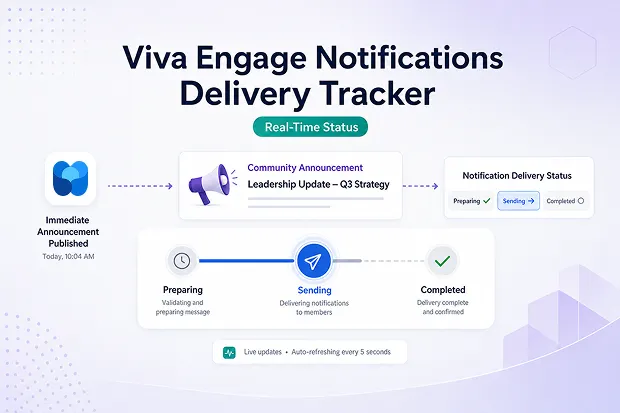
After you publish an immediate Community announcement, the tracker displays delivery status across three stages:
- Preparing — Viva Engage is getting the notification ready.
- Sending — notifications are actively being delivered.
- Completed — the notification delivery process has finished.
Think of it like a delivery-status view for internal communication. Instead of publishing and waiting without context, communicators can check whether the notification is preparing, sending, or completed.
This does not mean every employee has read the announcement. It means the notification delivery lifecycle has progressed and completed.
Why It Matters
Internal communication is often judged by timing. A message may be approved, well written, and published at the right moment—but if communicators cannot see what happens after they click publish, uncertainty remains.
The tracker gives leaders and communication teams more visibility when announcements are time-sensitive, such as:
- CEO or leadership updates
- Crisis or outage communications
- Compliance reminders with deadlines
- Town hall reminders before a live event
- Policy changes that need broad employee awareness
In these situations, the tracker helps communicators confirm that delivery has moved through the expected stages.
Important Scope to Remember
This feature applies only to immediate Community announcements in Viva Engage. Regular Community announcements are not included.
For high-priority messages, the tracker adds delivery confidence. For standard community updates, existing announcement behavior still applies.
Admin and Compliance Impact
No admin action is required to enable this feature. Once the rollout reaches your tenant, communicators who publish immediate Community announcements will be able to use the tracker.
The tracker adds visibility into notification delivery status, but it does not change existing compliance reports. Treat it as an operational communication aid, not a replacement for formal compliance reporting or engagement measurement.
How to Prepare
Even though admins do not need to configure anything, organizations can still prepare by informing communication owners, community managers, and leadership teams.
It may also be useful to update internal Viva Engage training materials. A simple publishing routine can help teams get more value from the feature:
Publish → check delivery status → confirm completion → review engagement later.
For a full view, pair the tracker with Conversation Analytics. The tracker helps answer whether notification delivery completed, while analytics can show whether employees viewed, reacted to, or engaged with the message.
Final Thought
The Notifications Delivery Tracker is not a large workflow change, but it solves a real communication pain point. It gives communicators more confidence after publishing important announcements and reduces guesswork around delivery status.
For organizations using Viva Engage for leadership communication, urgent updates, and employee engagement, this is a small feature with practical value: less uncertainty after publishing, and more confidence when timing matters.
















