


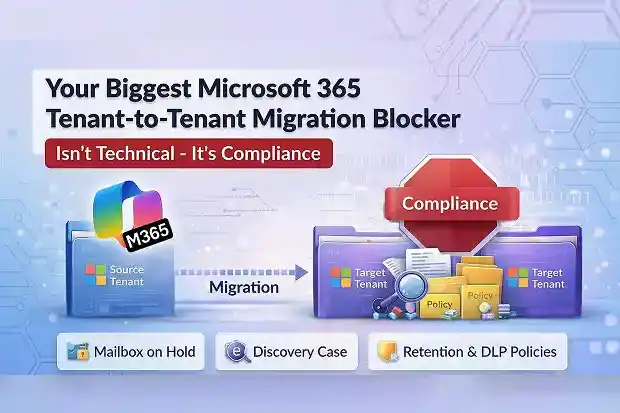
A Microsoft 365 tenant-to-tenant migration can be technically ready and still fail.
Domains are verified. Endpoints are configured. The first batch is scheduled.
Then the migration stops.
Not because of DNS. Not because of licensing. Not because of throttling.
It stops because certain mailboxes are on hold, and Microsoft will not allow them to move.
That is often the point where a migration stops being a technical project and becomes a compliance issue with legal consequences. The plan may be sound, but progress can still stall for reasons the migration team cannot safely control.
- Migration can move forward, but held mailboxes often cannot
- The mailbox can move, but the discovery case does not move with it
- The data arrives, but retention and DLP controls do not arrive with it
- One compliance problem creates the next
- The real solution starts before the first migration batch
- The migration may be technical, but the blocker is still compliance
Migration can move forward, but held mailboxes often cannot
This comes up often in tenant to tenant migration where legal or regulatory obligations are already in place.
Any mailbox subject to litigation hold, in-place hold, retention hold, or compliance tag hold is blocked from cross-tenant migration. Other migration work may continue, but those held mailboxes cannot move unless the holds are removed.
Microsoft applies this restriction at the platform level to protect the integrity and traceability of held data.
That is what makes the problem so difficult to manage.
The mailboxes blocked from migration are often the ones tied to the greatest legal sensitivity. They are also often treated as high priority, which puts immediate pressure on the timeline.
To move those mailboxes, the holds have to be removed.
That is where the risk begins.
Once a hold is removed, the issue is no longer just operational. It becomes a compliance and legal question. The migration may continue, but the protection the hold was meant to preserve may be weakened.
That is why this problem remains unresolved in so many migrations. It is not a scheduling issue. It is a fundamental conflict between migration progress and compliance protection.
The mailbox can move, but the discovery case does not move with it
This is another common failure point when litigation or investigations are active.
Active eDiscovery cases in Microsoft Purview do not transfer between tenants. After migration, eDiscovery against the migrated user’s source mailbox no longer works.
The root cause is straightforward. eDiscovery cases are tenant-bound Purview objects, and there is no export or import mechanism to move them across tenants.
That leaves the mailbox in the new tenant without the discovery context that existed around it before. Legal teams can lose working access to the discovery process they were relying on.
This is where a migration can look complete on paper while creating a different kind of failure underneath it. The batch may finish, but legal discovery obligations can break and regulatory risk can increase.
There is no native way to preserve this continuity. Purview multi-tenant capabilities do not yet support it.
The only practical path is manual. eDiscovery results need to be exported before migration. Cases then have to be recreated from scratch in the target tenant.
Even then, the source tenant cannot be shut down too early. It needs to remain available in read-only mode until legal obligations are fully satisfied.
And discovery is not the only thing that fails to carry over. The compliance controls tied to the data can break as well.
The data arrives, but retention and DLP controls do not arrive with it
This is not an edge case. It is a common problem in Microsoft 365 tenant-to-tenant migration involving compliance-governed data.
Retention labels, retention policies, and DLP policies do not transfer between tenants. These are Purview compliance objects, and they are tenant-scoped with no portability mechanism.
That leaves migrated data without the controls that governed it before.
Email retention policies can go missing after migration, and that can introduce immediate regulatory risk. The issue becomes more serious with regulatory record labels, which cannot be updated by design.
That can lead to compliance violations, audit failures, and data exposed without proper classification.
There is no native migration path for retention or DLP policies. Documentation and recreation have to be handled manually.
Policy definitions need to be exported through PowerShell so they can be rebuilt in the target tenant. If sensitivity labels are part of the migration scope, third-party tools can help with standard label migration, but they do not solve the broader compliance portability gap.
The result is extra rebuild work, extra validation work, and more room for something important to be missed after cutover.
That is where the larger pattern becomes hard to ignore. These are not isolated failures. Each one makes the next harder to manage.
One compliance problem creates the next
This is why the problem keeps expanding as the migration moves forward.
Retention policies do not migrate, so there is nothing carrying those controls into the target by default. Holds block migration, so the most sensitive mailboxes cannot move cleanly. eDiscovery is tenant-bound, so legal cases can break when those mailboxes do move.
Each issue changes the next decision.
If the holds stay, migration is blocked.
If the holds are removed, compliance protection is weakened.
If the mailbox moves, eDiscovery tied to the source tenant can lose continuity.
If the data lands in the target, the compliance controls may not be there to govern it.
That is why this is more than a set of technical limitations. It is one connected compliance problem that follows the migration from start to finish.
The technical path may be clear, but the delivery path narrows quickly as legal dependencies, manual workarounds, and rebuild requirements begin to stack up.
Once the problem is understood as one connected chain, the solution changes too. The real work has to start before the first batch is ever scheduled.
The real solution starts before the first migration batch
That is why the real work starts earlier than most M365 migration plans assume.
Before migration, every held mailbox needs to be identified. That includes not only litigation holds visible in the admin center, but also compliance tag holds and orphan holds that may only surface through PowerShell.
The full picture of active eDiscovery matters also needs to be understood. Retention policies, retention labels, DLP rules, and sensitivity labels in the source tenant need to be documented with their scope, conditions, and licensing requirements.
Without that visibility, the migration plan is incomplete from the start. Timelines slip, batches fail, and legal intervention usually arrives at the worst possible moment.
The target tenant needs the same level of preparation. Compliance policies need to be rebuilt and validated before the first mailbox moves, not after.
If eDiscovery cases need to be recreated there, and retention or DLP controls need to be rebuilt there, that work has to be part of the migration plan from the beginning.
Every held mailbox also requires a case-by-case decision routed through Legal. Hold removal, exception windows, and reapplication in the target need written approval and traceability.
After migration, the source tenant may still need to remain available in read-only mode until legal obligations are formally closed. For active litigation, that can last far longer than the migration timeline.
Skip this preparation, and the project can appear to be progressing while creating legal and regulatory gaps that only become visible during an audit, a court proceeding, or a regulatory review.
The migration may be technical, but the blocker is still compliance
This is the real lesson behind the entire issue.
The hardest part of a Microsoft 365 tenant-to-tenant migration is not always moving the mailbox. It is preserving the legal and compliance conditions attached to that mailbox before, during, and after the move.
Mailboxes on hold are blocked. eDiscovery does not transfer. Retention labels, retention policies, and DLP policies do not come across automatically.
None of that is a minor edge case. These are common migration problems, and there is no native end-to-end Microsoft solution that resolves them cleanly across tenants.
That is why the migration cannot be treated as a technical event alone.
The infrastructure may move the data.
Compliance determines whether the move can stand up to legal and regulatory scrutiny.
















