


Microsoft 365 Copilot agents can support everyday work across your organization, from finding policy information to assisting with content, research, and business processes. To make these agents genuinely valuable, you need visibility into how employees use them and whether they are helping people complete meaningful tasks.
Microsoft has introduced the Microsoft 365 Copilot Agents usage report in the Microsoft 365 admin center. This report helps you understand agent engagement, identify adoption opportunities, and make informed decisions about governance, enablement, and future Copilot investments.
Get Clear Visibility Into Copilot Agent Usage Report
When you make Copilot agents available to employees, it is important to understand whether they are being discovered, used, and helping people in real work scenarios. The Microsoft 365 Copilot Agents usage report gives you a clearer view of this activity from the Microsoft 365 admin center.
You can review agent usage at the tenant, user, agent, and user-agent interaction level. This helps you move beyond assumptions and see how Copilot agents are being used across your Microsoft 365 environment.
The report tracks agent activity in Microsoft 365 Copilot Chat and in Microsoft 365 apps such as Word, Excel, and PowerPoint. It can include agents created by employees, your organization, Microsoft, and Microsoft partners.
Key insights available in the report include:
- Total number of active users and active agents
- Daily and summary views of agent usage
- Usage details by user, agent, and user-agent interaction
- Number of agent responses received by users
- Usage by licensed and unlicensed Microsoft 365 Copilot users
- Agent activity grouped by creator type
- Most recent activity information for agents and users
With these insights, you can see which agents are delivering value and which areas may need stronger communication, training, or governance.
📌 Learn more about the “Microsoft 365 Copilot Agents usage report”.
📣 Launch an “Agent of the Month” Challenge
Highlight one approved Copilot agent each week to show employees how it can support a real business task, such as finding policies, preparing proposals, or summarizing project updates.
Promote it through Teams, SharePoint, or an internal newsletter. Include:
- A short explanation of its purpose
- One relevant business use case
- Three ready-to-use prompts
- Clear steps to access the agent
Review the Copilot Agents usage report afterward to measure changes in active users, interactions, and repeat usage.
Go Beyond Basic Adoption Metrics
Agent availability does not always mean agent adoption. An agent may be technically deployed but still remain unused if employees do not know what it does, cannot find it, or are unsure how it supports their role.
The Microsoft 365 Copilot Agents usage report helps you assess adoption with useful context, rather than relying only on the number of agents available in your environment.
Use the report to understand:
- Which Copilot agents have consistent and repeat usage
- Which departments or user groups are actively engaging with agents
- Whether employees are receiving responses from the agents they use
- Which agents need better visibility, training, or business use cases
- Whether internally developed agents are being discovered and adopted
- How usage differs between licensed and unlicensed Microsoft 365 Copilot users
The report also groups activity by agent creator type. This helps you compare engagement with agents created by employees, your organization, Microsoft, and Microsoft partners.
This view can help you identify where employees are finding the most value. It can also reveal whether certain agents need improvement before they can become part of everyday work.
For example, you may notice that a Microsoft partner agent has steady activity while a custom internal agent has very limited usage. This may indicate that the internal agent needs:
- Clearer guidance on what it can help employees accomplish
- Better placement or promotion within the Microsoft 365 environment
- Improved instructions, prompts, or knowledge sources
- Targeted training for the teams expected to use it
- A review of whether it supports a relevant business need
By looking beyond basic adoption numbers, you can make better decisions about where to invest in Copilot agent improvements, employee enablement, and governance.
📊 Turn Usage Data Into a Copilot Success Scorecard
Create a monthly Copilot success scorecard for your key business agents. Keep the scorecard simple and focused on outcomes that matter to employees and business owners.
You can include:
- Active users for each agent
- Total agent responses
- Repeat usage trends
- Common business scenarios supported
- Employee feedback and satisfaction
- Agent owner comments and improvement actions
Share this scorecard with agent owners, department leaders, and internal Copilot champions. It helps successful teams understand what is working while giving other teams a practical model to follow.
Find the Report in the Microsoft 365 Admin Center
You can access the Copilot Agents usage report from the Microsoft 365 admin center by navigating to:
Reports >> Usage >> Microsoft 365 Copilot >> Agents
The report provides summary views, trend information, and detailed tables for reviewing user activity, agent activity, and user-agent interactions. This makes it easier to move from high-level adoption reporting to more focused analysis.
When reviewing the report, consider the following questions:
- Which Copilot agents have consistent active usage?
- Which agents are receiving the highest number of responses?
- Which departments are using agents most often?
- Which user groups need additional adoption support?
- Are organization-built agents being discovered by employees?
- Do existing access and governance controls match real usage patterns?
Glimpse of Microsoft 365 Copilot Agents usage report
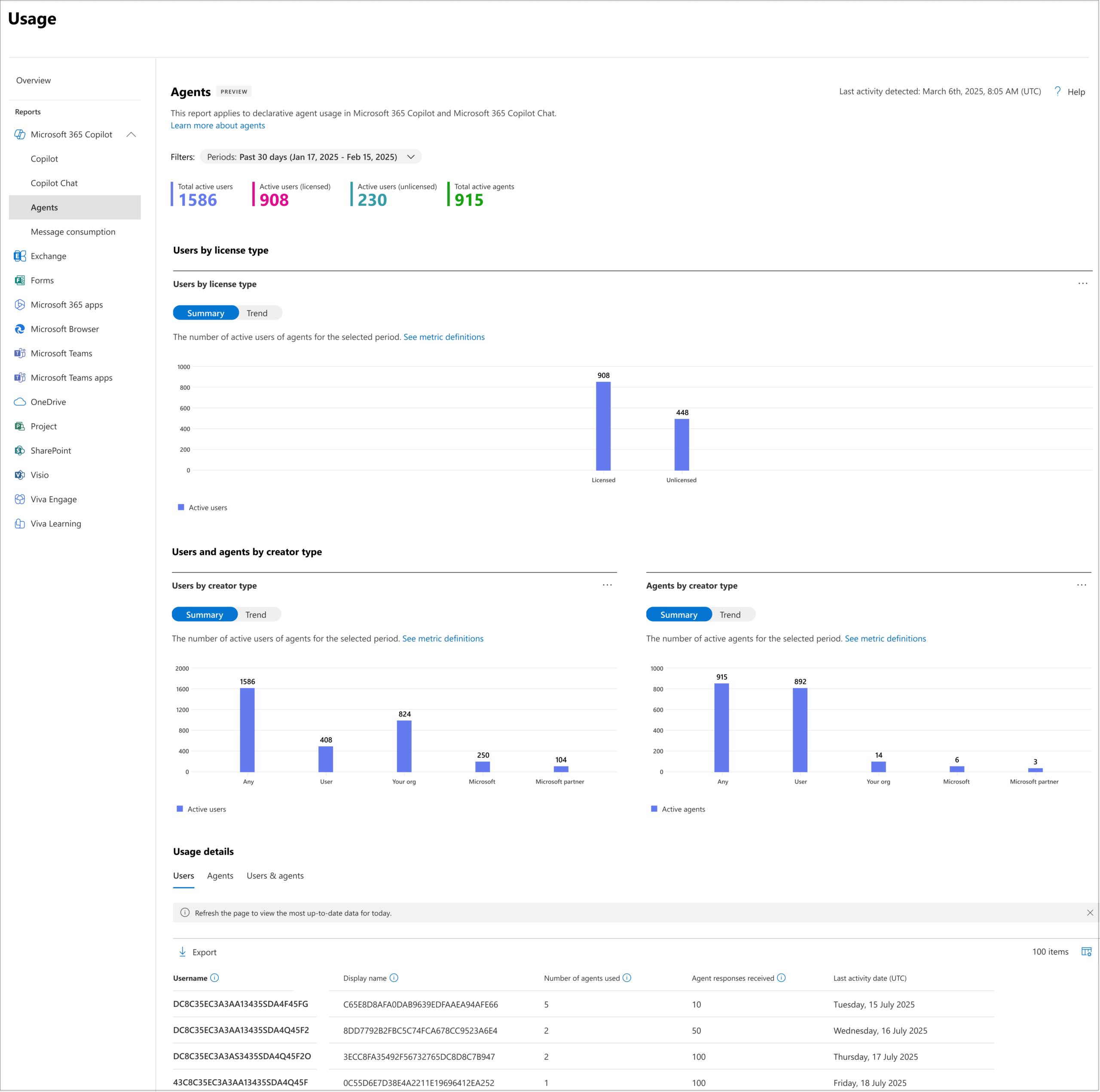
Usage reports may hide user-identifying information by default, depending on your organization’s privacy settings. Review your reporting configuration to ensure that your teams can access the right level of information while maintaining privacy and compliance requirements.
🔐 Pair Analytics With Office Hours
Use the Copilot Agents usage report to identify teams with low or inconsistent agent adoption.
Run short, role-based office-hours sessions using real work scenarios, such as finding policies, preparing customer follow-ups, or summarizing project updates.
During each session:
- Introduce one approved agent and its purpose
- Share two or three practical prompts
- Let employees test the agent with a real task
- Collect feedback on usefulness and accuracy
Review usage data afterward to see whether active users and repeat interactions improve.
Align Copilot Agent Usage With Governance Goals
Usage analytics are valuable, but they should work alongside strong Microsoft 365 Copilot governance. An agent should not be broadly available simply because it has been created.
Before deploying an agent to a wider audience, review its business purpose, knowledge sources, capabilities, actions, permissions, ownership, and compliance requirements. This helps you ensure that each agent supports a clear business need and follows your organization’s security standards.
Microsoft 365 provides controls that help you enable, assign, deploy, block, or remove Copilot agents. You can use these controls to make approved agents available only to the people and groups who need them.
A practical Copilot agent governance checklist includes:
- Define a clear business purpose for every approved agent
- Assign a named business owner and technical owner
- Review data sources, actions, and permissions before deployment
- Test agents with focused pilot groups before wider release
- Make agents available to relevant users and groups
- Monitor agent adoption and response activity regularly
- Improve, block, or remove agents that create risk or show limited value
- Review inactive or ownerless agents as part of regular governance
This approach helps you create a more secure and manageable Microsoft 365 Copilot environment while giving employees access to the agents that genuinely support their work.
📌 Learn more from Microsoft Documentation
- Explore how to manage Copilot agents in the Microsoft 365 admin center
- Read the Microsoft 365 agents admin guide
Make Copilot Agent Adoption Measurable
The Microsoft 365 Copilot Agents usage report gives you a practical way to understand whether agents are becoming part of everyday work. It connects agent availability with real user activity, engagement patterns, and response data.
You can use these insights to identify high-value agents, support employees who need help, improve underused agents, and make more confident governance decisions. This turns Microsoft 365 Copilot adoption into an ongoing improvement process instead of a one-time deployment activity.
By combining Copilot agent analytics, employee engagement initiatives, targeted training, and strong governance, you can build an AI agent environment that remains useful, secure, and aligned with business needs.
Frequently Asked Questions
You can manage agent availability, assignments, deployment, blocking, and removal through the Microsoft 365 admin center. Before wider deployment, review each agent’s capabilities, data access, actions, permissions, business purpose, ownership, and compliance requirements.
The Microsoft 365 Copilot Agents usage report is an admin center report that provides analytics on how people use Copilot agents. It includes information such as active users, active agents, response activity, usage trends, creator type, and user-agent interaction details.
Tracking Copilot agent usage helps you measure adoption, identify valuable agents, improve user enablement, and support better governance decisions. It also helps you distinguish between agents that are merely available and agents that are actively helping employees.
Yes. The report can show agent activity for both licensed and unlicensed Microsoft 365 Copilot users. This helps you understand agent engagement across different user groups in your organization.

















 Migrate
 Manage
 Migrate Microsoft 365








