


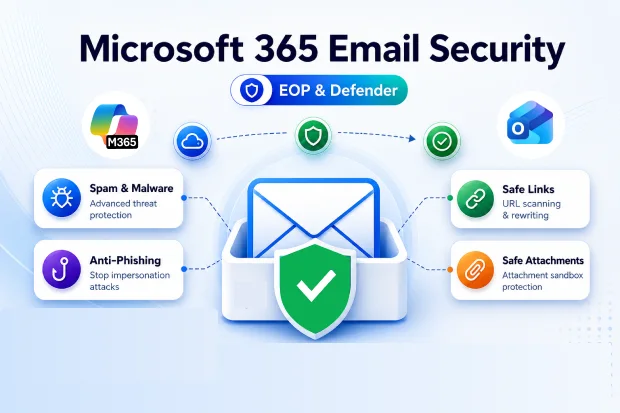
Phishing emails are getting smarter every day, and traditional spam filters alone are no longer enough to keep users safe. Attackers blend social engineering, malware, and business email compromise into messages that look and feel legitimate.
Microsoft 365 provides cloud native, AI powered online protection for Exchange that blocks many of these attacks at multiple layers before they reach the Inbox. When you configure Exchange Online Protection(EOP) and Defender for Office 365 correctly, mailboxes become a hardened front door instead of an exposed attack surface.
Why EOP Matters For Email Hygiene
Exchange Online Protection is the built-in email filtering service for Exchange Online that screens inbound and outbound mail for spam and malware. It uses connection filtering, content analysis, reputation data, and policy rules to enforce consistent email hygiene across a tenant.
With EOP, organizations get essential online protection for Exchange without extra gateways or appliances, so the email environment starts with a stronger security baseline.
Key benefits of Exchange Online Protection
- Cloud native exchange online protection with continuous updates from Microsoft threat intelligence.
- Connection filtering that evaluates sender IP reputation early to block suspicious mail before deeper inspection.
- Multi engine anti-malware and anti-spam filtering that inspects messages before delivery.
- Policy controls that can block high risk senders, domains, or message types automatically.
- Quarantine, safelist, and blocklist options that let administrators fine tune false positives and user experience.
Getting Your EOP Foundation Right
A strong EOP configuration is the baseline for secure email in Microsoft 365. Many organizations deploy Exchange Online and leave default policies in place, which often misses simple opportunities to improve spam and malware protection.
By tuning EOP, you increase the effectiveness of online protection for Exchange and reduce the pressure on downstream security tools.
Practical steps to strengthen EOP
- Enable recommended anti-spam and anti-malware policies and regularly review quarantine results.
- Use mail flow rules to block risky file types, enforce disclaimers, or route sensitive mail through extra controls.
- Configure spoof protection and sender authentication features to reduce impersonation attempts.
- Monitor reports to track spam volume and policy effectiveness over time.
⚙️ Policy Tuning Workshop
- Host a live or virtual session where administrators walk through current EOP policies.
- Share a simple checklist of key anti-spam and malware protections mapped to common attack scenarios.
- Guide changes that show near term improvements in spam catch rate and mailbox hygiene.
This gives customers a clear path from policy review to measurable outcomes, which keeps EOP configuration aligned with real risks.
Beyond Spam Filtering With Defender for Office 365
Defender for Office 365 builds over EOP to provide advanced protection against phishing, business email compromise, and zero-day attacks. It adds targeted threat detection, URL and attachment scanning, and post-delivery investigation features on top of the existing exchange online protection baseline.
This combination delivers a layered security stack that protects mailboxes, links, and collaboration tools such as Teams and SharePoint from evolving threats.
Core capabilities of Defender for Office 365
- Safe Links that rewrite and scan URLs at click time to stop malicious redirections.
- Safe Attachments that detonate files in a sandbox before users open them.
- Advanced phishing protection with machine learning and user impersonation detection.
- Automated investigation and response that helps security teams remediate suspicious activity faster.
Layering Defender for Office 365 On Top of EOP
Once EOP is in place, layering Defender for Office 365 moves email security from basic filtering to proactive threat prevention and response. Advanced anti phishing, real time URL scanning, and attack campaign views provide deeper visibility into how threats move across an organization.
Together, EOP and Defender create a unified email security posture that can be managed from a central security portal.
Best practices for Defender for Office 365
- Use preset security policies from Microsoft as a baseline, then adjust them for the specific risk profile.
- Turn on Safe Links and Safe Attachments for all users, prioritizing high value accounts first.
- Configure anti phishing policies that cover display name and domain impersonation and protect VIP users.
- Train support and security teams on investigation and response features so incidents are handled quickly.
🎯 Phishing Simulation Plus Fix
- Run a basic phishing campaign using Microsoft 365 tools to measure click rates and user behavior.
- Present the results to stakeholders and show how stronger anti phishing policies in Defender reduce exposure.
- Combine the simulation with configuration improvements so customers see both the problem and the fix in a single exercise.
This creates a clear narrative from user behavior to policy improvements, which helps build support for ongoing investments in email security.
Strengthening Email Authentication: SPF, DKIM, DMARC
Email authentication standards act as important partners to EOP and Defender for Office 365. When SPF, DKIM, and DMARC are correctly configured at the DNS level of your mail domains, they help verify legitimate senders and block spoofed messages used in many phishing campaigns.
Without these records, even a strong exchange online protection stack may struggle to separate trusted mail from carefully forged messages.
Key authentication steps
- Publish a Sender Policy Framework(SPF) record that lists authorized mail senders for the domains.
- Enable DomainKeys Identified Mail(DKIM) signing to validate outbound email from Exchange Online.
- Configure Domain based Message Authentication Reporting and Conformance(DMARC) to align SPF and DKIM and define actions for failed messages.
- Review DMARC reports regularly to identify unauthorized senders and misconfigurations.
Turning Email Security Into Continuous Governance
Email security is both a technical priority and a governance responsibility in Microsoft 365. EOP and Defender for Office 365 offer strong controls, but they deliver lasting value only when policy reviews, reporting, and user awareness become ongoing practices.
Treat exchange online protection and Defender configurations as living assets that evolve with the threat landscape rather than one-time projects.
Governance practices to adopt
- Schedule regular reviews of EOP and Defender policies tied to risk and compliance requirements.
- Use reports to track trends in phishing, spam, and malware, and use these insights to guide policy updates.
- Align user awareness campaigns with technical changes so staff understand why secure email behavior matters.
- Document configuration changes and decisions to keep auditors and stakeholders informed about the security posture.
To Learn deeper, explore these Microsoft resources:
For deeper guidance on configuring and managing email security in Microsoft 365, explore these Microsoft resources:

















 Migrate
 Manage
 Migrate Microsoft 365








