


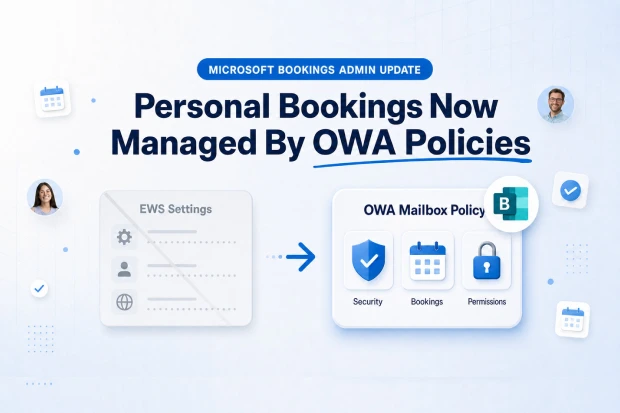
Microsoft is changing how IT admins control Personal Bookings (Bookings with me) in Microsoft Bookings, and this directly affects how you manage governance, security, and compliance in your Exchange Online environment.
Instead of relying on scattered Exchange Web Services EWS settings, control is being centralized in OWA Mailbox Policy, giving you a single, consistent place to manage who can use Personal Bookings and how.
For you as a Microsoft 365 administrator, this is a critical change for tightening calendar governance, improving access control, and simplifying Bookings with me management across your tenant.
What’s Changing In Microsoft Bookings
Microsoft is retiring EWS based controls that were previously used to enable or disable Personal Bookings, including organization level EWS configuration and per user CAS mailbox EWS parameters.
After this change, access to Personal Bookings is controlled only via OWA Mailbox Policy, which you can configure at the tenant level and assign to specific users as needed.
Key implications for your Microsoft 365 and Exchange Online administration include:
- EWS based Personal Bookings settings are ignored once the change takes effect.
- The default OwaMailboxPolicy-Default becomes the baseline for Personal Bookings availability when no custom policy is assigned to a user.
- Control shifts fully into the familiar OWA Mailbox Policy framework, aligning Personal Bookings governance with broader Exchange Online management practices.
Who Needs To Pay Attention
This update is especially important if your organization relies on Personal Bookings for internal meetings, customer appointments, or external stakeholder meeting scheduling.
You should review this change carefully if you are:
- A Microsoft 365 administrator responsible for Microsoft Bookings and Exchange Online.
- Part of an IT team that uses EWS organization configuration or per user CAS mailbox EWS settings to control Personal Bookings access.
- Responsible for security and compliance standards around self-service scheduling, Bookings with me, and calendar privacy.
Why Microsoft Is Moving To OWA Mailbox Policy
This update aligns with Microsoft Exchange Online security and management principles, where modern controls are consolidated into mailbox policies rather than legacy EWS flags.
By moving Personal Bookings access to OWA Mailbox Policy:
- You gain a single, consistent control plane for web-based Outlook and Bookings features.
- Policy based control becomes easier to audit, document, and align with security baselines and compliance frameworks such as CIS Microsoft 365 Foundations.
- You can apply predictable rules for Personal Bookings access that no longer depend on older EWS configuration.
What Is The Impact For End Users?
For end users, the Personal Bookings experience does not change even though the underlying control model is updated.
Bookings with me continues to:
- Use each organizer’s Outlook calendar and free or busy rules.
- Integrate with Outlook and Teams through the Bookings app for simple access to personal booking pages.
- Allow individuals to share a personalized scheduling link with internal or external contacts.
All changes are focused on how you manage access to Personal Bookings, not on how your users schedule time with others.
How To Update Your Personal Bookings Controls
To help you move cleanly from EWS based controls to OWA Mailbox Policy, here is a practical sequence of steps you can follow to review your current configuration, define your access strategy, implement the required policies, and validate the results in your Microsoft 365 tenant.
Step 1: Review Your Existing EWS Configuration
Start by identifying how Personal Bookings access is controlled today using Exchange Web Services.
- For organization wide EWS settings, run:
Get-OrganizationConfig | Select-Object EwsEnabled,EwsApplicationAccessPolicy,EwsBlockList,EwsAllowList - For per user EWS settings, run:
Get-CASMailbox -Identity <user> | Select EwsEnabled,EwsApplicationAccessPolicy,EwsBlockList,EwsAllow
This review gives you a baseline view of where Personal Bookings is enabled or restricted so you can plan equivalent controls in OWA Mailbox Policy.
Step 2: Decide Your Personal Bookings Access Strategy
Based on your findings and security requirements, decide how Personal Bookings should be available across your organization.
You can choose one of these models:
- Disable Personal Bookings for all users.
- Enable Personal Bookings only for selected users or roles.
- Keep Personal Bookings enabled broadly but disable it for specific high-risk accounts.
Having a clear strategy ensures your OWA Mailbox Policy configuration aligns with business and compliance expectations.
Step 3: Configure Personal Bookings With OWA Mailbox Policy
Implement your chosen strategy by configuring Personal Bookings access through OWA Mailbox Policy and assigning policies to users.
- To disable Personal Bookings for the entire organization:
Set-OwaMailboxPolicy -Identity “OwaMailboxPolicy-Default” -PersonalBookingsDisabled $true
Get-OwaMailboxPolicy -Identity “OwaMailboxPolicy-Default” | Select PersonalBookingsDisabled - To enable Personal Bookings only for specific users: Create a custom policy and assign the policy to selected users.
Set-OwaMailboxPolicy -Identity “OwaMailboxPolicy-Default” -PersonalBookingsDisabled $true
New-OwaMailboxPolicy -Name “BwmEnablePolicy”
Set-CASMailbox -Identity <smtp> -OwaMailboxPolicy “BwmEnablePolicy” - To disable Personal Bookings only for specific users: Create a custom policy and assign the policy to selected users.
Set-OwaMailboxPolicy -Identity “OwaMailboxPolicy-Default” -PersonalBookingsDisabled $false
New-OwaMailboxPolicy -Name “BwmDisablePolicy”
Set-OwaMailboxPolicy -Identity “BwmDisablePolicy” -PersonalBookingsDisabled $true
Set-CASMailbox -Identity <smtp> -OwaMailboxPolicy “BwmDisablePolicy”
These configurations shift control from EWS settings into a policy driven model that is consistent with other Exchange Online management practices.
Step 4: Validate And Clean Up After Migration
After you complete the policy changes, validate that Personal Bookings access matches your intended design and remove configuration that is no longer needed.
Focus on the following actions:
- Check that each user’s assigned OWA Mailbox Policy correctly reflects whether Personal Bookings is enabled or disabled.
- Remove any remaining EWS allow or block list entries related to Personal Bookings.
- Update internal documentation and notify helpdesk and Exchange administrators about the new control model.
This final step helps you avoid inconsistent access states and ensures your environment is fully aligned with the new OWA Mailbox Policy based approach.
🩺 Bookings Access Health Check
You can plan to examine OWA Mailbox Policy assignments and Personal Bookings status for a sample set of accounts.
In this health check, you can:
- Verify that each tested user has the right Personal Bookings availability.
- Highlight mismatches between expected access and actual policy configuration.
- Provide a compact report with recommended adjustments and documentation updates.
Compliance And Governance Considerations
Personal Bookings can expose free or busy information and appointment options to external audiences, which means it should be considered part of your security, privacy, and compliance framework.
With the shift to OWA Mailbox Policy controls:
- You can align Personal Bookings access with other Outlook Web and OWA policy decisions instead of treating it as a separate channel.
- Restricting Personal Bookings to specific users supports least privilege access and clearer accountability.
- Policy based controls are easier to monitor and audit against standards such as CIS Microsoft 365 Foundations and internal security baselines.
If your organization is regulated or carries strict security requirements, it is helpful to involve security and compliance stakeholders when you design your Personal Bookings approach.
They can help you:
- Define which user groups are allowed to publish and share personal booking pages based on risk and business need.
- Establish approval workflows for assigning enabling policies to new or existing users.
- Integrate Personal Bookings usage into ongoing monitoring and governance routines.
📋 Personal Bookings Adoption Playbook
Once your policy model is stable, you can safely encourage adoption in teams that need a streamlined way to schedule time with colleagues and customers.
You can build a Personal Bookings Adoption Playbook that includes:
- Short guides showing how to access the personal booking page from Outlook, Teams, or book ms and how to publish the page.
- Best practices for time slot configuration, buffer times, and appointment types that respect calendar hygiene and work life boundaries.
- Suggestions for sharing booking links in email signatures, customer communications, or internal portals to increase engagement without overwhelming calendars.
Align this playbook with your OWA Mailbox Policy assignments so that everyone understands when they receive access and how to use Personal Bookings responsibly.
Official Microsoft Links To Learn More
For deeper guidance, implementation details, and future updates, you can rely on Microsoft Learning documentation.
- Turn off Personal Bookings | Microsoft Learn
This article explains how administrators can control Personal Bookings availability and related settings. - Turn Shared Bookings on or off for organization | Microsoft Learn
This documentation covers how Bookings configuration works at the organization level and how OWA Mailbox Policy is used in broader Bookings scenarios. - Personal Bookings FAQ | Microsoft Learn
This FAQ answers common questions about Personal Bookings behavior, access methods, and licensing considerations. - Shared Bookings FAQ | Microsoft Learn
This FAQ helps you understand how Shared Bookings and Personal Bookings relate in Microsoft Bookings.

















 Migrate
 Manage
 Migrate Microsoft 365








