


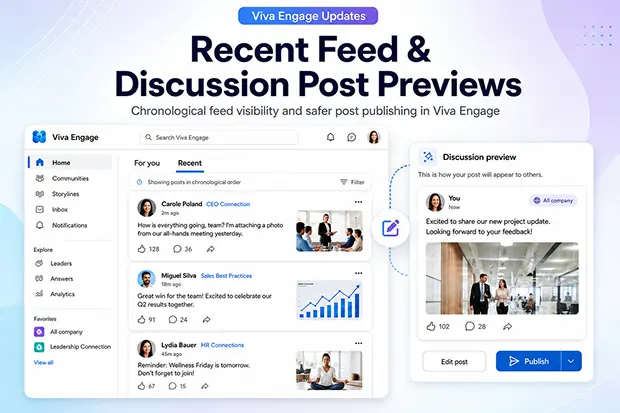
If you use Viva Engage to follow company updates or publish internal messages, two small changes can make a big difference. The new Recent feed helps you catch updates in time-based order, while discussion post previews let you check how your message looks before publishing. Together, these updates make Viva Engage feel more predictable for readers and safer for communicators.
Update 1: Recent Feed Arrives In Viva Engage Home
Microsoft is adding a new Recent feed in Viva Engage Home alongside the familiar ‘For you’ view you already know. ‘For you’ continues to surface content using recommendations, while Recent gives you a clearer, chronological way to see what is happening across your communities and connections.
What the ‘Recent’ feed actually does
- Presents a visible Recent option next to ‘For you’ in your Viva Engage Home feed.
- Shows posts from communities you follow, people you follow, and priority communications in a time-based order.
- Keeps your feed preferences consistent when you move between web, mobile, and the Viva Engage app in Teams.
By simply switching to Recent, you gain a more dependable view of what has been posted and when, instead of depending solely on automated recommendations.
Why this matters for your day
- You can quickly scan important leadership updates, HR notices, and team messages without worrying if the algorithm hid them.
- You reduce feed fatigue because you choose when to explore ‘For you’ and when to focus on Recent.
- You stay closer to the communities that matter most to you since their posts appear in a consistent order.
If you have ever wondered whether you missed a critical announcement in Viva Engage, the Recent feed is meant to help you feel more in control.
Update 2: Discussion Post Previews
Discussion post previews are coming to Viva Engage so you can see how a post will appear before publishing it. This is especially helpful if you create communications for leaders, communities, or companywide audiences inside Viva Engage and Teams.
What discussion post previews enable
- You see a preview option when composing discussion posts in Viva Engage on the web and inside Teams.
- You can validate formatting, headings, links, images, and overall readability in a preview screen before posting.
- Existing permissions and governance controls stay the same, so only the experience of preparing and publishing posts becomes smoother.
This gives you a safe space to check your work, much like reviewing a draft email or document before sharing it widely.
Why this matters for your communications
- You gain confidence before publishing sensitive or high impact messages from leaders or HR.
- You reduce the need for follow up corrections due to broken links, layout issues, or confusing formatting.
- You keep internal brand and tone more consistent by validating formatting and layout once, knowing the design is responsive across Viva Engage experiences, including Teams.
For anyone who writes announcements or updates as part of their role, previews feel like a small but powerful upgrade in everyday communication.
Where These Updates Will Appear
Both features are designed to appear in the Viva Engage experiences you already use.
- The Recent feed will be available in Viva Engage on the web, on mobile, and in the Viva Engage app inside Microsoft Teams.
- Discussion post previews will be available when you create discussion posts in Viva Engage on the web and through Teams.
- Both features connect naturally into your existing communities, storylines, and leadership communication patterns in Microsoft Viva.
You do not need to learn a new product or switch platforms. Instead, your current Viva Engage environment becomes more predictable for reading and more reassuring for publishing.
Official Microsoft Links To Learn More
For official details, rollout timelines, and admin guidance, refer to the Microsoft roadmap and support resources below.
- Track Update 1: “Recent feed” update in Microsoft Roadmap
- Track Update 2: “Discussion post previews” update in Microsoft RoadMap
- Viva Engage features service description | Microsoft Learn
- Viva Engage Home feed guidance | Microsoft Support
- Write and schedule posts, articles, and announcements in Viva Engage

















 Migrate
 Manage
 Migrate Microsoft 365








