


Your organization runs on cloud apps, but do you actually know which ones your employees are using right now? Most security teams are shocked when they discover the true scope of “shadow IT” hiding inside their network.
Microsoft Defender for Cloud Apps (formerly Microsoft Cloud App Security, or MCAS) is Microsoft’s flagship cloud app security platform. It was built to expose exactly that and to give you full command over your entire SaaS landscape.
If you’ve ever worried about data leaking through an unsanctioned app or a risky OAuth integration, this guide is your starting point. Let’s break down what MCAS is, why it matters, and how it strengthens your cloud app security posture.
- What Is Microsoft Defender for Cloud Apps?
- Why Cloud App Security Matters Today
- Key MCAS Capabilities in Practice
- Key Benefits and the Zero Trust Connection
- How MCAS Works: Visibility and Control
- Access Policies vs. Session Policies
- Common Use Cases for Security and Governance Teams
- MCAS in the Microsoft Defender Family
- Licensing and Where MCAS Lives
- Getting Started With Defender for Cloud Apps
- Bringing It Together
What Is Microsoft Defender for Cloud Apps?
Microsoft Defender for Cloud Apps is a comprehensive cloud access security broker (CASB) that delivers full protection for your SaaS applications. It sits between your users and your cloud services to give you visibility and control over how data moves.
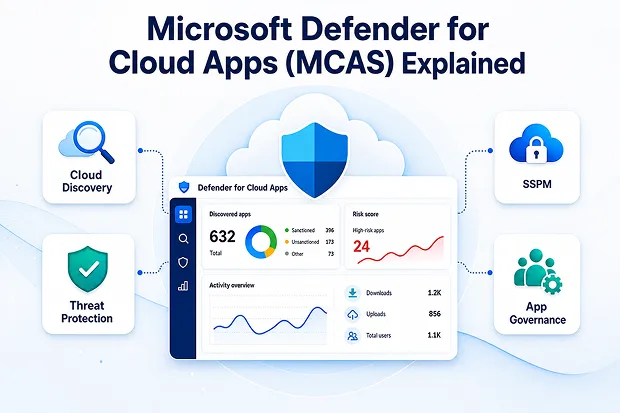
The platform combines four core capabilities into one solution:
- Fundamental CASB functionality for discovery and policy enforcement
- SaaS Security Posture Management (SSPM) to harden app configurations
- Advanced threat protection across connected apps
- App-to-app protection that governs OAuth and API integrations
Beyond simply finding your apps, it inspects the data moving through them, spots unusual behavior like a sudden spike in downloads, and can act on its own when something looks wrong.
Why Cloud App Security Matters Today
The shift to SaaS means sensitive corporate data now lives outside your traditional network perimeter. Without proper cloud app security, you lose sight of where data travels and who touches it.
Left unmanaged, that gap shows up as concrete risk:
- Sensitive files quietly spreading into apps IT never approved
- OAuth grants handing third-party apps standing access to your data
- Compromised accounts and insider activity blending into normal cloud traffic
- Compliance gaps created by unmonitored SaaS sprawl
Key MCAS Capabilities in Practice
Those four capability areas show up as a set of practical building blocks that map to the full security lifecycle.
Capability | What It Does |
|---|---|
Cloud Discovery | Identifies shadow IT and calculates risk scores for discovered apps |
Information Protection | Inspects content, applies DLP, and protects sensitive data in motion |
SaaS Security Posture Management | Assesses SaaS app configurations and recommends fixes to close security gaps |
Threat Protection | Uses access and session policies plus anomaly detection to flag risky and suspicious activity |
App Governance | Monitors and secures OAuth apps and unusual data usage |
Cloud Discovery and Shadow IT
Cloud Discovery surfaces every app in use, then scores each on a risk scale so you can act quickly. You can tag risky apps as unsanctioned and even block them automatically through integration with Microsoft Defender for Endpoint.
Cloud Discovery can run in two ways. You can upload firewall or proxy logs for analysis, or you can integrate with Microsoft Defender for Endpoint to pull telemetry straight from managed devices. The Defender for Endpoint route is the lowest-friction option because it needs no extra appliance, proxy, or software agent, and no network changes.
SaaS Security Posture Management (SSPM)
SSPM gives you a detailed read on the security state of your SaaS apps. It surfaces misconfigurations and recommends specific fixes, so you can close the gaps that attackers look for first.
Threat Protection and Anomaly Detection
On connected apps, MCAS learns what normal looks like for each user, then flags the deviations — an impossible-travel login, a sudden burst of downloads, or a session from a risky IP. You can route those alerts to automatic responses, such as suspending the user or forcing a fresh sign-in.
App Governance for OAuth
OAuth apps tend to hold broad, standing permissions to your data and rarely get a second look. App governance lists every connected OAuth app, scores it on permission risk and publisher reputation, and lets you revoke anything that’s over-privileged, unused, or sketchy.
Try This: The 7-Day Visibility Challenge
A simple way to see MCAS value fast is to enable Cloud Discovery and review the discovered apps dashboard each day for a week. Within days, patterns emerge: unsanctioned file-sharing tools, redundant SaaS subscriptions, and high-risk apps that warrant immediate policy action.
Key Benefits and the Zero Trust Connection
Adopting MCAS delivers measurable advantages for security and governance teams:
- A complete inventory of every SaaS app in use, sanctioned or not
- Real-time session controls through Conditional Access App Control
- Data loss prevention with content inspection and admin quarantine
- Threat detection and automated governance response actions
- Stronger Zero Trust monitoring across your cloud estate
MCAS is a natural fit for a Zero Trust strategy because it continuously monitors and verifies activity rather than trusting any app or session by default. Access and session policies let you control exactly what users can do inside an app — such as blocking downloads of sensitive files to unmanaged devices.
How MCAS Works: Visibility and Control
Cloud Discovery vs. App Connectors: Two Ways MCAS Sees Your Apps
MCAS gains visibility through two complementary methods that serve different purposes.
- Cloud Discovery analyzes traffic logs to surface unsanctioned apps and shadow IT, giving you the full picture of what people actually use
- App connectors use provider APIs to pull deep, real-time data and apply governance actions on sanctioned apps like Microsoft 365, Salesforce, and Box
Together they cover both the apps you know about and the ones you don’t.
Knowledge Drop: Sanctioned vs. Unsanctioned
Sanctioned apps are the ones your organization has formally approved and connected for deep, ongoing monitoring. Unsanctioned apps are those flagged as risky or unapproved, which can then be restricted or blocked outright. The distinction matters because it determines how much visibility and control MCAS can apply: connected sanctioned apps get full API-level governance, while unsanctioned apps are managed mainly through discovery and access restrictions.
Access Policies vs. Session Policies
Conditional Access App Control gives you two policy types to govern user activity in real time.
Policy Type | Best For |
|---|---|
Access Policy | Allowing or blocking sign-in to an app based on user, device, or location |
Session Policy | Controlling in-app actions such as blocking downloads, uploads, or copy-paste of sensitive data |
Session policies are powerful for unmanaged or BYOD scenarios where you want access but not data exfiltration.
Common Use Cases for Security and Governance Teams
MCAS solves several everyday problems that security and governance teams face.
- Catch and block risky OAuth apps before they over-permission your data
- Enforce DLP on sensitive files traveling through cloud apps
- Detect anomalous activity such as impossible travel or mass downloads
- Strengthen SaaS configurations using SSPM recommendations
- Extend Conditional Access controls to the session level
Discussion Starter: Your Biggest SaaS Blind Spot
Most SaaS risk hides in one of three places: unsanctioned apps IT never approved, OAuth grants that hand third-party apps standing access, and insider or compromised-account activity that blends into normal traffic.
Each blind spot calls for a different MCAS control, from Cloud Discovery for shadow IT to app governance for OAuth and anomaly detection for risky behavior. Mapping your environment against these three categories quickly reveals where your biggest exposure sits.
MCAS in the Microsoft Defender Family
Defender for Cloud Apps doesn’t work in isolation; it integrates across the Microsoft security stack. Its connection with Microsoft Defender for Endpoint enables agentless Shadow IT discovery and one-click blocking of risky apps.
Signals also flow into the broader Microsoft Defender XDR experience, helping correlate cloud app activity with wider threat investigations.
Licensing and Where MCAS Lives
Defender for Cloud Apps is included in Microsoft 365 E5 and E5 Security, and it’s also sold as a standalone license. So many organizations on a modern Microsoft 365 plan already have access. Confirm your licensing position before a rollout, because some capabilities have dependencies — Conditional Access App Control, for example, relies on a Microsoft Entra ID P1 license for the underlying Conditional Access policy.
You manage everything from the Microsoft Defender portal at security.microsoft.com, under the Cloud Apps section, where the discovery dashboard, policies, and alerts all live. For data protection, MCAS works alongside Microsoft Purview Information Protection, applying and respecting sensitivity labels and DLP policies across your connected apps.
Getting Started With Defender for Cloud Apps
Setup begins with providing basic information about your organization, then connecting your cloud apps through API connectors. From there, you can view and manage your security posture, build policies, and turn on app governance for OAuth apps.
A practical rollout order looks like this:
- Complete basic setup and organizational details
- Connect your priority cloud apps
- Enable Cloud Discovery to map shadow IT
- Configure access and session policies
- Turn on app governance for OAuth monitoring
Best Practices for a Strong Rollout
A successful deployment follows a phased approach rather than enabling everything at once.
- Start in monitor mode to baseline normal activity before enforcing policies
- Prioritize connecting your highest-value sanctioned apps first
- Review SSPM recommendations regularly to close configuration gaps
- Tune policies to reduce false positives before scaling org-wide
- Document an app approval workflow so governance stays consistent
Action Challenge: Build Your First Policy This Week
A strong starting point is a single session policy that blocks downloads to unmanaged devices on one sanctioned app. It delivers an immediate, measurable security win and builds momentum for a wider, phased rollout.
Bringing It Together
Strong cloud app security comes down to two things: seeing what your people actually use, and staying in control of the data once they’re inside those apps. Defender for Cloud Apps gives you both — discovery for the shadow IT you can’t see, and governance for the sanctioned apps you depend on. Start small, measure what you catch, and expand from there.
Official Microsoft References
To explore the topic further, Microsoft provides detailed guidance through its official resources.
Start with Microsoft’s official Defender for Cloud Apps overview to understand what the platform does and how it helps protect SaaS applications.
You can also refer to the Defender for Cloud Apps documentation for complete setup, configuration, policy, and governance guidance.
For posture management, review SaaS Security Posture Management in Defender for Cloud Apps to learn how Microsoft helps identify risky SaaS configurations and recommend fixes.
If you are planning a rollout, the basic Defender for Cloud Apps setup guide is a good starting point for initial configuration.
To control real-time app access, Microsoft also explains how to create access policies with Conditional Access App Control.
For product-level details, licensing context, and feature positioning, visit the Microsoft Defender for Cloud Apps product page.

















 Migrate
 Manage
 Migrate Microsoft 365








