


Overview
In today’s evolving regulatory landscape, organizations face increasing pressure to maintain data privacy, security, and regulatory compliance. With growing data volumes and stricter global regulations, manual compliance tracking is no longer sustainable.
This is where Microsoft Purview Compliance Manager becomes a game-changer offering a centralized, automated, and intelligent approach to compliance management in Microsoft 365 and Azure.
In this guide, we’ll explain what Microsoft Purview Compliance Manager is, how it works inside the compliance center, how Compliance Score and assessments help measure compliance posture, and how templates, benefits, and best practices support modern enterprise compliance management.
- What Is Microsoft Purview Compliance Manager?
- Compliance Manager Inside the Compliance Center Pillar
- Understanding the Compliance Score
- Assessments in Compliance Manager
- Compliance Templates Explained
- How Microsoft Purview Compliance Manager Works
- Benefits of Using Microsoft Purview Compliance Manager
- Microsoft Purview Compliance Manager vs Traditional Compliance Tools
- Who Should Use Microsoft Purview Compliance Manager?
- Best Practices for Using Microsoft Purview Compliance Manager
- Final Thoughts
- Frequently Asked Questions
What Is Microsoft Purview Compliance Manager?
Microsoft Purview Compliance Manager is a compliance risk management solution within the Microsoft Purview compliance portal that helps organizations assess, manage, and improve their regulatory compliance posture. It provides pre-built compliance templates, automated assessments, real-time risk tracking, and actionable improvement insights for various industry and regional standards.
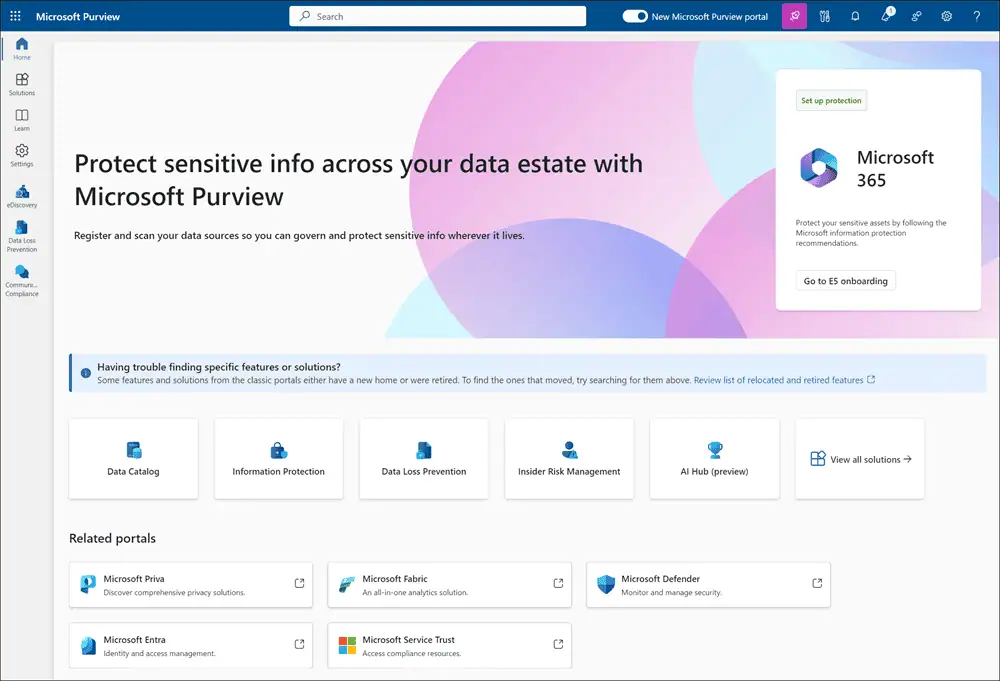
Image Courtesy: Learn about Microsoft Purview portal
It enables businesses to:
- Monitor compliance across Microsoft 365, Azure, and third-party environments
- Identify compliance gaps and risks
- Track improvement actions with assigned responsibilities
- Demonstrate regulatory adherence with audit-ready reports
By centralizing compliance governance, Microsoft Purview Compliance Manager center reduces operational risk while strengthening trust and accountability.
Compliance Manager Inside the Compliance Center Pillar
Compliance Manager does not work in isolation. It lives inside the broader Microsoft Purview compliance portal, the central hub that unifies data governance, risk, and compliance tools in one place. Microsoft has since folded this experience into the unified Microsoft Purview portal, so the compliance portal’s tools now sit under a single entry point.
Simply put, the Microsoft Purview portal is like a house, and Compliance Manager is one important room inside that house. Along with Compliance Manager, there are other rooms (solutions) such as Data Loss Prevention (DLP), Information Protection, and eDiscovery, each designed for a specific compliance task. Within this pillar, Compliance Manager plays a specific role:
- Turns regulatory requirements into measurable, trackable actions
- Connects signals from other Purview tools into a single score
- Acts as the reporting layer for audits and governance reviews
This tight integration means the sensitivity labels, DLP policies, and classification work you configure elsewhere in Purview feed directly into your compliance posture.
For the full breakdown of the portal itself – its tools, roles, and setup – see our Microsoft Purview Compliance Center guide, which this article builds on.
Understanding the Compliance Score
The Compliance Score is the headline metric in Compliance Manager. It measures your organization’s adherence to regulatory requirements as a single, easy-to-read percentage.
The score is calculated from completed improvement actions, each carrying a point value based on risk. Higher-risk actions contribute more points when completed.
The score is built from two types of points:
- Your points, earned through actions your organization manages and completes
- Microsoft-managed points, earned automatically for controls Microsoft handles in its cloud services
This scoring approach helps security and compliance teams:
- Prioritize high-risk areas first
- Track continuous compliance improvement over time
- Benchmark regulatory readiness as a measurable KPI
A useful habit is to treat the Compliance Score like a credit score for governance. It moves as you complete actions and gives leadership a clear, trackable signal of progress.
Assessments in Compliance Manager
An assessment is a grouping of controls tied to a specific regulation, standard, or policy. It measures how well your environment meets the requirements of that particular framework.
Each assessment brings together the improvement actions, evidence, and control status needed to demonstrate compliance with one standard.
Compliance Manager supports two assessment approaches:
- Automated technical assessments that continuously evaluate Microsoft services such as Microsoft 365, Azure, and Dynamics 365
- Manual assessments for organizational and procedural controls that cannot be tested automatically
Automated signals reduce manual effort by updating control status as your environment changes. Manual controls cover the people-and-process side, ensuring end-to-end governance coverage.
The result is a realistic picture of both your technical configuration and your operational practices in one place.
Compliance Templates Explained
Templates are the starting point for every assessment. Each template contains the pre-mapped controls and recommended actions for a specific regulation or standard.
Instead of building a framework from scratch, you select a template and Compliance Manager generates a ready-to-use assessment around it.
Purview ships with ready-made templates for major industry regulations, including:
- GDPR
- ISO 27001
- NIST
- SOC 2
- HIPAA
- PCI-DSS
- FedRAMP
These templates drastically reduce the time required to build a compliance framework and are continuously updated to reflect regulatory changes.
You can also work with custom and extended templates to cover regional rules or internal policies not included by default.
How Microsoft Purview Compliance Manager Works
Microsoft Purview Compliance Manager operates through three core layers:
- Assessment Layer – Evaluates controls using automated signals and user inputs.
- Scoring Layer – Calculates the Compliance Score based on completed actions.
- Management Layer – Enables tracking, documentation, and reporting for continuous compliance.
This structured approach simplifies even the most complex regulatory environments and ensures organizations stay aligned with changing compliance requirements.
Benefits of Using Microsoft Purview Compliance Manager
Centralized Compliance Governance
Manage all regulatory frameworks from a single interface within the Microsoft Purview compliance portal – eliminating scattered tools and manual spreadsheets.
Reduced Compliance Risk
With real-time insights and prioritized improvement actions, organizations can proactively mitigate risks before they turn into violations.
Automated Regulatory Mapping
Microsoft automatically maps its cloud service controls to regulatory standards, reducing the burden on compliance teams.
Improved Audit Readiness
Maintain continuous audit readiness with structured evidence collection, version-controlled documentation, and traceable improvement actions.
Scalability for Global Enterprises
Whether you operate in one region or across multiple countries, Microsoft Purview Compliance Manager scales effortlessly to support diverse regulatory requirements.
Microsoft Purview Compliance Manager vs Traditional Compliance Tools
| Feature | Traditional Tools | Microsoft Purview Compliance Manager |
| Manual Tracking | High | Minimal |
| Automated Assessments | Limited | Extensive |
| Built-in Regulatory Templates | Few | Extensive |
| Real-Time Compliance Score | No | Yes |
| Microsoft 365 & Azure Integration | Limited | Native |
| Audit Reporting | Manual | Automated |
Who Should Use Microsoft Purview Compliance Manager?
Microsoft Purview Compliance Manager is ideal for:
- IT and security administrators
- Compliance officers and governance teams
- Highly regulated industries such as finance, healthcare, education, and government
- Organizations undergoing Microsoft 365 security and compliance modernization
- Enterprises preparing for ISO, SOC, or regulatory audits
Best Practices for Using Microsoft Purview Compliance Manager
- Start with High-Impact Regulations: Prioritize GDPR, ISO 27001, or industry-specific frameworks.
- Assign Clear Ownership: Allocate improvement actions to accountable teams.
- Leverage Automation: Regularly review automated assessments to maintain real-time compliance.
- Review Compliance Score Periodically: Use it as a KPI for your organization’s risk management.
- Keep Evidence Updated: Upload supporting documentation consistently for audit readiness.
Final Thoughts
Microsoft Purview Compliance Manager is no longer just a compliance tracking tool-it is a strategic platform for continuous risk management, regulatory governance, and digital trust. With automated assessments, intelligent scoring, and centralized reporting, it empowers organizations to stay compliant in an increasingly complex regulatory world.
For organizations leveraging Microsoft 365 and Azure, adopting Microsoft Purview Compliance Manager is a critical step toward building a future-ready compliance and security framework.
Frequently Asked Questions
Microsoft Purview Compliance Manager supports a wide range of global and industry regulations, including:
- GDPR
- ISO 27001
- NIST
- SOC 2
- HIPAA
- PCI-DSS
- FedRAMP

















 Migrate
 Manage
 Migrate Microsoft 365








