


As teams roll out Microsoft 365 Copilot, one question keeps coming up: what data can these AI tools actually see, and how do you keep sensitive information from reaching the wrong people? A single Copilot prompt can draw on content across SharePoint, OneDrive, Teams, and Exchange. Without a clear view of where that data lives and who can reach it, managing the risk becomes guesswork.
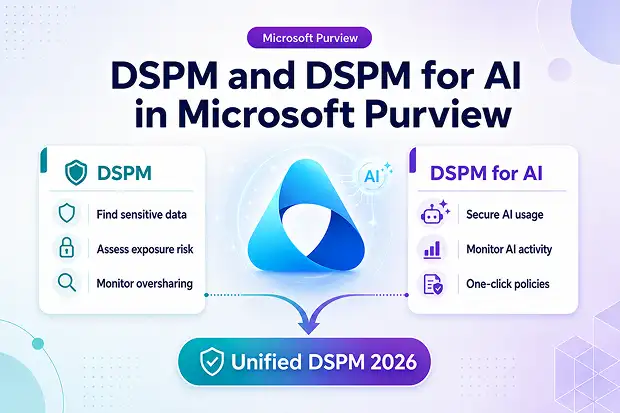
Microsoft’s answer is Data Security Posture Management (DSPM). And in 2026, the way it works changed in a way worth knowing before you follow any older tutorial. DSPM and DSPM for AI were once two separate experiences, but they’ve now merged into a single solution that is generally available – and the classic versions are on their way out.
This guide covers what DSPM and DSPM for AI are, what the 2026 consolidation changed, what the retirement timeline means, and how the pieces fit together.
- What is Data Security Posture Management (DSPM)?
- DSPM in Microsoft Purview
- What is DSPM for AI?
- DSPM vs. DSPM for AI
- The 2026 change: DSPM and DSPM for AI are now one solution
- Inside the new DSPM portal
- How DSPM for AI protects Copilot and your data
- Data risk assessments: preparing for a Copilot rollout
- Licensing and prerequisites
- A practical adoption path
- Summary
What is Data Security Posture Management (DSPM)?
At its core, DSPM is a discipline for finding sensitive data wherever it lives and assessing how exposed it is to security threats and non-compliance. Day to day, it continuously answers four questions:
- Where does your sensitive data live? Across SharePoint, OneDrive, Teams, Exchange, and third-party clouds.
- Who can access it? And are those permissions still appropriate?
- How is it being shared or moved? Including whether it’s being fed into AI tools.
- What is the risk right now? Misconfigurations, oversharing, and exposure that could turn into a breach.
Notice that word – continuously. That’s what separates DSPM from traditional compliance, which tends to be a point-in-time exercise, like an annual audit. DSPM is ongoing monitoring that keeps your view of risk current. In Purview, it does this by correlating signals across your data security, risk, and compliance solutions to flag unprotected data and prompt timely action.
This matters because most enterprises now span multiple clouds, the majority of business data is unstructured and scattered across collaboration tools, and regulatory expectations keep tightening – more than any team can track by hand. That growing exposure is why DSPM cybersecurity has moved up the priority list for many organizations.
DSPM in Microsoft Purview
What sets DSPM in Purview apart is that it isn’t a separate scanner – it builds on the data protection controls Microsoft 365 customers already own. It consolidates insights from Data Loss Prevention (DLP), Insider Risk Management, Information Protection, and Data Security Investigations into a single view for monitoring risk, policy coverage, and posture trends.
The current version is organized around data security objectives. Instead of configuring tools one at a time, you pick an outcome – say, “Prevent oversharing of sensitive data” – and Purview guides you through the full workflow, surfacing key metrics like the share of data covered by policies and prioritized actions you can apply directly.
The 2026 release also reaches beyond Microsoft’s own services to third-party platforms – Salesforce, Databricks, Snowflake, and Google Cloud Platform – through partner integrations such as Varonis, BigID, Cyera, and OneTrust, though these connectors remain in preview. The goal is one posture view across all your sensitive data, not just what’s inside Microsoft 365.
What is DSPM for AI?
DSPM for AI addresses a problem generative AI introduced almost overnight. AI surfaces data faster, to more people, with less friction – so existing permission mistakes become visible much more quickly. A SharePoint site shared too widely might go unnoticed for years; point Copilot at it, and that content can appear instantly in a summarized answer.
DSPM for AI is the AI-aware layer of DSPM, providing a central place to secure data for AI apps and monitor AI usage. It delivers three things:
- Insights and analytics to track AI activity, including interactions that touched sensitive data.
- One-click policies to reduce the risk of leakage in AI prompts and responses.
- Compliance controls that apply your data-handling rules to AI usage.
Which AI apps does it cover?
Microsoft groups supported apps into three categories:
- Copilot experiences and agents — Microsoft 365 Copilot, Copilot Chat, Security Copilot, Copilot in Fabric, Copilot Studio, and Teams agents.
- Enterprise AI apps — Microsoft Foundry, Entra-registered AI apps, Anthropic Claude (Enterprise), and ChatGPT Enterprise.
- Other AI apps — consumer ChatGPT, Google Gemini, consumer Copilot, and DeepSeek.
That third group is the hardest to manage, since employees reach those tools straight from a browser. DSPM for AI extends to them through the Microsoft Purview browser extension (Edge, Chrome, Firefox) and Endpoint DLP, which can warn or block users from entering sensitive information into a third-party AI site – such as pasting credit card numbers into a public chatbot.
DSPM vs. DSPM for AI
DSPM | DSPM for AI |
|---|---|
|
Finds and protects sensitive data |
Secures AI usage and AI-related risks |
|
Identifies oversharing and exposure |
Monitors prompts, responses, and AI activity |
|
Focuses on data security posture |
Focuses on AI security and compliance |
In simple terms, DSPM protects the data, while DSPM for AI helps ensure AI uses that data safely. In 2026, Microsoft combined both into a single DSPM experience.
The 2026 change: DSPM and DSPM for AI are now one solution
If you take away one thing from this guide, make it this.
Through most of 2025, Purview showed two separate experiences: DSPM and DSPM for AI (originally “Microsoft Purview AI Hub”). In 2026, Microsoft merged them into a single solution, now generally available under Solutions > DSPM. (Government clouds – GCC, GCC High, and DoD – follow a slightly later schedule.)
The earlier products weren’t deleted. They were renamed Data Security Posture Management (classic) and DSPM for AI (classic) and still work for now – but Microsoft is retiring both on September 30, 2026. Until then they run alongside the new DSPM so nothing breaks; after that date, the unified DSPM is the only option. Your features and data are already in the new experience, so the move is about timing, not risk.
The in-product notice says it plainly: “Data Security Posture Management (classic) and Data Security Posture Management for AI (classic) will be retired on September 30, 2026. All features from the classic solutions and your data are available now in the new DSPM.” (Microsoft Purview portal, DSPM overview)
Here’s what the unified version brings:
Capability | What it means in practice |
|---|---|
|
Unified visibility |
A single posture view across Microsoft 365, Azure, Fabric, and third-party SaaS — traditional data risk and AI risk in one place |
|
AI observability |
Dashboards for AI agent activity, including oversharing, exfiltration, and unusual access patterns |
|
Administrative unit support |
Delegated administration to scope DSPM by region or business unit (rolling out — confirm it’s active in your tenant) |
|
Data Security Posture Agent |
An AI agent that speeds up investigations (in preview) |
For most organizations, the move is undramatic: most tasks from the previous versions are now embedded in the new experience, policies and configurations carry over, and the classic versions remain reachable until they retire. So if a guide tells you to look for a “DSPM for AI hub (preview)” with no license required, treat it as out of date.
Inside the new DSPM portal
Open Solutions > DSPM and you’ll find six main areas:
- Posture — your overview, with key data discovery and protection metrics from the last 30 days.
- Objectives — the outcome-based workflows above.
- AI observability — how AI apps and agents are interacting with your data.
- Discover — where data risk assessments live.
- Tasks and actions — remediation steps and recommendations.
- Reports — posture trends over time.
There’s also an embedded Copilot that answers questions like “Which devices were involved in exfiltration activities?” right in the overview – so you can move from spotting a risk to acting on it without leaving the workflow.
How DSPM for AI protects Copilot and your data
DSPM for AI doesn’t reinvent data protection; it applies existing Purview controls to AI usage. The main pieces work together as follows.
Sensitivity labels are the foundation
Labels govern what Copilot is allowed to see, making them the most important control. Microsoft 365 Copilot respects existing access rights – data is never returned to a user, or used by the model, if that user lacks access. When a label applies encryption, the user needs EXTRACT and VIEW rights before Copilot can surface the content. A well-labeled estate means Copilot inherits your permission model rather than working around it.
Data Loss Prevention keeps sensitive data out of prompts
Purview DLP for Microsoft 365 Copilot can prevent labeled files and emails from being used as grounding data, and now also protects prompts that contain sensitive data. For third-party AI in a browser, Endpoint DLP can warn or block sensitive data from leaving the device.
Insider Risk Management identifies risky behavior
The Risky AI usage policy template detects AI-specific threats, including prompt injection attacks and attempts to access protected materials, with insights flowing into Microsoft Defender XDR.
Auditing and Activity Explorer provide the record
Every prompt and response is captured in the unified audit log and appears in the AI activities tab in Activity Explorer – showing how users interact with an AI app, which service was involved, which files were referenced, and whether labels applied. Because prompts and responses sit in the user’s mailbox, eDiscovery can search them too.
Data risk assessments: preparing for a Copilot rollout
Data risk assessments are usually the first feature you’ll use before deploying Copilot – and one of the most valuable. An assessment scans your environment to surface oversharing before AI can. The default runs weekly across the top 100 SharePoint sites by usage, flagging unprotected sensitive files with broad or external access. You can also run custom assessments on demand.
In 2026, assessments gained item-level investigation and remediation for SharePoint, letting admins act on flagged items in four ways: resolve the item, apply a sensitivity label, notify the owner, or remove the sharing link.
Microsoft also split assessments by surface: Microsoft 365 assessments focus on SharePoint and OneDrive oversharing (the main Copilot-readiness step), while Fabric assessments cover Microsoft Fabric workspaces. Many organizations use both.
Licensing and prerequisites
Licensing. The full DSPM and DSPM for AI experience needs Microsoft 365 E5 or E5 Compliance. A version of DSPM for AI is also available with E3 and Microsoft 365 Copilot licenses, and monitoring actual AI interactions requires Copilot licenses. DSPM for AI has no permission structure of its own – it relies on the underlying Purview solutions, so you’ll need licenses for those. Business Premium customers can reach much of this via the Purview Suite add-on, though some advanced AI capabilities still require E5 Compliance.
Permissions. Assign the least-privileged role that fits. Full access comes with the Compliance Administrator, Global Administrator, or Purview Compliance Administrator role group; view-only access is available through roles like Security Reader and Purview Data Security AI Viewer.
Setup. Enable unified audit logging and AI collection policies first. For shadow-AI visibility, install the Purview browser extension and onboard your devices. Then allow at least 24 hours for the dashboard to analyze your environment.
A practical adoption path
- Confirm licensing and prerequisites – audit logging, AI collection policies, and the browser extension on managed devices.
- Run a data risk assessment to find your worst oversharing first. Treat it as a readiness gate.
- Remediate the obvious exposure — apply labels, fix broadly shared sites, remove stale anonymous links.
- Turn on one-click policies and a “prevent oversharing” objective for ongoing guardrails.
- Review the AI activities tab to see how AI is being used, then refine DLP and Insider Risk policies accordingly.
Summary
DSPM has become the control plane for adopting AI without losing sight of your data. As of 2026, the picture is simpler: one unified Data Security Posture Management experience in Purview, covering both your traditional data estate and your AI usage – with the classic versions retiring on September 30, 2026.
The organizations that adopt Copilot most successfully are the ones that can see where their data is, understand their risk, and act before a permission mistake becomes an incident. That’s the purpose of DSPM – and a good reason to start moving off the classic experiences well before the deadline.
If you need help preparing your SharePoint and OneDrive environment for Copilot – labeling sensitive content, addressing oversharing, and managing permissions at scale – that data-readiness work is exactly what DSPM is built to support, and it’s best done before you enable AI across your organization.
















