


SharePoint storage can grow quietly until it becomes a costly and urgent problem. A new project site, a large Teams workspace, a migration, or years of retained documents can push your tenant beyond its included storage capacity faster than expected.
Microsoft’s new pay-as-you-go SharePoint storage option gives you a more flexible way to manage that growth. Rather than purchasing additional storage before you know how much you will need, you can pay for the storage consumed beyond your tenant quota.
This gives you greater control over SharePoint Online storage costs while helping you keep collaboration moving without unnecessary capacity purchases.
- What Is Microsoft’s New SharePoint Storage Meter?
- Why Consumption-Based SharePoint Storage Matters
- How Pay-As-You-Go SharePoint Storage Works
- Check Your SharePoint Storage Before Enabling It
- Pay-As-You-Go vs. Extra Storage Add-Ons
- Microsoft 365 Archive and Storage Planning
- A Practical Checklist for SharePoint Admins
- The Bottom Line
What Is Microsoft’s New SharePoint Storage Meter?
Microsoft has introduced a consumption-based billing option for extra SharePoint storage. It is designed to help you manage storage overages when your SharePoint Online usage exceeds the storage included with your Microsoft 365 tenant.
With this option enabled, extra SharePoint storage is billed based on what your organization actually uses above its available quota. This can be useful when storage needs change frequently or when growth is difficult to predict.
You still have the option to purchase additional storage through the existing Office 365 Extra File Storage add-on. The new pay-as-you-go option simply gives you another way to plan and manage SharePoint capacity.
This update can be particularly useful if you manage:
- Fast-growing SharePoint document libraries
- Teams-connected SharePoint sites with heavy file activity
- Client, project, or department collaboration portals
- Large volumes of migrated files
- Long-term business documents and records
- Multiple sites with changing storage requirements
Why Consumption-Based SharePoint Storage Matters
SharePoint storage needs can change quickly due to migrations, new projects, Teams collaboration, and growing file libraries. Pre-purchasing capacity may leave you paying for storage that is not immediately needed.
With pay-as-you-go SharePoint storage, you pay only when usage exceeds your tenant quota. This gives you a more flexible way to handle unexpected growth while keeping storage costs aligned with actual business demand.
Key Benefits for Microsoft 365 Administrators
- Pay only for SharePoint storage used beyond your tenant quota.
- Avoid purchasing excess capacity before it is required.
- Support changing storage needs without disrupting users.
- Keep the option to purchase fixed extra storage when preferred.
💡 “Would You Switch?” Storage Poll
Share a quick poll that encourages Microsoft 365 admins, IT leaders, and finance stakeholders to think about how they manage SharePoint storage costs.
Poll question:
Would your organization rather pre-purchase SharePoint storage or pay only when usage exceeds the tenant quota?
- Pre-purchase capacity for predictable budgeting
- Use pay-as-you-go for flexible growth
- Combine both approaches
- Start with a SharePoint storage audit
This is a simple way to start a conversation about storage planning, cloud cost management, and Microsoft 365 governance.
How Pay-As-You-Go SharePoint Storage Works
Your Microsoft 365 tenant continues using its existing SharePoint storage allocation as normal. The new billing option becomes relevant only when your tenant’s SharePoint storage consumption goes beyond the included or licensed capacity.
Once enabled, the extra storage used above your quota is measured and billed through a pay-as-you-go model. This gives you the flexibility to accommodate storage growth without manually purchasing capacity before it is required.
To use the service, you need an Azure subscription connected for billing and the correct administrative permissions in place. You can configure pay-as-you-go services from the Microsoft 365 admin center.
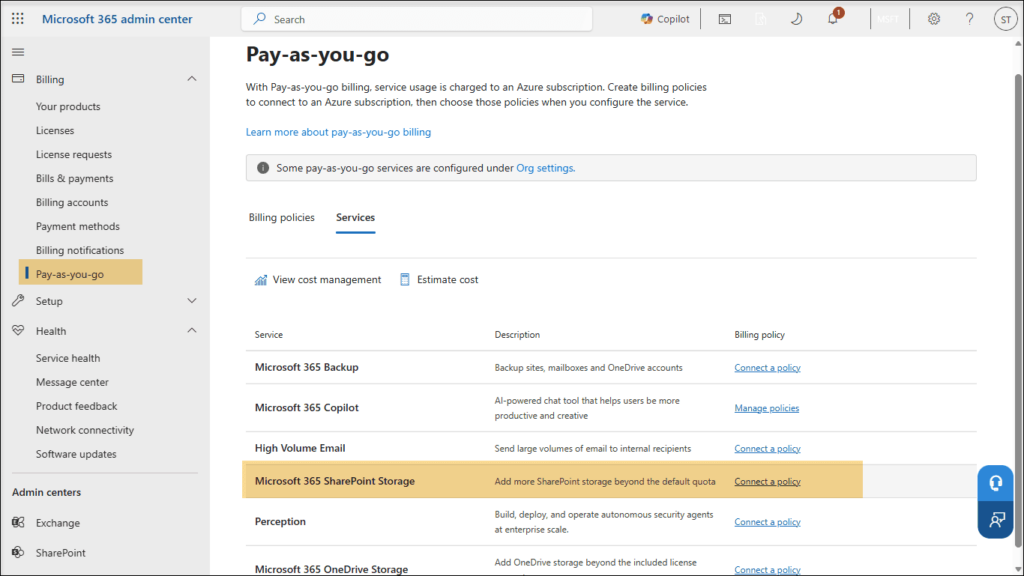
What You Need to Know
- The feature is intended for organizations managing SharePoint Online storage.
- It is opt-in and remains off until an administrator enables it.
- Charges apply when SharePoint storage consumption exceeds your tenant’s available quota.
- An Azure subscription is required for usage-based billing.
- Appropriate Microsoft 365 and Azure billing permissions are required for setup.
- The Office 365 Extra File Storage add-on remains available for fixed-capacity planning.
- This option is currently not available for education tenants.
Check Your SharePoint Storage Before Enabling It
Before choosing a new storage billing model, take time to understand how your SharePoint storage is being used today.
Start by reviewing your SharePoint storage usage in the SharePoint admin center. The Active sites page can help you identify which sites consume the most capacity and where storage growth is happening.
This review can reveal whether your storage increase is caused by active collaboration, a temporary business project, old site content, duplicate files, large media assets, or an incomplete migration cleanup.
SharePoint admin center showing Active sites and the Storage used column
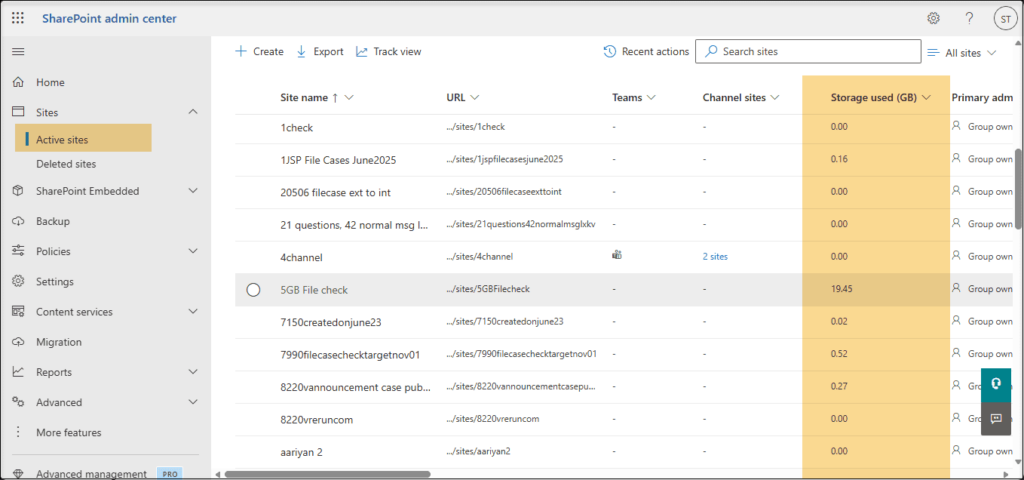
Use this view to identify:
- High-growth SharePoint sites
- Teams-connected sites with large document libraries
- Inactive project or department sites
- Sites with unusually high storage consumption
- Old content that may need a governance review
- Content that may be suitable for archiving, cleanup, or retention review
Storage growth is not always a problem. However, unexplained growth can signal gaps in content ownership, lifecycle management, site governance, and file management practices.
🧭 “Find Your Storage Hotspots” Mini Challenge
Turn this Microsoft update into a practical challenge for your audience.
Ask them to review the five largest SharePoint sites in their tenant and consider the following questions:
- Which site is using the most storage?
- Is the content actively used by the business?
- Does the site have a clear business owner?
- Are old project files still needed in active SharePoint storage?
- Could some content be archived, cleaned up, or governed more effectively?
This engagement idea encourages action while helping your audience see SharePoint storage as more than just a technical metric.
Pay-As-You-Go vs. Extra Storage Add-Ons
Both options can help you manage SharePoint storage beyond your tenant quota. The best choice depends on whether your storage requirements are predictable or likely to fluctuate.
Pay-as-you-go storage may be helpful when your organization is completing a migration, supporting a major client project, creating a new collaboration environment, or experiencing temporary storage growth.
Pre-purchased storage may be more suitable if your organization consistently needs additional capacity and prefers fixed, planned storage allocation.
For many organizations, the right approach may include both regular storage governance and a flexible method for handling unexpected growth.
Consideration | Pay-as-you-go SharePoint Storage | Office 365 Extra File Storage Add-On |
|---|---|---|
Payment approach | Pay for storage consumed beyond your tenant quota | Purchase additional storage capacity in advance |
Best fit | Uncertain, temporary, seasonal, or changing storage growth | Stable and predictable long-term storage requirements |
Flexibility | Supports storage growth based on actual consumption | Supports planned capacity through fixed storage purchases |
Budgeting approach | Requires usage monitoring and Azure billing oversight | Supports more predictable subscription-based planning |
Administrative setup | Requires pay-as-you-go billing configuration | Requires additional storage capacity purchase |
Cost management focus | Track storage overages and consumption trends | Plan capacity based on expected long-term needs |
Microsoft 365 Archive and Storage Planning
Managing SharePoint storage effectively is not only about buying more capacity. It is also about understanding which content needs to remain active and which content can move into a more cost-efficient long-term storage approach.
Microsoft 365 Archive can support this strategy by helping you retain inactive SharePoint files and sites without keeping all content in active SharePoint storage.
For example, completed projects, historical client records, old department sites, and inactive workspaces may still need to be retained. However, they may not require the same level of day-to-day access as active collaboration content.
A practical SharePoint storage strategy can include:
- Keeping active files and project sites in standard SharePoint storage
- Reviewing inactive sites for archive eligibility
- Removing duplicate, obsolete, or unnecessary content where permitted
- Applying retention policies for business and compliance requirements
- Monitoring storage growth regularly
- Identifying sites with no clear ownership
- Choosing the right balance between pay-as-you-go storage and pre-purchased capacity
The goal is not simply to reduce storage. It is to ensure that your SharePoint environment remains useful, governed, secure, and cost-aware.
A Practical Checklist for SharePoint Admins
The new pay-as-you-go SharePoint storage option gives you more flexibility, but it works best when paired with clear storage monitoring and governance.
Before enabling the service, use this checklist to assess whether it fits your organization.
- Review total SharePoint storage usage across your tenant.
- Identify the SharePoint sites consuming the most capacity.
- Determine whether storage growth is temporary, seasonal, or permanent.
- Review inactive sites, old project workspaces, and duplicate content.
- Check whether inactive content can be archived or removed according to your policies.
- Confirm the Azure subscription that will be used for billing.
- Verify that the required Microsoft 365 and Azure permissions are available.
- Establish ownership for monitoring usage-based storage charges.
- Involve finance or procurement teams in the cost-management process.
- Compare expected overage costs with pre-purchased storage add-on costs.
- Create a regular SharePoint storage review process.
The Bottom Line
Microsoft’s pay-as-you-go SharePoint storage option gives you a flexible way to handle storage usage that goes beyond your tenant quota.
Instead of purchasing extra storage before you need it, you can choose a consumption-based approach that aligns costs with actual SharePoint usage. This can be valuable when storage needs change due to projects, migration activity, business growth, or increased collaboration.
The best results come from combining flexible billing with strong SharePoint storage governance. Review your largest sites, understand what is driving storage growth, involve the right business stakeholders, and choose the model that fits your organization’s operational and financial needs.
Learn More from Microsoft
Use these Microsoft resources to explore setup steps, storage options, and archive pricing in more detail.
















