


External collaboration is now a normal part of Microsoft Teams. Employees chat with vendors, partners, customers, consultants, and other external organizations every day.
That flexibility is useful, but it also creates a visibility problem.
How do Teams admins know when external communication suddenly becomes unusual?
A single external domain creating more 1:1 chats than usual, starting multiple group threads, or showing a sudden spike in engagement may not always be malicious. But it is worth investigating.
Microsoft is now addressing this gap with a new External domains anomalies report in the Microsoft Teams admin center.
What Is the External Domains Anomalies Report?
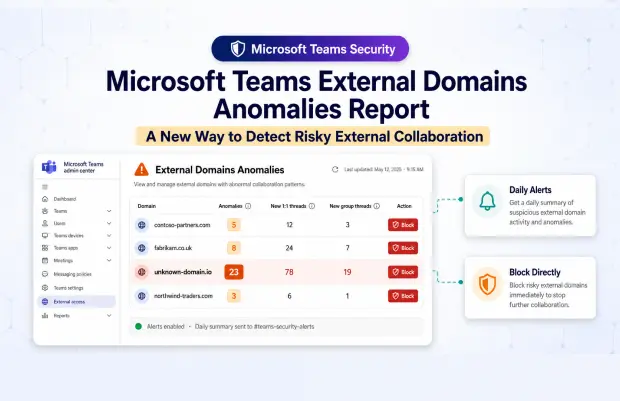
The External domains anomalies report helps Teams administrators identify unusual communication patterns between their tenant and external organizations.
Instead of only showing standard external collaboration activity, the report highlights domains that show abnormal behavior, such as sudden increases in communication or unexpected engagement patterns.
This gives admins a more practical way to detect external collaboration risks before they become larger security or governance issues.
The report will be available in the Teams admin center under Protection reports.
Why This Matters
External access in Teams is useful, but it can also become difficult to monitor at scale.
In many organizations, users communicate with dozens or hundreds of external domains over time. Some are trusted business partners. Others may be temporary vendors, old project contacts, or unknown organizations that were never reviewed properly.
Without anomaly detection, admins often rely on manual review, user reports, or periodic audits. That approach can miss sudden changes.
For example:
An external domain that rarely interacted with your users may suddenly create many new 1:1 chats.
A partner domain may begin creating multiple group threads unexpectedly.
A previously low-activity external organization may show a sharp communication spike.
These patterns do not automatically mean there is a threat. But they are exactly the kind of signals Teams admins should be able to review quickly.
What Admins Will See
Teams admins will be able to run the report by selecting Communication anomalies and choosing a date range.
The report will show external domains with unusual communication activity, including:
|
Report Insight |
What It Helps Admins Understand |
|---|---|
|
External domain name |
Which external organization is involved |
|
Total anomalies detected |
How many unusual patterns were found |
|
New 1:1 threads created by that domain |
Whether direct external conversations increased |
|
New group threads created by that domain |
Whether group-based external communication increased |
This helps admins move from broad external access visibility to more focused investigation.
Instead of asking, “Which external domains are communicating with us?”, admins can ask, “Which external domains are behaving unusually?”
Built-In Block Option
One of the most important additions is the ability to take action directly from the report.
Microsoft is adding a Block option for managing external domains from within the report experience.
This is useful when an admin identifies a domain that appears risky, suspicious, or no longer approved for collaboration.
The value here is not just visibility. It is faster response.
Admins can review unusual activity and act on it without switching between multiple admin workflows.
Proactive Alerts for External Domain Anomalies
The report is useful for investigation, but Microsoft is also adding alerting support.
Admins can enable External domains anomalies alerts in the Teams admin center.
To configure alerts, admins can go to:
Notifications & alerts > Rules > External domains anomalies
From there, they can set the rule status to Active and optionally specify a Teams channel where notifications should be sent.
Once enabled, daily alerts will summarize the top five external domains with unusual activity.
This is especially helpful for security and collaboration governance teams that do not want to manually check reports every day.
Why This Is Useful for Teams Admins
This release gives Teams admins a better way to monitor external communication risk without blocking collaboration completely.
Many organizations struggle with the balance between productivity and security. Turning off external collaboration may be too restrictive. Leaving it unmanaged creates risk.
The External domains anomalies report supports a middle path.
Admins can allow external communication while still monitoring unusual behavior.
This helps with:
Detecting suspicious external engagement patterns
Reviewing unexpected partner or vendor activity
Investigating communication spikes
Supporting external access governance
Responding faster to risky domains
Improving visibility across tenant-to-tenant collaboration
What Organizations Should Do Next
No action is required to access the report once it becomes available in the Teams admin center.
However, organizations should not treat this as just another report. It should become part of the Teams governance and security review process.
Admins should consider:
- Defining who reviews external domain anomalies
- Enabling daily alerts for proactive monitoring
- Sending alerts to a dedicated Teams channel
- Reviewing current external access policies
- Creating a response process for suspicious domains
- Documenting when a domain should be blocked
- Communicating with security teams before blocking major partner domains
- The report is most valuable when it is connected to a clear operating process.
Admin Checklist
|
Area |
Recommended Action |
|---|---|
|
Report access |
Confirm Teams admins can access Protection reports |
|
Alerting |
Enable External domains anomalies alerts |
|
Notification channel |
Configure a Teams channel for daily alerts |
|
Review process |
Assign ownership for anomaly review |
|
Response |
Define when to investigate, allow, or block a domain |
|
Governance |
Align findings with external access policies |
Final Thoughts
The External domains anomalies report is a practical improvement for Microsoft Teams governance.
External collaboration is not going away. In most organizations, it will continue to grow as Teams becomes the default place for cross-company communication.
But as external communication increases, admins need better ways to identify what looks unusual.
This new report gives Teams admins a focused view of abnormal external domain activity, along with alerting and a direct block option. That makes it easier to investigate risky patterns, respond faster, and maintain safer external collaboration without creating unnecessary disruption for users.
















