


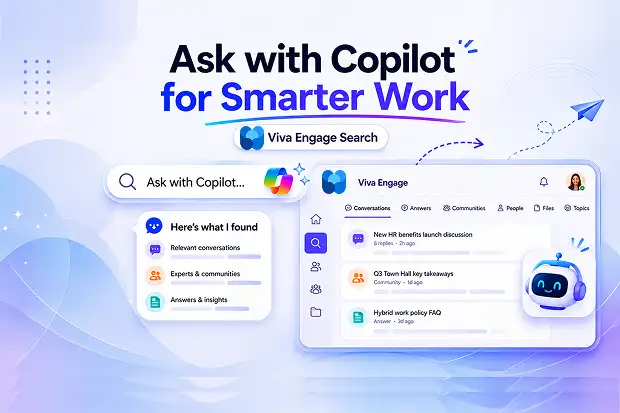
Finding the right information at work should not feel frustrating or slow. Microsoft’s latest Viva Engage search update makes that experience much smarter by bringing together AI, personalization, and Copilot in a way that helps you discover conversations, people, answers, and communities faster.
If you use Microsoft 365 every day, this update matters because it changes how you uncover internal knowledge and stay connected to what your organization is talking about.
- What’s New In Viva Engage Search
- Stage 1: Instant Suggestions And Ask Copilot
- Stage 2: Rich, Filterable Search Results
- How Licensing Impacts Your Search Experience
- How Viva Engage Hybrid Search Works
- Privacy, Personalization, And Ranking
- How To Get Better Results In Viva Engage Search
- Why This Update Matters For Digital Employee Experience
What’s New In Viva Engage Search
Viva Engage now delivers a more personalized search experience, which means results are shaped by the people, communities, and content most relevant to you. Even when two employees search for the same term, they may see different results based on their own work context and activity.
Here are the biggest improvements:
- Personalized ranking based on your activity, communities, and connections
- Hybrid search that combines keyword matching with AI powered meaning matching
- A redesigned search journey with smart suggestions and a richer results page
This update is designed to improve enterprise search, employee engagement, and knowledge discovery across Viva Engage.
Stage 1: Instant Suggestions And Ask Copilot
The new experience starts the moment you click the search bar. Viva Engage immediately shows suggestions based on recent activity and previous searches, so you can get to the right content faster.
As you type, search can surface:
- Suggested searches related to your query
- Relevant people, communities, and campaigns
- The new Ask Copilot option for natural language questions
Ask Copilot is especially useful when you want a direct answer instead of a list of posts. For example, it can help with general questions like who won the company hackathon, what happened in a town hall, or how to complete a task inside Viva Engage.
Ask Copilot sends your question to Microsoft 365 Copilot, which looks across Viva Engage conversations and returns a natural language answer with citations to the original content.
Stage 2: Rich, Filterable Search Results
After pressing Enter, you land on a redesigned results page that organizes content into clear tabs. This helps you move quickly between discussions, people, communities, and other content types without losing focus.

The main search tabs include:
- Conversations
- Answers
- Communities
- People
- Campaigns
- Files
- Topics
Search results also include filters such as date, author, and community, making it easier to narrow down what you need. Microsoft also highlights matching keywords in titles, previews, and replies so you can understand why a result is relevant at a glance.
How Licensing Impacts Your Search Experience
Your license decides whether you see only standard search in Viva Engage or also get Ask Copilot.
- Users with standard Viva Engage License gets access to Viva Engage search (with keyword matching, meaning matching, personalized ranking, and filtering).
- Users with a Microsoft 365 Copilot License gets access to “Ask Copilot in Viva Engage” additionally.
Note
Premium Viva Engage licenses (for example, Viva Suite) unlock Engage Copilot v1 and other advanced Viva Engage features, but do not replace the need for a Microsoft 365 Copilot license for Ask Copilot.
How Viva Engage Hybrid Search Works
Microsoft says Viva Engage search combines keyword and meaning matching, so it can find exact terms while also understanding the intent behind your query.
Keyword matching finds exact words and phrases, while meaning matching uses AI to surface similar content even when the wording differs.
For example, searching for team morale ideas might still surface a post titled Fun Activities to Boost Team Engagement because the intent is similar. This helps uncover useful content that traditional search may miss.
Privacy, Personalization, And Ranking
Microsoft says Viva Engage search respects Microsoft 365 permissions, so you only see content you already have access to view.
Private community posts that you cannot access, along with deleted threads, are not shown in results.
Search ranking is also influenced by many signals, including text relevance, your interactions, community activity, semantic similarity, recency, and engagement levels. That is why search results can feel more useful and tailored to your role and interests over time.
How To Get Better Results In Viva Engage Search
The updated Viva Engage search becomes more useful when you search with clear intent. A more specific phrase like FY26 leadership strategy will usually work better than a broad term like strategy.
These simple habits can help:
- Use more specific search terms
- Switch tabs when looking for people or communities
- Filter by date when you know roughly when something was posted
- Filter by author when you remember who shared it
- Filter by community when you know where the conversation happened
- Apply search operators such as AND, OR, NOT, and quotation marks for exact phrase matching
- Hashtags and topics can also help surface content more precisely.
Why This Update Matters For Digital Employee Experience
This is more than a visual refresh. Microsoft is positioning Viva Engage search as a smarter way to connect people with internal knowledge, relevant conversations, and organizational expertise.
For businesses using Viva, Teams, and Microsoft 365 Copilot, this can reduce time spent hunting for answers and help more employees rely on Viva Engage as a trusted place for shared knowledge. Over time, that can support stronger communication, better collaboration, and more connected workplace communities.
Learn More From Microsoft
Here are the official Microsoft links to explore this update further:
















