


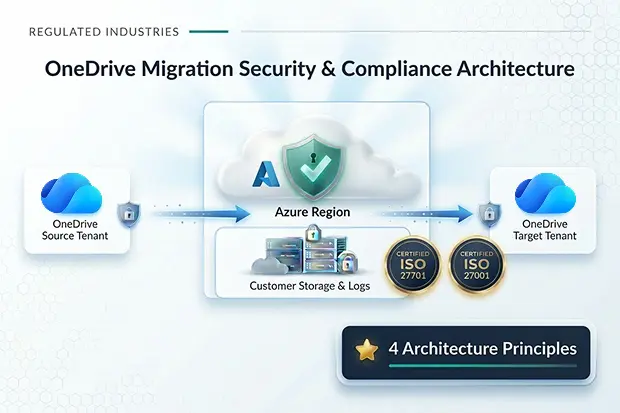
Migrating OneDrive for Business between Microsoft 365 tenants is not just a productivity project; it is a security and compliance project first. If you work in finance, healthcare, government, or any regulated vertical, you need to prove that your OneDrive for Business migration security approach protects data, preserves data residency, and aligns with ISO 27001 and 27701.
Security must be prioritized in any cross-tenant migration involving regulated data. Clear risk, audit, and impact analysis keeps every technical choice compliant and defensible – setting the stage for the importance of migration security.
- Why OneDrive for Business Migration Security Matters
- Architecture Principle 1: Customer Owned Data Plane
- Architecture Principle 2: Entra ID Delegated Permissions (Least Privilege)
- Architecture Principle 3: Controlled Access via CORS and Localhost
- Architecture Principle 4: Built In Compliance – ISO 27001 and 27701
- Meeting Data Residency and Sovereignty Requirements
- Security Best Practices for OneDrive for Business Tenant Migrations
- How Apps4.Pro Compares to Native Cross Tenant OneDrive Migration
- Helpful Resources While Planning Migration
- FAQs: OneDrive Migration Security & Compliance
Why OneDrive for Business Migration Security Matters
Microsoft OneDrive for Business now holds a large portion of regulated and confidential content, from financial reports to Protected Health Information(PHI) and citizen records. Any insecure OneDrive for Business cross-tenant migration can introduce data leakage, incorrect permissions, and non-compliance with regional or industry regulations.
- Migrations offer attackers opportunities, as quick changes in identities, permissions, and endpoints can create security gaps.
- Regulators increasingly scrutinize how data is handled during cross tenant or cross region migrations.
The fastest way to earn auditor confidence is to keep control of data and logs in your own environment. When the data plane is truly customer owned, you reduce exposure to third parties and make it much easier to prove data residency and sovereignty to regulators and auditors.
Now, let us ground the migration in a few architecture principles you can defend in any audit.
Architecture Principle 1: Customer Owned Data Plane
A secure OneDrive for Business tenant to tenant migration should ensure that data never leaves your control while it is in motion. With Apps4.Pro, all migration state and metadata stay inside customer owned Azure Table Storage and Service Bus within your own Azure subscription.
- No customer content or metadata is stored in vendor owned storage.
- You choose the Azure region by using your own Azure AD application, which helps you enforce OneDrive for Business migration data residency and sovereignty policies.
This approach is crucial for regulated tenants that must keep records, logs, and data operations inside specific jurisdictions.
For a detailed, step by step walkthrough on how to Configure Azure AD application, refer Apps4.Pro OneDrive for Business Migration Guide.
Architecture Principle 2: Entra ID Delegated Permissions (Least Privilege)
Many older OneDrive migration tools demand Global Admin or broad app only permissions, which sharply increases risk. Apps4.Pro uses Entra ID delegated permissions with the principle of least privilege to support secure OneDrive for Business migration between office 365 tenants.
- Only scoped, delegated permissions are granted to the migration app.
- Global Admin role is not required to complete OneDrive for Business migration tasks.
This keeps the identity surface smaller and makes it easier to justify the migration posture to both internal security reviewers and external auditors.
Architecture Principle 3: Controlled Access via CORS and Localhost
A secure OneDrive for Business migration architecture must tightly control how and from where admin consoles are accessed. Apps4.Pro enforces a strict CORS policy with a single allowed origin host, which reduces the risk of browser-based token theft and cross site attacks during admin operations.
- CORS locked to a single host ensures only the authorized migration console can call backend APIs.
- Combined with MFA and conditional access, this setup significantly lowers the attack surface.
In regulated organizations, this careful control over endpoints becomes a key line in migration architecture documentation and risk assessments.
Work with your SOC team so that the migration console URL and relevant IP ranges are added to monitoring and allow list policies.
Architecture Principle 4: Built In Compliance – ISO 27001 and 27701
When you evaluate any ISO 27001 migration tool for OneDrive for Business, you should look at both the technical controls and the vendor certifications. Apps4.Pro is designed to align with ISO 27001 for information security and ISO 27701 for privacy information management, which gives auditors a familiar framework to review.
To satisfy ISO driven expectations around security and privacy, the OneDrive data migration platform is backed by formal policies and controls that are designed and operated in a structured way.
- Policies cover access control, logging, and operation of the migration infrastructure.
- Privacy centric controls help protect personal data that is processed during the migration lifecycle.
This alignment makes it easier for you to map OneDrive for Business migration security controls into your existing ISMS and privacy documentation.
Residency questions can stop a migration late in the process if they are not addressed early. Make region control a core requirement so you can demonstrate, with evidence, that data stayed where it is allowed to be.
Meeting Data Residency and Sovereignty Requirements
Many enterprises move OneDrive for Business data from one tenant to another or into a new tenant due to mergers, divestitures, or changes in data residency rules. In these situations, regulators often expect clear proof that data stayed inside approved regions throughout the OneDrive for Business migration.
- Customer owned Azure Table Storage and Service Bus lets you pin migration data to specific Azure regions.
- You can align the OneDrive for Business migration data residency design with your existing Azure and Microsoft 365 regional strategies.
This approach is especially important for public sector, financial services, and healthcare organizations with strict local data residency expectations.
A solid architecture is only as strong as the operational discipline around it. A clear set of security routines reduces surprises, shortens incident response time, and keeps stakeholders confident throughout the migration.
Security Best Practices for OneDrive for Business Tenant Migrations
Strong architecture works best when it is matched with disciplined operations during migration.
- Turn on MFA and conditional access for every migration admin account.
- Conduct a pre-migration audit of permissions and sharing configurations for all scoped OneDrive for Business accounts.
- Ensure all migration traffic uses encrypted channels in transit (such as HTTPS with TLS).
- Schedule migration waves during non-peak hours to avoid throttling and reduce user impact.
- Monitor logs and alerts continuously while migrations are running.
When you combine these practices with the Apps4.Pro architecture, you get an end-to-end OneDrive for Business migration security posture that is defensible and auditable.
Practical moves you can make during planning: Host a 30 minute “Migration Readiness Standup” that brings IT, security, and business owners together to walk through this checklist and assign clear owners.
By adopting these best practices, you not only strengthen your migration security but also set the stage for a more reliable and controlled experience. This approach ensures confidence as you evaluate different migration solutions.
How Apps4.Pro Compares to Native Cross Tenant OneDrive Migration
Native cross tenant OneDrive for Business migration from Microsoft is powerful, but it is built primarily for scripted, one time moves using SharePoint Online PowerShell. Apps4.Pro Migration Manager focuses on giving you a guided, high control experience designed for repeatable projects, deep reporting, and stronger operational controls in regulated environments.
- Native relies heavily on PowerShell, identity mapping CSVs, and Cross Tenant User Data Migration(CTUDM) licensing.
- Apps4.Pro provides a visual interface, richer scheduling, incremental runs, and detailed reports with fewer manual steps.
- Both methods retain data within Microsoft 365, but Apps4.Pro adds a structured migration layer to Microsoft’s ISO-certified platform, offering more control over migration logs, telemetry, and processes to meet compliance and residency needs.
Comparison: Apps4.Pro Vs Native Cross Tenant OneDrive for Business Migration Tool
| Aspect | Native cross tenant OneDrive migration tool | Apps4.Pro OneDrive migration tool |
|---|---|---|
| Setup experience | PowerShell driven, requires admin familiarity with SharePoint Online cmdlets and cross tenant trust setup. | Guided UI, connects tenants with wizards, minimal scripting, faster onboarding for admins. |
| Migration model | One time “move” focused, best suited to planned waves with redirects after completion. | Supports full and incremental migrations, pilot runs, and retries with granular task control. |
| Identity mapping | CSV based identity mapping is required and manually managed. | Built in inventory and mapping helpers reduce manual effort and errors. |
| Security and compliance | Data stays in Microsoft 365 with ISO certified security, but majorly still depends on your role, permission, and admin configuration. | Adds an ISO aligned migration layer, deeper logs, and lets you run components in your own Azure subscription for tighter governance. |
| Reporting and visibility | Limited progress and error reporting, mainly via PowerShell outputs. | Rich dashboards, per user and per job reports, exportable proof for audits and stakeholders. |
| Scale and performance | Supports up to 4,000 OneDrive accounts queued per batch, with service limits on size and paths. | High speed engine with parallel processing, large volume handling, and controls to manage throttling. |
| Use cases | Best for straightforward, script friendly, one and done tenant consolidation scenarios. | Better fit for regulated, complex, or large programs that need repeatability, evidence, and flexible scheduling. |
Helpful Resources While Planning Migration
The strongest plans borrow from proven guidance rather than reinventing controls under deadline. Curating trusted resources up front helps your team move faster while staying aligned to security and compliance expectations.
You can lean on the below proven Microsoft and Apps4.Pro resources.
- Learn broader SharePoint Migration patterns from the SharePoint Online Tenant-to-Tenant Migration Article
- Strengthen your SharePoint security posture with the SharePoint Security Best Practices article.
- Use the article on OneDrive Migration Guide to plan and execute user file moves as part of your broader Microsoft 365 tenant migration.
Secure migrations made simple, choose Apps4.Pro!
Apps4.Pro offers secure, ISO-compliant OneDrive for Business migration with cross-tenant support and delegated permissions for regulated industries.

















 Migrate
 Manage
 Migrate Microsoft 365








