


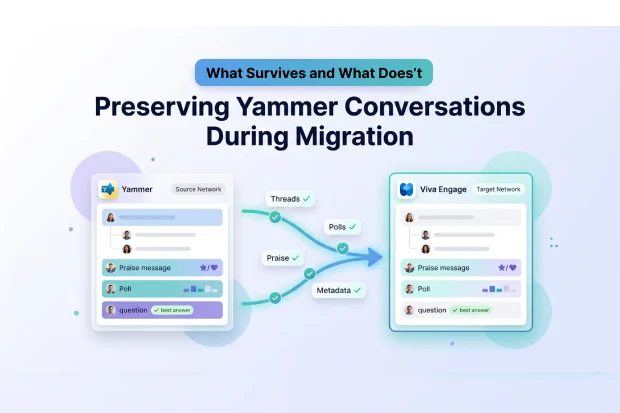
The most common question IT teams ask before a Yammer tenant migration is simple: will I lose my conversations?
The short answer – with Microsoft’s native network consolidation tool, yes. Only user accounts and empty group structures transfer. The conversations inside those communities – every thread, praise message, poll, announcement, and reply are permanently deleted.
This guide explains exactly what happens to Yammer conversation data during migration, what Microsoft’s native tool does and doesn’t preserve, and how Apps4.Pro fills the gap by migrating full thread hierarchies with metadata intact. Whether you’re consolidating tenants after an acquisition, moving to a new geo for EU data residency, or migrating from legacy Yammer to Viva Engage, the conversation preservation question is the same.
For a broader view of the full Yammer migration process, see our complete guide to migrating your Yammer network.
- What Microsoft’s Native Tool Actually Does
- Why Conversation History Matters More Than IT Teams Expect
- What Apps4.Pro Preserves: The Full Conversation Architecture
- How the Migration Works: Technical Architecture
- Migration Scenarios Where Conversation Preservation Matters Most
- What to Validate After Migration
- Get Started
- Frequently Asked Questions
What Microsoft’s Native Tool Actually Does
Microsoft has a network consolidation feature for Yammer (now Viva Engage) that merges multiple networks into a single parent network, a common requirement during mergers and acquisitions or tenant consolidation.
Here’s what the native tool handles:
User accounts – active users are migrated to the target network
Admin settings – some network-level configurations carry over
Group structure – communities are recreated in the target (but empty)
Here’s what it deletes:
Every conversation thread
Every reply, like, and reaction
Every praise message and announcement
Every poll and its results
Every question and best answer
Every file attachment
Every mention and tag
Every closed conversation
Microsoft’s own documentation confirms this – content has not migrated during network consolidation. Users arrive in the target network, but the communities they join are empty.
For organizations where Yammer is a casual chat tool, this might be acceptable. For organizations where communities serve as knowledge bases, decision logs, or compliance records – losing that history is a serious problem.
Why Conversation History Matters More Than IT Teams Expect
Yammer conversations aren’t just social posts. In many organizations, they’re the closest thing to a searchable knowledge base.
Institutional knowledge. Long-running discussion threads often contain troubleshooting steps, process explanations, and decisions that were never documented anywhere else. When those threads disappear, the knowledge disappears with them.
Compliance and audit trails. Regulated industries use Yammer conversations as part of their communication record. Deleting conversation history during migration can create compliance gaps, especially if retention policies were applied to the source network.
Employee engagement history. Praise messages, recognition threads, and milestone announcements contribute to organizational culture. Losing them during migration means new hires and transferred employees have no visibility into team recognition or milestones.
Decision context. Questions marked with best answers, polls with results, and announcement threads with replies often capture the why behind business decisions. The decisions may be documented elsewhere but the reasoning behind them lives in Yammer.
What Apps4.Pro Preserves: The Full Conversation Architecture
Apps4.Pro Migration Manager migrates Yammer conversations as complete, structured threads, not flattened exports or CSV dumps. All message types, replies, and metadata transfer to the target network in their original hierarchy.
Here’s what each migration approach preserves – and what it loses:
| Message Type | Apps4.Pro | Microsoft Native | Manual Export |
|---|---|---|---|
| Discussions (full threads) | ✅ Preserved with hierarchy | ❌ Deleted | ❌ CSV only – flat, no threading |
| Praise messages | ✅ Preserved | ❌ Deleted | ❌ Not exportable |
| Questions & best answers | ✅ Preserved with best answer marking | ❌ Deleted | ❌ Not exportable |
| Polls & poll results | ✅ Preserved as comments with results | ❌ Deleted | ❌ Not exportable |
| Replies & thread hierarchy | ✅ Full parent-child threading | ❌ Deleted | ❌ Flat export – no nesting |
| Announcements | ✅ Preserved | ❌ Deleted | ❌ Not exportable |
| Likes & reactions | ✅ Preserved | ❌ Deleted | ❌ Not captured |
| Mentions & tags | ✅ Re-mapped to target identities | ❌ Deleted | ❌ Not captured |
| File attachments (SharePoint-linked) | ✅ Re-linked to target library | ❌ Deleted | Manual copy required |
| File attachments (Yammer-native) | ✅ Migrated with thread | ❌ Deleted | ❌ Not exportable |
| Closed conversations | ✅ Preserved with closed status | ❌ Deleted | ❌ Not exportable |
| Author & timestamp metadata | ✅ Original author and date preserved | ❌ Lost | Partial – author name in CSV, no timestamp fidelity |
The distinction between Apps4.Pro and a manual CSV export is worth emphasizing. A data export gives you a spreadsheet of messages, but it loses threading, reactions, poll results, file attachments, and metadata. You get the words, but not the structure that made them useful.
Apps4.Pro preserves the structure. A discussion thread with 40 replies arrives in the target as a 40-reply thread, not 41 disconnected rows in a spreadsheet.
Evaluating your Yammer migration options? Apps4.Pro preserves every message type listed above – no scripting, no CSV workarounds. See the full migration scope →
How the Migration Works: Technical Architecture
Here’s what happens under the hood – useful for planning timelines and setting expectations with stakeholders
Authentication
Apps4.Pro connects to both source and target Yammer networks (or Viva Engage networks) using Azure AD application registrations with scoped permissions. No global admin credentials are stored – the tool uses OAuth 2.0 tokens scoped to read from source and write to target
Identity Mapping
Yammer messages, mentions, and likes are all tied to user identities. For conversations to make sense in the target, those identities must be re-mapped.
Apps4.Pro maps source user identities to their corresponding accounts in the target tenant. This means:
- Message authors display correctly, not as a migration service account
- @mentions resolve to the right people in the target network
- Likes and reactions are attributed to the correct users
- Best answer selections are linked to the original respondent
If a source user doesn’t exist in the target tenant – common during M&A when onboarding is still in progress – the tool flags the mapping gap rather than silently dropping the attribution.
Thread Reconstruction
Yammer conversations have a hierarchical structure: top-level message → replies → nested replies. Apps4.Pro rebuilds this hierarchy in the target network using the Yammer API, so reply chains keep their parent-child relationships.
Polls are a special case. Since the target network can’t recreate an active poll with existing votes, Apps4.Pro migrates poll results as structured comments within the thread – preserving the question, options, and vote counts in a readable format.
File Handling
Files shared in community conversations are stored in SharePoint, and a link to the file is added within the conversation.
During migration, these files are transferred along with the conversation, and the links are updated to point to the corresponding files in the target tenant.
Migration Scenarios Where Conversation Preservation Matters Most
These are the scenarios where conversation history is most critical:
Mergers and acquisitions. The divesting organization’s Yammer network contains years of community knowledge. When the TSA expires and the source tenant is decommissioned, that knowledge is gone unless explicitly migrated. For more on M&A migration planning across all workloads, see our Microsoft 365 migration checklist.
Yammer to Viva Engage rebranding and restructuring. Organizations restructuring their communities during the Yammer-to-Viva Engage transition often need to consolidate or reorganize networks. Our Yammer to Viva Engage rebrand migration guide covers the specific considerations for this scenario.
EU data residency and geo-relocation. Organizations moving Yammer data to EU-hosted tenants for GDPR compliance need conversation history to move with it, not just user accounts. Our Yammer EU geo-relocation guide covers the data residency angle in detail.
Tenant consolidation. Companies merging regional or departmental tenants into a single Microsoft 365 environment. Community conversations across those tenants represent cross-team collaboration history that shouldn’t be abandoned during consolidation.
What to Validate After Migration
Before decommissioning the source network, run through these checks:
Thread integrity. Open several high-activity discussion threads in the target and confirm reply chains are intact. Check that nested replies appear under the correct parent message, not as orphaned top-level posts.
Metadata accuracy. Verify that message authors show the correct user, not a service account or admin. Check that timestamps reflect the original post date, not the migration date.
Praise and announcements. Open a few praise messages and announcements in the target. Confirm they display correctly and are attributed to the right people.
Polls. Confirm that poll results appear as structured comments with question, options, and vote counts readable in context.
File Attachments: During migration, ensure all SharePoint-linked attachments are properly transferred and verify that each file opens correctly in the target environment.
Mentions. Open a message with @mentions and verify the mentions resolve to the correct target tenant users.
For the full validation workflow and detailed scope of what’s migrated, see our Yammer migration support guide.
Get Started
IT teams across industries use Apps4.Pro to move Yammer communities with full conversation history intact – from 50-community consolidations to enterprise-wide tenant migrations. Threads, replies, praise, polls, files, and metadata all arrive preserved.
👉 Start your free 15-day trial

















 Migrate
 Manage
 Migrate Microsoft 365








