


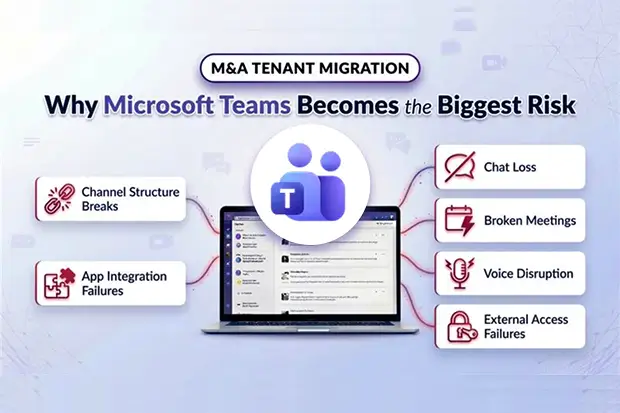
In many M&A migrations, leaders expect the biggest risks to sit in email, identity, or file access. In reality, the first visible disruption often comes from Microsoft Teams.
Teams is not a standalone workload. It sits at the center of meetings, chat, calling, external collaboration, and day-to-day execution. When it breaks, the business feels it immediately.
What makes Teams especially risky in M&A is not one single failure point. It is the way multiple issues can surface at once: channel access problems, incomplete chat history, broken meeting links, voice disruption, app failures, and external collaboration gaps.
That combination is what turns a technically planned migration into a visible business event.
In this blog, we will look at the Seven Teams risk areas that most often disrupt M&A tenant migrations and what leadership teams should do before cutover.
- Channel structure breaks faster than expected:
- Chat history rarely matches user expectation
- Teams can look intact while core functions fail
- Voice disruption can become a business outage
- Education workloads require separate validation
- Even “successful” migrations can feel broken
- A leadership checklist for reducing Teams migration risk
- Making Teams migration work under M&A pressure.
Channel structure breaks faster than expected:
One of the first places this pressure shows up is in channel structure.
Private channels often hold the most sensitive collaboration in the business: HR cases, legal reviews, executive discussions, and finance workstreams. Because each private channel has its own SharePoint site collection, they do not migrate as cleanly as standard channels in cross-tenant M&A scenarios.
In practice, that means separate handling, manual recreation, or third-party migration support. The result can be fragmented content, missing data, and unclear ownership. Where regulated or high-risk information is involved, that quickly becomes an audit, retention, or chain-of-custody concern.
Shared channels create a different problem. They may look seamless to users, but they depend on B2B direct connect and cross-tenant trust settings that do not automatically follow users into the target tenant.
If the acquired company uses shared channels with clients, vendors, regulators, or partners, those channels may stop working the moment users move unless trust is rebuilt in the target environment. In an M&A, that disruption is visible outside the organization immediately.
Inventory private and shared channels early, rank them by business criticality, and plan recreation, data preservation, and trust reconfiguration during pre-cutover planning.
Chat history rarely matches user expectation
Channel access is only part of the problem. In most M&A migrations, the bigger issue is conversation continuity.
Historical Teams chats do not usually replay in the target tenant the way users remember them. One-to-one chats may be restructured, meeting chats can lose their meeting context, and messages are often recreated by service or migration accounts rather than the original users. That changes authorship, alters layout, and flattens parts of the original conversation experience.
Losses extend well beyond formatting. Reactions, read receipts, mentions, pinned or starred context, stickers, GIFs, and other rich elements may not carry over cleanly. Chats involving deleted users can become incomplete, externally initiated conversations may not be visible at all, and bot or app messages can lose their original functional context in the target tenant.
From IT’s perspective, these may look like fidelity limitations. From a user’s perspective, they feel like they have lost history. For executive, legal, or compliance-sensitive teams, that can quickly become an escalation issue.
More importantly, this is not only a tooling limit. It is a platform constraint in cross-tenant Teams migration. Set expectations early, use archive-based preservation where needed, and protect critical external, meeting, and high-risk chat content in advance of migration instead of promising a perfect one-to-one recreation.
Teams can look intact while core functions fail
Even when channel structure and chat history are addressed, Teams can still fail in the places users notice first.
Every Teams meeting link points to the source tenant. After migration, those links do not redirect. As a result, recurring customer calls, steering committee meetings, partner syncs, and executive meetings can fail unless they are recreated.
This has become one of the most visible cutover issues because external stakeholders feel it immediately. Microsoft Orchestrator can help in some supported scenarios by cancelling and rescheduling meetings, but that still creates disruption and requires clear communication.
Channels can also appear intact while core functionality is gone. Tabs may be blank, app connections can break, connector alerts can stop, and webhooks may need to be rebuilt. Because these configurations are tenant-bound, they do not simply transfer into the target environment.
Loop components add another hidden risk. Content embedded in chats or collaborative workflows may not migrate across tenants at all. That can leave collaborative notes, planning content, and action items lost or orphaned unless they are preserved separately before cutover.
This is why a Microsoft Teams tenant to tenant migration can look complete on paper while the business still cannot work the way it did before. Tabs, apps, connectors, webhooks, and important Loop content all need to be documented, prioritized, and rebuilt or preserved based on business criticality.
Voice disruption can become a business outage
By this point, the risk is no longer just about collaboration context. In some environments, it affects core business operations directly.
There is no built-in Teams Phone migration tool for cross-tenant moves. Phone numbers must be ported through carriers, and that process can take anywhere from a few days to several weeks depending on the country and provider. Auto attendants and call queues often have to be recreated from scratch as well.
When that slips, the impact is immediate. Reception lines fail, customer support numbers go down, sales calls are missed, and incoming calls may not reach the business reliably. For organizations using Teams as their phone system, this is not a collaboration inconvenience. It is a business outage.
Voice planning for Teams tenant migration needs to start early, with number porting initiated in advance, auto attendants rebuilt in parallel, and contingency call forwarding or routing ready prior to transition.
External collaboration breaks after cutover
Voice is one operational dependency. External communication creates another, and it often breaks in less visible ways.
External collaboration risk goes beyond shared channels.
One of the hardest Teams blind spots in M&A is external and guest chat. If a conversation was initiated from another organization’s tenant, migration tools may not be able to read or migrate it because they cannot access data inside the external tenant.
As a result, partner, vendor, and client conversation history can be lost unless it is archived or otherwise preserved ahead of migration
Even when external history is preserved, ongoing communication can still break in the target environment if federation is not rebuilt correctly. Because federation settings are tenant-specific, users may find that presence no longer works, partner chat becomes unreliable, or external communication stops working until both organizations update their configurations.
This kind of issue does not always show up as a dramatic outage. It often degrades collaboration quietly for days or weeks before anyone escalates it properly. In an M&A, that matters because external relationships are part of the value being integrated.
When Teams chat history disappears or partner communication becomes unstable, continuity suffers and relationship handover becomes harder than it should be.
Archive critical external chats before migration, use compliance export where needed as a fallback, and coordinate federation changes early with partner IT teams on both sides.
Education workloads require separate validation
For schools, universities, and other education environments, M365 Teams migration introduces a different set of validation risks.
Not every Teams risk shows up as a telephony outage. Some appear in workload-specific areas where standard migration approaches do not fully apply.
Class Notebooks, Staff Notebooks, Assignments, Grades, and Classwork have special migration requirements that many standard migration approaches do not fully support.
A technically successful Microsoft Teams Education migration can still become an operational failure if coursework, assignment submissions, or grading records are incomplete or missing. In these environments, migration requires more than execution. It requires validation.
Pilot with test classes, verify Assignments and Grades carefully, and use education – focused migration tooling where needed to reduce academic disruption and grade-loss risk.
For organizations outside education, the wider post-cutover challenge remains the same: even a technically successful migration can still feel broken to users.
Even “successful” migrations can feel broken
Even when the Microsoft Teams migration between tenants is technically successful, the user experience can still deteriorate during coexistence and immediately after cutover.
Once mailboxes move, the source-tenant Teams experience may degrade in specific ways because Teams depend in part on mailbox location for certain user experiences. Calendar app access can break, profile picture updates may stop syncing, and public team search can become inconsistent.
Stale client cache can add another layer of confusion by causing ghost channels, old authentication artifacts, and sign-in issues.
These problems are often temporary, but they shape perception quickly. Users do not separate client-state issues from migration-state issues. They simply conclude that Teams is broken.
This is where the leadership risk becomes real. Users do not experience these issues one by one. They experience them together. Broken meeting links, missing private channels, incomplete chats, voice issues, external access failures, and stale client behavior can all hit at once in a large enterprise M&A.
That turns migration into a visible business event. Employees lose confidence. Executives escalate. External stakeholders experience disruption before they hear the strategic message behind the merger.
The consequences go beyond IT. Regulatory exposure increases. Customer and partner relationships take a hit. Workforce confidence drops. Executive trust in the integration program weakens.
That is why Microsoft Teams migration planning has to assume simultaneity, not sequence, and why Teams migration should be completed quickly and communicated clearly once mailbox moves begin.
A leadership checklist for reducing Teams migration risk
Use this as a working framework for your CIO, integration PMO, or M&A steering committee.
60 days before cutover
Complete a full Teams dependency inventory, including private channels, shared channels, chats, tabs, apps, bots, Loop content, voice, external chat exposure, and federation.
45 days before cutover
Start number porting, partner coordination, and shared channel trust reconfiguration.
30 days before cutover
Run a preservation sprint for high-risk content such as external chats, Loop content, app configuration details, and sensitive collaboration spaces.
14 days before cutover
Brief leadership on what will and will not be preserved fully. Set realistic expectations around chat fidelity, meeting links, and rebuilt app functionality.
7 days before cutover
Push client-readiness actions such as cache reset scripts, endpoint policies, communications, support guides, and cutover staffing.
At cutover
Migrate in waves where practical. Prioritize executive, customer-facing, and operationally critical teams first.
7 days after cutover
Run validation across chat accessibility, search indexing, channel completeness, telephony, app rebuild status, and external collaboration restoration.
Making Teams migration work under M&A pressure.
In M&A, Teams migration becomes difficult when chats, channels, meetings, files, app dependencies, and post-migration validation all have to be coordinated under tight timelines and business scrutiny.
Apps4.Pro Migration Manager is designed for that kind of environment. It can support Teams chat and channel migration, associated SharePoint-linked content, workspace files, and education workloads that often require more specialized handling than standard migration approaches provide. It also supports broader Microsoft 365 migration scenarios, which matters in M&A because Teams rarely moves in isolation.
For enterprise migration teams, the practical challenge is not simply moving Teams objects from one tenant to another. It is reducing fragmentation, preserving continuity where possible, and limiting post-cutover disruption for users and stakeholders. That is the context in which Apps4.Pro is most useful.
Recommended Reading:
1. For guidance on identifying Pre-Deal risks before signing, see The M365 Pre-Deal Due Diligence Problem: Why You’re Pricing What You Can’t See.
2. For a prioritized data room request framework, see
















